Search
-
Rafael Malavassi - Pathfinder Core Rulebook Scene

 Hi Everyone! I am starting this topic as a documentation and showcase of my work process in my Pathfinder Core Rulebook scene project. It`s a personal project for demo reel purposes and the ideia is to translate to a real-time scene the Pathfinder Core Rulebook illustration done by Wayne Reynolds:…
 -
Displaying modified textures in/from material node editor -Blender?
 I have been struggling with this for a while now Is there a way to display a texture u have modified in the node editor for materials cycles( not compositing editor) using the invert, rgb, contrast nodes in the viewport or uv/image editor? The compositing editor has this, why not the material node editor? The only way I…
 -
Re: Chris Crawford on games
 What makes him a douche isn't that he disagrees with me, but that he pretends to know anything at all about what is going on in the game industry, which he obviously doesn't anymore. Lets see, is Hollywood more innovative than the games industry? Obviously not. Are the dynamics of making and selling games going to stay the…
 -
Wood fibers node question
 Hi all. Is it possible to change scale of wood tile node? Transformation2D node is not the option, because it makes visible tile. I want unique scale, to make it smaller. Thanks.
 -
Real time 3d web engines
 Hey there, at the moment I'm doing research on real time 3d web engines targeted at interactive architectural visualization and I'm wondering if my list of up-to-date engines is complete or whether I'm missing some big players. I'm mainly interested in engines which don't require you to download any additional plug-ins ,…
 -
Poly Haven: Smugglers Cove (Pirate)
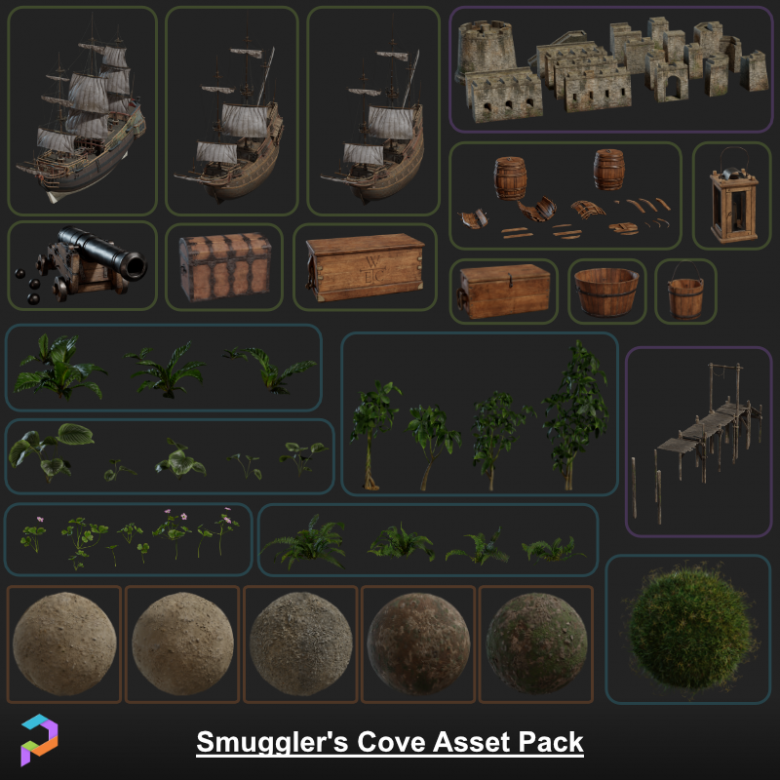 Smugglers Cove: Weigh Anchor and Hoist the Mizzen! We are excited to announce our entrance into the Unreal Engine space with the release of our Smugglers Cove assets on the Unreal Engine Marketplace. The pack contains 104 Unique pieces which include: - Pirate Ships - A Modular Fort - Tropical plants - Environment scans -…
 -
Substance Designer 5 and RO's nodes
 I recently purchased SD5 and enjoying it quite a bit. I also found RO's nodes that he uses for his work with Naughty Dog. Awesome, right? Not at the moment. ha ha! When I try to drag and drop one of his nodes into my graphs an update report pops up the information would read something like this.... 1.1.0.14365: Diffuse to…
 -
3ds max rendering mode
Hi, can someone tell me how to change the rendering mode from DX9 to DX11 in 3DS max 2012, it used to be under the choose driver setting in 2011 however all I have there now is the option to revert from DX mode -
Re: DIY 3D printer, anyone?
 all the printers in here use g-code, and there's a few different programs, like Cura, ReplicatorG, and Netfabb, that you can use to convert STL files to G-code. So you can model in your favorite program -> export mesh as an STL -> convert STL to gcode -> send gcode to machine for printing.
 -
Re: Softimage polygon selection problem
hmm ok, I thought thats what command did, never used it myself, as I am happy with the use of both standard and raycast polgon selection modes. What you could do is: * copy this code below to a script file and save it. * Then open a new custom toolbar, select the script and drag it to this toolbar. * Create the button as…
>58124 results