Search
-
Re: Maya - UV Strip Straightener?
 I usually select the polygons I want to map. Do an automatic projection. Under 'Polygons' in the UV editor pick "Unitize". Select the edges that'll be sewn together and use "Move and Sew". Then do an "Unfold" with a Vertical or Horizontal constraint on those uvs. Pretty quick when you get the hang of it for uving strips.
 -
Re: [Riot Art Contest] - Cho'Gath Redesign
 Reply by Golden Yak · · Home› Contests & Challenges Archives› Riot Art Contest› Riot Art Contest - Character ArtVery nice, having him transform as he gains power from Feast was a good move. edit - The extra armor and spikes aren't bad either, they do give him a wider and bulkier appearance. It's pretty cool seeing his chitin plates unfold and split as his body grows beneath them though.
 -
Re: Help with Hair (That old chestnut)
 I assume you want nice straight UVs - in which case you want to unitize, stitch by rings and then unfold in one axis rather than both. That said, there are better ways to unwrap a strip now that maya has partially worked its way out of the 1990s - try using straighten on what you have there
 -
Re: Maya UV and Opacity Map (Make holes) – Need Help
 You've got to unfold your UV's so that you have the same pixel density across the UV shell. Look up 'UV layout', 'texture stretching', etc. Any UV layout 101 tutorial should explain the reasons why you are getting more resolution in some areas and also where there is distortion (stretching).
 -
Re: Explosions at Boston marathon
 It wasn't a joke, it was a security company that launched their site at the wrong time, and Tumblr, being the White Knight that it is decided to jump on it. They were going to do the entire "Action" ad that a German company did for their TV station about pressing a button, and action unfolding, that's it. Bad timing…
 -
Re: I'm just getting into 3d and I'm trying to make a thing with proper topology.

 Since it looks like you aren't planning on subdividing the model and its gonna be low poly only, I didnt bother with a proper subdividable topology. Rather I went with the bare minimum to get a good end result. uved: Simple UV's, using a basic camera projection and then just unfolding them. Good luck!
 -
Re: DOOMSLAYER - Hand Painted DOOM Fanart - Blender/BPainter

 Got everything unfolded and packed and got an baked out some AO. The hands are symmetrical which is why the right hand looks gross but it's all getting painted out anyways. One issue I haven't found a solution for is I keep getting a black line baked where the UV seams are. Even with margins maxed out it still happens.…
 -
Re: How do you solve cuts in the Uvs?
 If its a circular shape use cylindrical mapping and use unfold in unwrap, adjust your UVs and then both sides (cut) will align without this issue you are having. Search Poly Wiki for more know how on how to unwrap properly. Also note SEAMS (cuts) are unavoidable and there are tricks at play to make the effect less…
 -
Re: Hoverbot/Turret-WIP
 ok so here is some pics from the unfolded turret robot, don't really like how the legs look, did have some more advanced legs earlier but i thought they would be hard to do well in the lowpoly, i would really be happy to get some ideas for new legs and ways to transform.
 -
Unreal Engine 4 texturing glitch/distortion. HELP
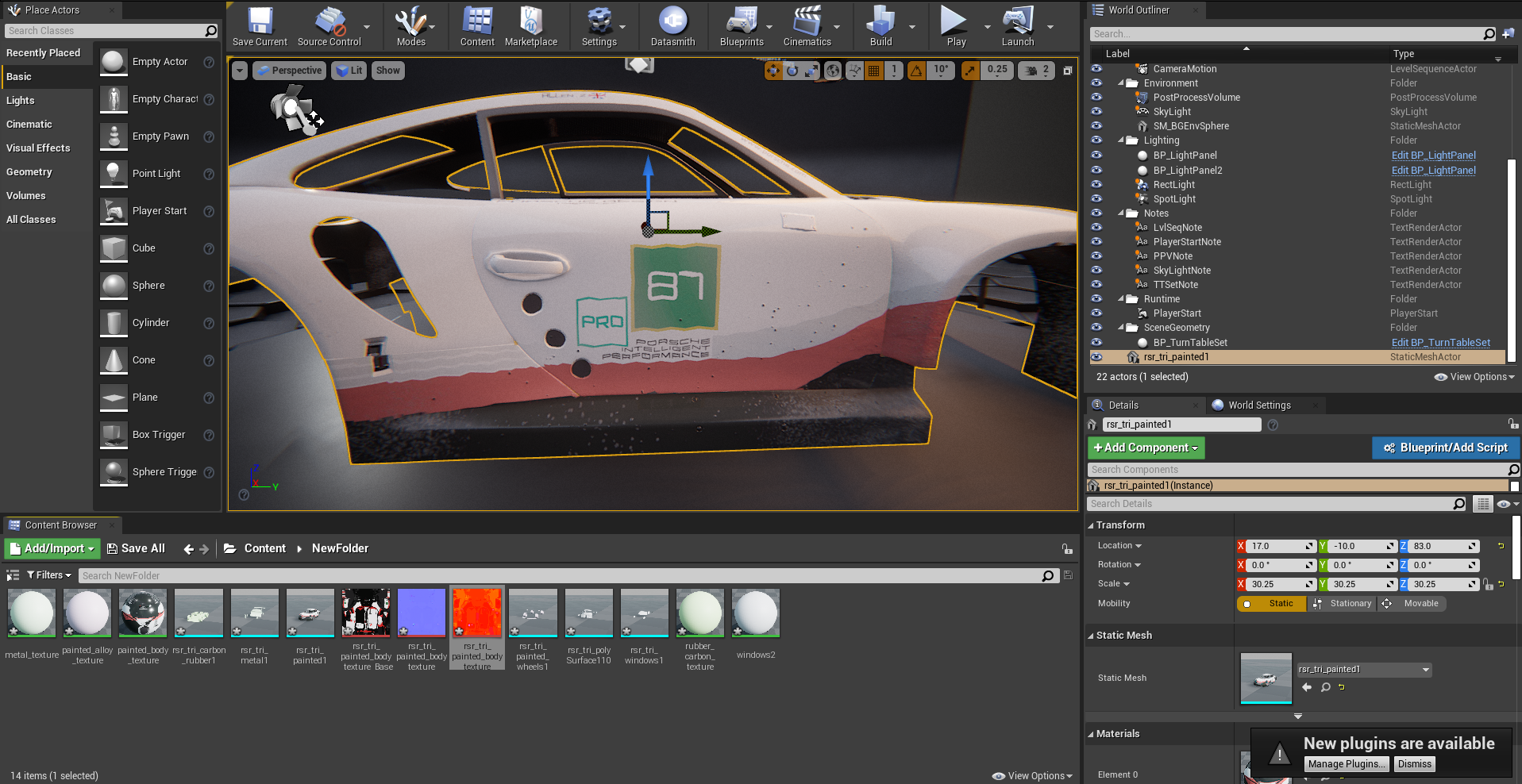 So I am currently working on a porsche 911 rsr model and I would like to render it in UE4. However, when applying the textures to the model in UE4, the base colour is wavy and pixelated. In Maya and substance, it is completely fine. All of the UVs have been unfolded. I thought that it could be a triangulation error, but I…
968 results