Search
-
Normal map doesn't look good on my LOD's sharing the same UV's/Maps

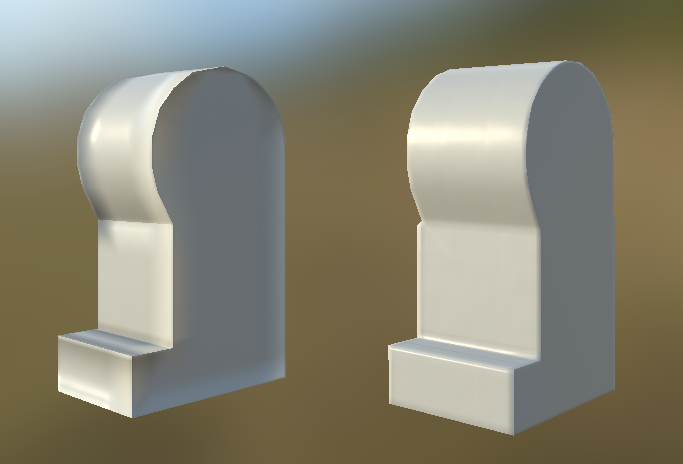 I'm attempting to create a LEGO leg with 2 LOD's my initial high quality is fine for what I need but every time I try and break down the model for the lower LOD I cannot get the normal maps to look correct. So here's my LOD 1 and 2 and as you can see the normal maps for the left lower LOD look strange I can't work out why…
 -
Re: Kanye West (WIP - Critiques Wanted!)
 Couple key areas to look at (if you aren't already): -lower jaw should jut forward to be even with upper jaw, most likely due to the surgery after his car accident.. his profile view shows the lips should hit an even vertical plane -front view, his temple is a more tapered straight line from wide jaw to more narrow…
 -
Re: Controlling edge falloff on a worldspace projected texture
 Did you try connecting to a Power node as to control the sharpness of the falloff? Either that, or try a Clamp node and see which one suits your needs better. Forgot to mention, you do this to the Z-Mask nodes before connecting to the Lerp Alpha.
 -
Re: Gadaffi dead
 AFAIK he's already dead on the video. Well what would you expect after decades of oppression and terror, and months of bloody civil war instead of giving up power peacefully? How many lives were lost just since the summer?
 -
Re: How to use mental ray materials?
 Depends on wich 3d package you are using... In 3dsmax for example you can use the arch&design materials. They are really powerful to create convincing 3d renderings. There are also a lot of templates shipped with the arch&design materials. For these also exist seperate renderchannels.
 -
Re: Change rotation pivot of a group in Maya??
 He's talking about the select miscellaneous icon up in the toolbar next to the lock/unlock icon under the main menu. You can access the rotational pivot by hitting insert or holding d as Bartalon said and clicking the power icon that shows up.
 -
Re: Warehouse 13's Farnsworth.
 Yeah thanks for spotting the scratches. It was late and i was tired and looking back i kinda went a bit mad with the power of the ps brush :D . But i've corrected the madness. So here is the updated finished shot with a construction sheet along for the ride as well.
 -
Re: 3DS Max: Reference image problem with viewport...
 With Nitrous, the options are all in display performances in the viewport configuration. (I had to switch to nitrous 9, due to a cut tool bug tho) Set your image or canvas size to 2048 in photoshop. Max doesn't like non power of 2 textures.
 -
Re: Albedo creation
 I use a photoshop script for frequency separation. Got it from this website i believe: https://phlearn.com/amazing-power-frequency-separation-retouching-photoshop It's pretty useful, not just for albedo but also for preparing your source if you use ndo or whatever.
 -
Re: $10 if i choose your song
 [ame=" https://www.youtube.com/watch?v=3Uno0ghHDVo"]Televisor - Le rock Franc?ais (FREE DOWNLOAD IN DESCRIPTION) - YouTube[/ame] oh wait, this is even better! [ame="https://www.youtube.com/watch?v=XGmeq2E4LLQ"]Power Glove - Telecom - YouTube[/ame]
>22484 results