Search
-
Re: Does anyone use checklists to verify model integrity?
 Turbo Squid has a good checklist for their Checkmate Pro models: Here's the copy and pasted list (got the info from here, http://support.turbosquid.com/entries/20203606?locale=1 : 2. Standards for 3D Model Inspection 2.1 Geometry 2.1.1 No isolated vertices 2.1.2 No coincident vertices 2.1.3 No coincident/coplanar faces…
 -
Re: Do NDA's really matter given the remote work situation many developers are facing right now?
 You are aware that remote work is not a new thing, right? NDAs cover these sorts of situations, the only thing that's new right now is the scale with which it is happening. All of the same things that applied to NDAs previously still apply, if you choose to break your NDA then you will deal with the fallout from your…
 -
Re: [WIP][Historical] — Wehrmacht Grau Ambush Camouflage
 ambush cammo pattern was not applied in all vehicles , in fact there are no references that ambush applied on panzerwerfe 42 , and some of other light vehicles. Ambush though was used in the most of medium and heavy tanks but not in the same way , not all the patterns was the same some where and others wont due to witch…
 -
Re: PS-Deform Image Along Path?
 I think the only way to achieve this in PS would be ... to apply the pattern as a texture to an imported 3D shape hehe :D But really, that's kindof pointless - you'd be better off tiling it as a straight strip in your texture map and apply that to the geometry with straight UVs. As a matter of fact, the specific example…
 -
Re: Renderman textures not showing in the Maya viewport

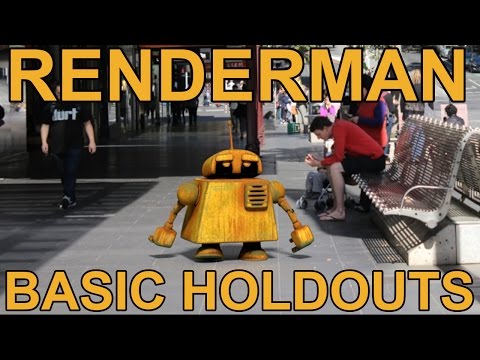 @oglu Thank you for your reply. Is that the only way to show the textures? I'm not looking into viewport rendering, I simply want to check to see how the textures are applied on my model in the viewport without rendering every single time. (0:02) I want to be able to see the textures applied on the model like this robot in…
 -
Re: 3d Max Object
 Thanks keres for responding. That did work to some extent, the only problem is I'm trying to apply a Bend modifier to it. When I apply it the Gizmo takes place of the white outer box so it's on an angle. I have to manually try to set it perfectly symmetrical with rotation. I was wondering if there was any way to reset it…
 -
Re: Looking For a Mentor
 yeah i have DT but its hard to find the time to spend actually doing the classes i mostly just watch the video's that apply to what i am doing in some way, i know its just one of those things you gain over time how to apply all the concepts to what you are doing and i am getting there. thanks for you're input
 -
Re: Xgen Fur Issue No Geometry Found
 In a clean scene I can apply still apply a description to 3 small cubes working fine (including creating a map and painting on all 3, previewing it). I still think you might be right since it does make sense thank you. Issue #2 is still the main concern as I don't have time to restart and likely to get it again. Thanks…
 -
Re: Sci-Fi Hallway (WIP)
 So it's been about a month since I really worked on this (I needed to take a brake from it) All modelling is done and I'm working on textures. In UE4 with normals applied and flat gray diffuse Floor textures applied Still to do: Rest of diffuse textures Spec/Roughness/Metallic maps Finalize shaders in unreal Finalize…
 -
Re: Battlefield: Bad Company 2. What is your handle?
 The Punkbuster issues are actually individual servers errors (the quick kick and INIT ERROR). EA released a server patch (R5) for all servers Saturday. However, the update isn't applied until the server is restarted. Many servers have not yet been restarted to finish applying the patch, so PB gets a mis-match error. For…
>29993 results