Search
-
Re: 3DS Max FBX exporter update?
 If updating doesn't work, try adding a Turn_To_Mesh modifier, or an Unwrap_UVW modifier before exporting. I seem to remember doing that for Max 2012 and 2013. Reference: https://dl.dropboxusercontent.com/u/2904948/Temp/FBXBinormals.png
 -
Re: Issue with lowpoly mesh (smoothing groups?)
 Hey, I would try Edit Triangulation in the Edit Poly modifier. If that doesn't improve things you could have a play around with the Edit Normals modifier.
 -
Re: UV Island Edge Splitting Questions [3DS MAX]
 in blender you can split the mesh along defined edges (sharp edges) using the edge split modifier. it is a modifier, so you can turn it on and off.
 -
Re: Beginner : Help me make a bunker
 You should play around with the "shell" modifier. You make a single poly thickness, and the shell modifier gives it actual depth and connections. It's awesome for this kind of thing.
 -
Making foliage from an object - editing normals
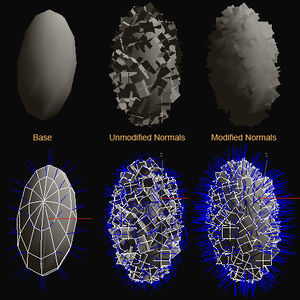 Does anyone know how to create the scattered polygons shown in the picture under the Modified Normals text in 3ds max? I know that this is from another thread but it didn't exactly explain step by step on how to create the modified version of the object.
 -
3ds max fur, render to texture bake.
 I am making this squirrel and wanted to use the Fur modifier and do a render to texture bake but I am not sure if that is possible...any ideas? I just see these amazing results from the fur modifier and wanted to bake it onto a map.
 -
Using FFD on a few vertex only
 Is there any way to use the FFD modifier only on a few vertex that I selected before adding the FFD modifier? When I try to do that, the FFD change all my model once I try to save or go on edit poly again.
 -
[MaxScript] Need help with Chamfer Segments
Hi all! Can someone help me modify this script to prevent negative value? Lowest value that I need is 1, not 0 or -1. ( local currMod = modPanel.getCurrentObject() ( if (classof currMod) == Editable_Poly then ($.edgeChamferSegments -= 1) else ($.modifiers[#Edit_Poly].edgeChamferSegments -= 1) ) ) -
Re: Good UV-ing tool?
 that definitely does not sound like a max error, but something on your behalf. i assume you do not collapse your UV modifier down, then do stuff to the mesh and then your modifier doesnt apply anymore?
 -
Re: Gradient generation through curves.. how?
If you want to create color ramps in photoshop,just create a linear gradient and modify it with adjust-curves. You can also modify the curves of a screenshot of your model,save them as preset and apply on the colorramp.
>11681 results