Search
-
Re: Blue Fire Hydrant
 Depends on the object from what I remember. If it will never deform and always orient the same way to the world axis then its fine. Level dressers like to rotate and position props which might not orient to the world correctly, or a prop might be turned into a physics prop later on where it could be blown all over the…
 -
Re: Making Zbrush 4 more...Mudboxish.
 I think I know what he means. Try locking your camera to the Y axis Froyok, you'll find that option just to the right of the screen by default :) The camera will behave like a turntable then.
 -
Re: Suffer Gimbal lock ?

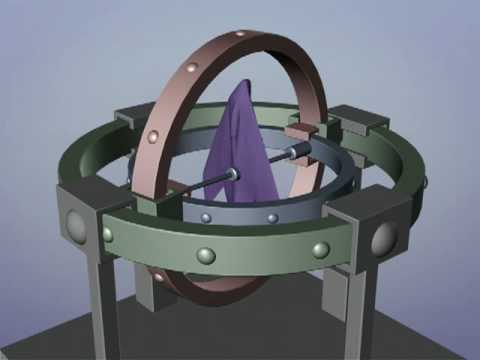 The second axis of a joint is what you need to pay attention to, on all joints. So, if your axis order is XYZ then the Y axis is going to be the one that you want to be doing the least rotation on. In Max, you can change a joints axis order via motion tab > PRS Parameters: Rotation > Euler parameters: Axis order In Maya,…
 -
Re: [MaxScript] Sub-object pivot
 oh i just meant if you were sliding along the X, Y, or Z axis since you're grabbing the handle maybe it's interpreting that offset between the gizmo handle vs. the vert as the centerpoint of the operation until it can find something to snap to
 -
Re: Snap Toggle issues in Max
 Looks like the difference is that he is using vert snap and his verts align with his geo. On your test, you look like you are attempting to snap your plane's edge to another edge. Which is a bit more tricky if you want it to be perfect. I would suggest one of two things: 1. Make some edge loops to add verts to the area you…
 -
Re: Normal/Bump map in Arnold Shader Maya 2017
 Geez it was that simple that I just had to set the bump map to RAW in Viewport 2.0. I feel like such a noob haha! Thanks a bunch for the help Axi5!
 -
Re: Affinity Photo, the better Photoshop?
 I'm using it for image editing, seamless texture creation and stuff like that. In my opinion it's the best alternative to Photoshop right now, although in terms of painting Clip Studio Paint remains better. Obviously, like Axi5 and Larry said, if you have access to Photoshop you don't need it. More info here.
 -
Re: Mirroring normal maps?
 thanks guys, I didn't remember that - but now I moved them. But my normals are still wrong - the light is "mirrored". I moved them in the U axis -does it matter which axis you use?
 -
Re: Sketchbook: z0ltan
 So me not being a little girl worked out really well. Started working on a covered wagon. Why? Only baby jesus knows. pretty much figuring out how a covered wagon is supposed to look. The cloth is just me messing around with the cloth modifier in max and playing with the different settings. Still scowering for some good…
 -
Re: Billy the courier
 Oh, I should have made it clear that this is for the SMD exporter. My bad. For FBX, you can just go into the options (Export [Option Box] -> set FBX as file type -> hit "edit preset" and look for Advanced Options -. Axis conversion in the window that pops up.
>5462 results