Search
-
Re: Projection painting in Maya
 You are referring to a "render", what do you use this for? The bitmaps that I used were these -Color texture for the New UV Set. -Facing Ratio Texture for the Original UVSet to use as a mask -Color texture, the Warp Image results fitting the Original UV Set, using the Facing Ratio Texture as a Mask.
 -
Re: How much time you're given to switch to a different software?
 Same here i was hired without maya exp. The best thing was they forced me to copy the shortcuts and custom tools of the modeling Lead and had to learn them sitting beside him and asking all day long the shortcuts for the tools i needed. After a week i was up to speed and started to create my own shotcuts and marking…
 -
Re: Animation - Keeping Count (Chocula)
 Yea, basically from what I understand of what you're asking I'd agree with Mark. I'd block in the main poses by keying every control of the rig on those frames. Get the timing and the poses looking good and working together like this and then start offsetting stuff (letting it get messier) from there in order to refine the…
 -
Re: [FINISHED][UE4] Steampunk Capsule

 Hi, I got small update for my scene, i modelled the roof. The holes in roof coating are made with usage of vertex painting and opacity mask, unfortunately it doesn't work with lightmass ( meshes cast shadows like without mask) and I ended with adding additional dynamic light to cast proper shadows.
 -
Re: Dota 2 import help needed... "import successful" but item isnt there!
If you are not using one of the mask levels and have left it all black that can effect it as it says in the design document that at least one pixle must be white in order for the mask texture to work correctly. Hopefully this helps if not then I'm not suer I'm affraid. I'm having a few issues with my items myself lol :) -
Re: SOLVED: Ddo Removes layers from other maps randomly
 Actually I have one other issue that you could probably help me with. On the topic of optimization of materials. Every time I try to add more than one ID to a material through the Mask editor it cancels them both out leaving the mask completely black. Is there a fix or workaround for this at the time?
 -
Re: Sketchbook: DeepSpaceBanana

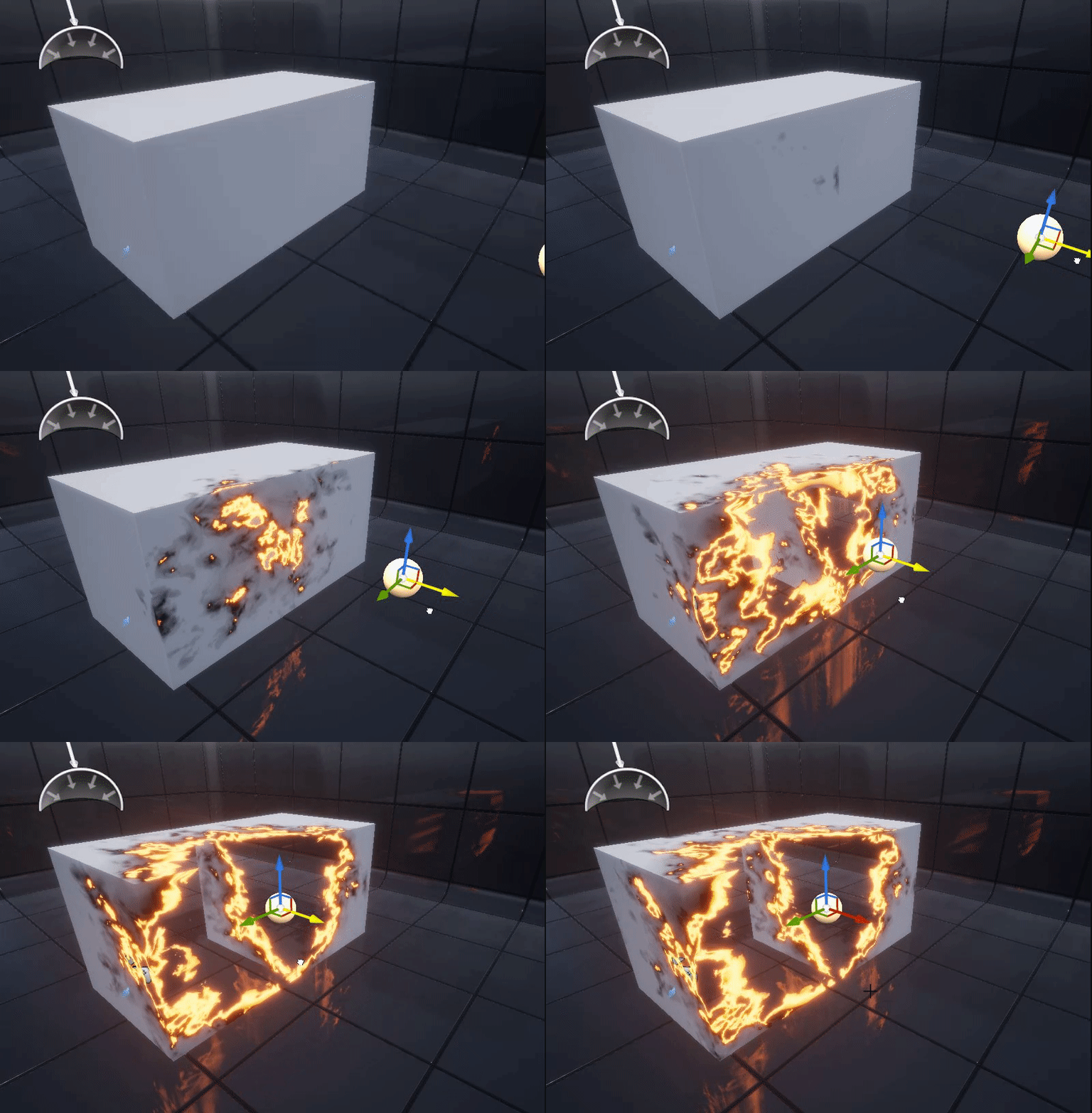 Forgot to post it here but, something I made a couple days back, a simple burn shader using flow mapped noise and a sphere mask. Scaling the Radius of the spheremask to make it look like it's burning through the material. Red channel of the Flow mapped noise visualized: And the sphere mask is driven by blueprint location:
 -
Re: WorkShop two_larsens
 The only suggestion I have is to make the colors more similar to the ones on Rubick. Like vertical said, make the green greener, and also the gold. I recommend using the original textures and masks for his default items to get a nice feel of the hues, etc. Apart from that, the mask itself looks great!
 -
Re: orc bust
 Quite a nice piece, i like the armour design quite a bit. The main thing that stands out to me is the SSS as areas are translucent that shouldn't be, which gives it the latex mask Johan described. Perhaps you could make a greyscale SSS mask to control that better. What did you use to render?
 -
Use created Shader to work with current Albedo
 Hi, I've created a frag shader that is suppose to read a second uv channel and mask for it to be used/blend with current available Albedo. For Marmoset Normal and detail normal does the job needed for second uv channel which works with my uvchannel 2 mask, but more focused on Albedo and trying/wanting to make said shader…
>40567 results