Search
-
Re: The Rig on my characters arm is barely following the rest of my rig
 so the spine of the rig is a skin joint, I had skeletal oriented the clavicle (the end) joint to the shoulder then parented the same end to the chest of the spine rig. Could the clusters that I create have something to do with keeping the arm in place? Sorry if I'm not entirely clear here...
 -
Re: Making sense of hard edges, uvs, normal maps and vertex counts
 Those screenshots are of a skeletal mesh with a blendshape. The shots are before and after toggling the blendshape in engine. I messed around briefly with manually rotating the bones in-engine and it looked like I was getting the same errors. I can revisit the file later today and verify, if you want.
 -
Re: Animation Reference and Inspiration

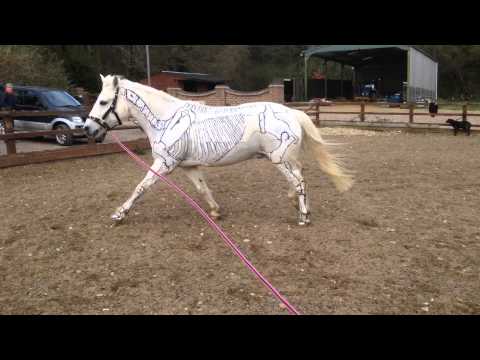 Very specific reference I am using for a similar creature however contains both a Canter and a Trot for a horse plus they decided to paint the skeletal stucture of the horse, onto the horse. Could also be useful for joint positioning during rigging. https://www.youtube.com/watch?v=jtPAy3yXeCo
 -
Re: WIP Martini Bar
 Jumping into UDK always feels good. I love being able to block out an environment and actually being able to walk around in it. That's a good point, actually. Try dropping in a Skeletal mesh of a biped character from UDK's Content Browser for scale :)
 -
Re: Unreal Tournament 2007 first video
And, um, can you tell your programmers that the mod community would EXTREMELY APPRECIATE an ASCII-based intermediate format for skeletal meshes that we can export into and have UED read? The PSK specs are nigh unusable when you're not writing C. -
Re: Paintstorm studio - new painting package.
I still think nothing is better that almost 15 years old Creative House Expression. And its so called "skeletal' brush strokes. Too bad Microsoft killed the soft and even made Windows version no more available, Their "Design' attempt is just a castrated original version. -
Re: Material - Dynamic Shield anyone (Turtles Included)?
 Further addition on more reading: Looks like decals can project on skeletal meshes. So you may want to look into decal creation via Material Instance Time Varying. Still going to need some script hooks for the full effect though.
 -
Re: WIP- Jonas Jantzen- Character

 Did a couple rough sketches of some skeletal anatomy to get a better grasp as to what I want to do. I'm thinking of doing a biped alien with 4 arms. I'll most likely be doing a lot more research before I start modelling.
 -
How to stop custom normals from breaking on deform in UE4?

 Can anyone clarify how companies like CyberConnect2 and Arc System Works keep their normal edited meshes looking so clean even with skeletal and morph target deforms in UE4? I get clean normals for deforms in blender by using a proxy mesh to copy normals from. Is this possible in UE4?
 -
Re: RAGE
It looks like it's pulling the wrong mip-map out for some reason. I can't imagine the game texture is really that low. The lack of shadowing on animated skeletal meshes is a bit worrying. Edit: Also the shadow casting from the character and the environment seem to be from different sources, or is that just me?
>3497 results