Search
-
Material Editor: Reduce Stretching on Animated Mesh
 Question! Is there any way using the material editor that a texture can be actively kept in proportion on a mesh that is animated? Like, a way to reduce the amount of texture stretching as a mesh (like a simple plane) deforms?
 -
Re: What are you working on 3D? 2021
-
Re: Modeling Help with Curvature

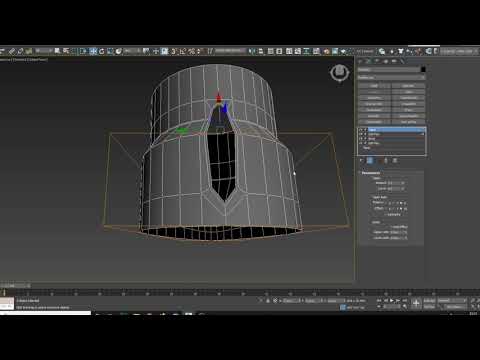 Maybe start with a plane, find the right amount of segments, cut in the holes/details, then bend it into a cylinder. something like that but less crap https://www.youtube.com/watch?v=B2D1Ti60B_k
 -
Re: Maya Vertex Paint from Texture without Blur
 The model doesn't have enough vertices to support that detail. You will need a massive amount of subdivision to support that kind of detail. Basically, a vertex for every pixel of the original texture.
 -
Re: Tyn's Workshop
-
Re: L4D2 SDK to feature more options for modders.
Id love to be a part of this, I think a while back this idea was toyed with but it fizzled out. The sheer amount of talent here though means potentially this could be really amazing -
Re: Computer Frezzing up!
 Thank for the help guys, gonna try the power saving tip. Can't believe the amount of power saving options in Win7. Guess this is what we get for trying to be green.
 -
Re: Landscape tool too low poly
 Thanks! The shadow bias helped a lot. Also just decreasing the overall size of the landscape so the polys are more "compact" worked. Even though there's the same amount of polys.
 -
Re: What is up with those brutal challenges at Artstation?
 I'm pretty sure my amount of F5 on the submission thread is enough to be consider DDOS. I can't wait for the 3D part to be open, really glad they add an extension to it :) !
 -
Re: [UDK] Normandy SR2 Retrofitting facility
 Nice crazy amount of detail you got there! Are you instancing the high poly around for class? That is just an extremely inefficient way of doing it if you were producing it for a game.

>15644 results