Search
-
Re: First Time Sculpting
 One thing you want to do moving forward is taking advantage of Dynamesh (http://pixologic.com/zclassroom/homeroom/lesson/dynamesh/). When people are just starting out I see lots of large polygons or stretched out polygons that stick out, which are fairly distracting. Dynamesh should fix that for you. Outside of that, look…
 -
Re: Fixing Stretched Polys Issue...
 Yes, Dynamesh will result in some loss of detail. Generally you will want to use Dynamesh to block out all the major details of your bust before subdividing and going into the finer details as to avoid your current dilemma. You could always make a duplicate of your current model, re-dynamesh to get more polys, then use the…
 -
Re: [ZBrush] OVERHANGS WITH SMOOTH GROUP BRUSH/POLISH GROUPS

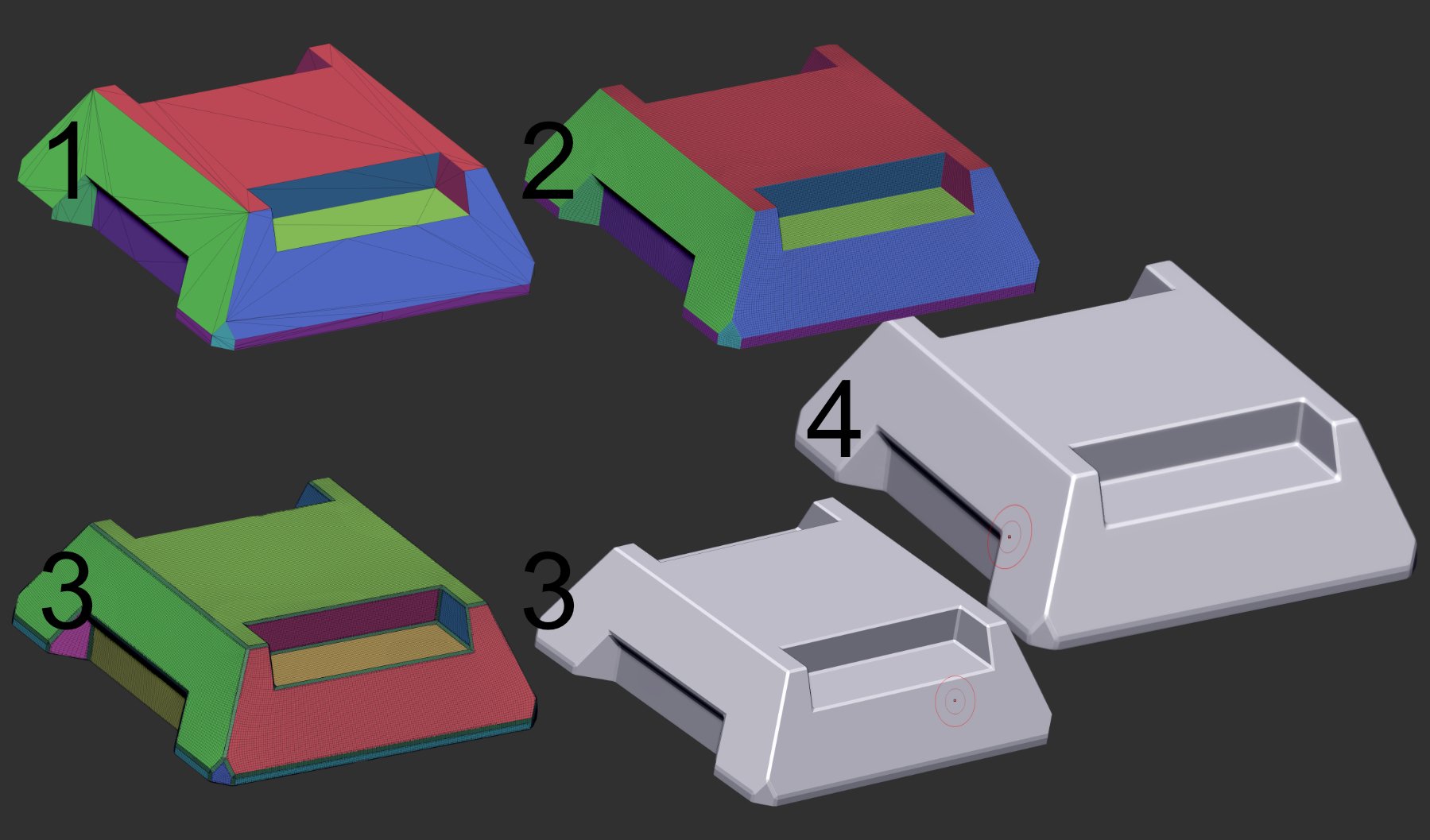 Ended up going with a different approach that I'm satisfied with for the learning experience. 1. Boolean mesh 2. ZRemesher (Target polygons = 100, KeepGroups) 3. BevelPro output 4. Dynamesh (Resolution 500, Polish).
 -
Re: Kings Quest 5 Environment
 Starting to crudely block out the tree in the foreground. I started in maya with a base mesh for the trunk and a few other pieces for the branches and roots and then dynameshed them all together in ZBrush. I found that I needed to bump up the Dynamesh resolution to about 256 because anything lower would shrink the smaller…
 -
Re: Dishonored Character
 More subdivs down. I'd personally dynamesh it at a number where I could clearly see the polygons. Looks like you need to dynamesh the face anyway given the areas with very stretched out polys. Your face forms aren't at a level where you should be detailing yet, so don't worry about losing that detail when dynameshing (if…
 -
Re: zbrush edge sculpting bug
 yes happens with all brushes. Maybe try this yourself, as a test use the standard zbrush cube dynamesh it. Trimming the edges on this one is fine, but then import a simple box from maya or 3ds max dynamesh it and all goes wrong. somehow this also always just happens to the sides which are on the negative side of the grid.…
 -
Re: [ZBrush] Hard surface base mesh workflow?
 You have to bevel all the edges you want hard in your 3d app or using the zmodeller brush. If you want more even topo the just insert loops evenly along the length of the model. Dynamesh is dependant on the size of your model. you can dowload DynamehMaster here:…
 -
Re: Micaki's art thread
 Are the bones you're creating going to go into putting together some sort of skeleton? I'd highly recommend that over individually modeling bones and then just leaving them. If these are dynameshed, I'd also suggest staying away from dynamesh until you've got a firm grasp on how the objects look. That way you can just…
 -
Re: New Zbrush properties how to merge object one in the other and ....
 You can merge all, dynamesh it, sculpt, polypaint, decimate and export to obj. Use xnormal to bake the sculpted dynamesh sword into your original (unwrapped) sword . That way you don't lose the original topology. 1- GOZ - 3Ds max > ZBrush 2- Merge all 3- Dynamesh 4- Sculpt / polypaint 5- Decimate !- if needed -! 6- Export…
 -
Re: (NSFW) Silly Female for 3D print
 I didn't read the whole thread, so maybe this has been mentioned, but dynamesh is the most convenient way to do this - for me anyways, perhaps I'm being lazy. Delete all lower subdivs and use an IMM brush to subtract out a hole in the base of the mesh, where you want the hollowness to begin. Make sure that in the dynamesh…
>2521 results