Search
-
Re: Substance Archive error in unity? (Failed to retrieve)
 Unity use the Substance Engine 5 currently. Changing the engine compatibility in your settings will only highlight incompatible nodes in your graph, it will not affect the cooking of your substance (sbsar). You will have to check manually your graph for nodes and property that don't exist in the v5 of the engine.
 -
Re: Help me improve!
 Connect the heightmap's channel to the alpha of a LERP node. The LERP node sets what number is your highest value(white) and lowest (black) By default it has 1 and 0 so you just plug it to alpha. Then i guess you could multiply the outcome with a constant 1
 -
Re: How to make unevenness

 Do this: Where it says "Shape Crop" switch that to read "Projection Cropped to shape" you'll now get a border again To fix this Add a levels node and set "Affected Channel" to "height" now drag the black slider on the levels node until it's at -1 <- this will get rid of the border.
 -
Re: How to Rigging a Modular Character ?
 Yes, it's too relative and I think that's more a question of experimenting than anything. It's about liking nodes in a node graph aswell, setting driven keys (driver), etc. One thing to be sure: work everything so the hidden stuff need no computation consuming your PC.
 -
Re: Substance Designer + Input image Size -> Projection-Tool
If there's no exposed scaling parameters on the projection node you should be able to use a transform node to scale the input image to the right proportions within a square - youll have to give it the original resolution and do some mild sums to work out the correct scaling but it won't be too tricky. -
Re: MAXScript mesh intersections, tree data?
 1) physics systems probably handle this best (well better/way faster than any mxs implementation would). reactor/massfx or what ever the autodesk goto physics handler is these days :) 2) ? the "tree" is exposed via mxs rootnode && <node>.children && <node>.parent
 -
Re: Problem with Maya 2014 Help!
 After looking at the MEL for that script, my only hunch is that somehow you're selecting the transform node instead of the shape node somehow, but that's a shot in the dark. When in doubt with Maya, either delete or rename your prefs folder and restart. That will force Maya to re-create the default preferences.
 -
Re: Any tips on working on big Maya scenes with lots of objects ?
 Are you importing a lot? This can leave a ton of trash nodes which really slow everything down. Check the outliner and uncheck "dag objects only" to see all the other crap. Quite a lot of it is neccessary, but you might find loads of redundant camera nodes, for example.
 -
[WIP] Overwatch Widowmaker Fanart Skin
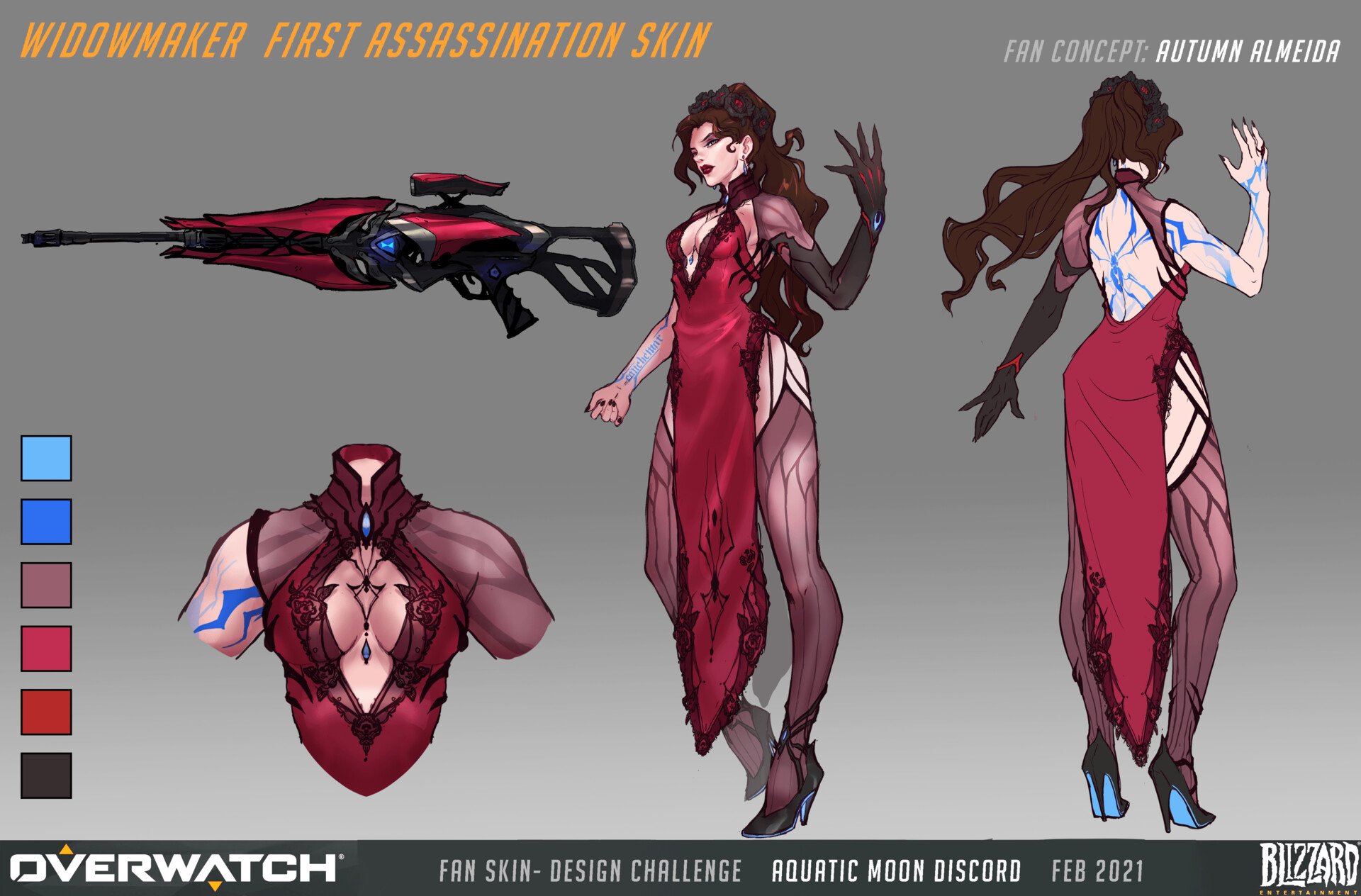 Hello to my fellow polycounters! I’ve been working on a character in the evenings after my day-job, in hopes of pushing my portfolio forwards. In the past I’ve either had a fairly generalist portfolio, or the chosen designs were not visually strong. I’ve reflected a lot lately, and decided to push forwards with a stylized…
 -
Re: [3DS MAX] Someone explain to me how textures work
 Hi, no the object has no materials assigned and from the material editor, which opens by pressing M there is no node. In my opinion it is impossible that there are no materials assigned to the file but I do not know how to check this. I have searched several times both on the internet and on youtube but no one talks about…
>37262 results