Search
-
We're hiring: TECHNICAL ARTIST / 3D Generalist Remote
 With a small and dedicated team, we are currently working on a first-person tactical co-op game using Unreal Engine 5. The game features a realistic, military-focused setting with a strong emphasis on simulation and tactical gameplay. We are searching for an ambitious generalist with a high focus on art and tech-art…
 -
Re: I’m stuck. (topology for the cloth)

 Hello ! Always loving the JuniorSenior avatar :) Along the lines of the suggestions from the Great Eric, and considering that the goal is an actual game asset for UE, then simply start by modeling a first version of the final polygon game asset of the tent at rest. Garment making tools may be useful to an extent since they…
 -
Re: Bake artifact - Help pls
 Hello! I really thank you for answering this question I had. I did what you mentioned as you can see in this screenshot, I hardened the edges with "Mark Sharp" and instead of applying "Shade Smooth" I applied the "Shade auto smooth" (I saw it in a video that talked about hardening the edges). When doing this, the strange…
 -
The difference a good reference makes!
 deleted
 -
Issues with baking
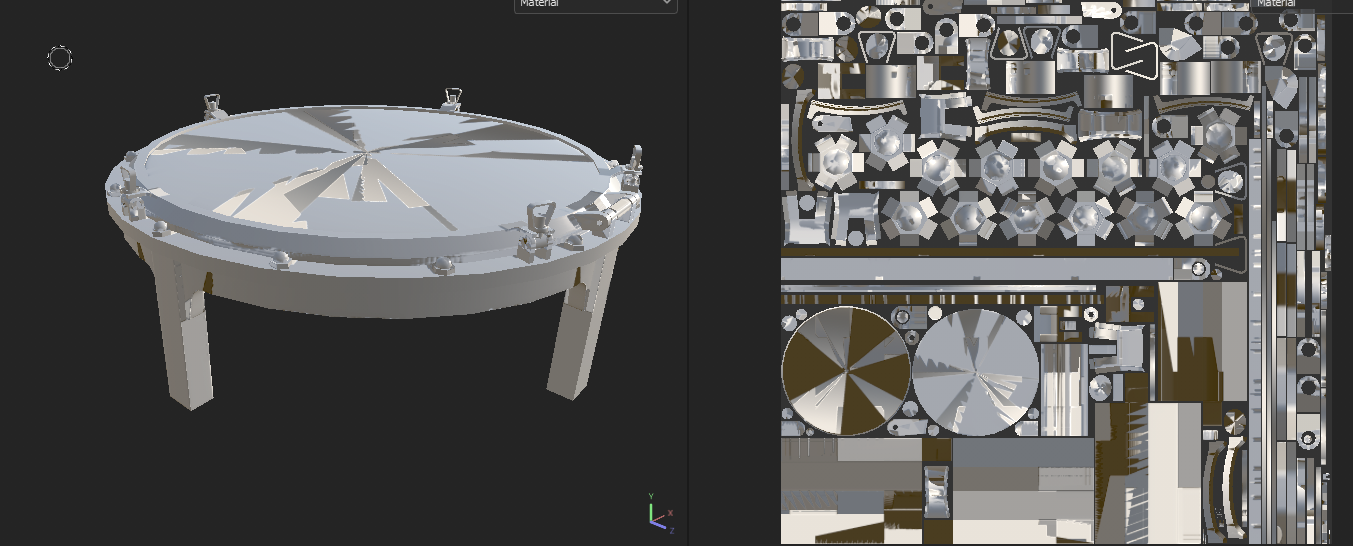 Hi. I'm working making a set of furnitures with boat themed that are around my house. I got one of the first with good topology and UVs but when I bake it it doesnt look that good so I wanted to try to use a cage but when using it it looks awful. I looked if I might be missing something and all normals are in good…
 -
Baking models sunk into each other
Hello! There is also an urgent question. When baking, there are many models sunk into each other. And it is necessary to make a smooth chamfer at the joints where one model enters the other - bake. But there is always a seam, this seam goes away if you sew models, but there will be too much since I have a huge amount of… -
xNormal vs. Max bakes
 Hey people, I've got some questions about xNormal normal bakes vs. Max (3.18.9 vs. 2013 PU6). This may be an extreme example and some of these problems are likely to be invisible in game but I'd like to hear your thoughts regardless. Note: * All maps were baked uncompressed with no supersampling or antialiasing at…
 -
Make Something Unreal Winners!
 http://www.makesomethingunreal.com/final_winners.aspx
 -
Re: Is it possible to bake normal maps into diffuse maps?
 I haven't tried that PRTP method yet. It looks good. But I have gotten very nice results doing an AO bake in xNormal, along with a Cavity map bake in XNormal. Then I take those 2 and Overlay them in potatoshop :-) onto the diffuse and playing with the opacity until it got me the look I wanted. To make it really pop, try…
 -
Re: How To Request: Baked Vertex Lighting in Maya
Select your object, then go to Display>>Custom Polygon Display (option box) Make sure that "Color in Shaded Display" is checked. This will make vertex color show up in the viewport instead of diffuse color. Setup your lights, select your object then go to Edit Polygons>>Colors>>Prelight. I've never used anything but Maya…
>107324 results