Search
-
Mesh dissapears unless im in game mode
 I did something bad, and now i can only see my mesh when I am in game mode. When i get out of game mode, I can see my light icons but now mesh. What did I do and how do I fix this? Thanks
 -
Re: How do I enable reverse foot lock for Cat Rig in 3D Studio Max?
 I selected the knee vectors and clicked "unlink" which removed their connection to the pelvis. I then created a cat motion layer and went into animation mode. During the walk animation, the foot rotates during the walk in an odd way. When I turn off "use up node" the problem goes away. Odd. The problem can be recreated by…
 -
Re: (UE4) Different texture cordinates plugged into mask channels texture?
 Obscura, is there any chance you could pls make it possible to add an additional texture coordinate for the alpha channel? I did try to see if I could modify the function to do this but I got totally lost. Seriously, really grateful for the code and thanks for the help so far :) . I have also be reading of mask texture…
 -
Re: needs help with 3ds max cloth
 You can link Vertices of your Cloth to any Node you want...go into Goup Subobject Mode (press 1 or click on the + next to the Modifier and select Group), select the Vertices you want to link and hit the Node button...then chose an Object from the scene...I haven't so far been able to make it work with deforming…
 -
Re: UDK Replace instead of just Blend for Height Maps
if you're doing this with vertex painting and the material editor then you can use an if node to compare the two height maps. multiply the sand height map by the vert colour channel and where it's greater than the cobblestones height map use that, where lesser use the cobblestones height map. use the resulting blended… -
Re: Texture /photo straightening techniques?
 Something like this? This is a mesh transformed into curves then filled and passed through a triangle tessellation group, all with Blender's geonodes. Corners are preserved in the conversion to curves by being marked with a Boolean x Point attribute so they get temporarily split. You may need to tweak the Corner Angle…
 -
Re: Textures in Maya are showing up Black
 yeah this is usually a result of hq or viewport2.0 rendering modes. I usually delete the material node and start over by bringing in the relevant texture maps while still in whatever rendering mode was producing the problem
 -
Re: Does having five edges meet here work for this product? What’s a better alternative?
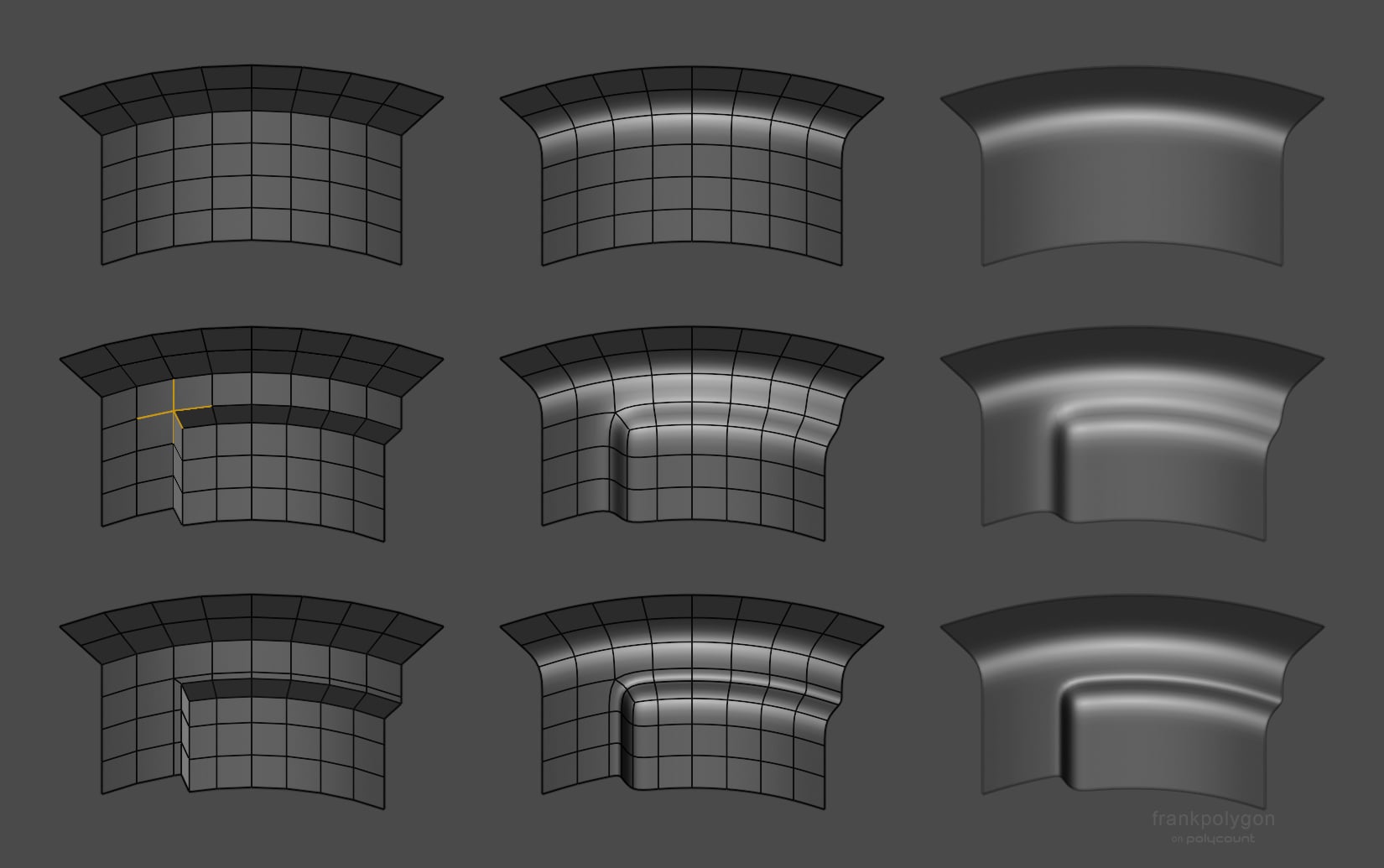 @zylan Determining if a high poly mesh is acceptable really boils down to how closely the shapes in the model match the shapes in the references and whether or not the topology subdivides cleanly, without generating any noticeable smoothing artifacts or other surface quality issues. If the shapes and surface quality checks…
 -
Re: Material Instance crashes Unreal 5
 "Pixel Normal WS node" <--- THIS That's the problem. More precisely, you're trying to change the Normal Map through this PixelNormal node, thereby causing an infinite loop. The normal map needs to have different logic.
 -
Re: Mel Script: Toggle Camera Based Selection
 Here's a hint to make things that toggle into really simple code: toggleCmd -flag (1-`toggleCmd -q -flag`); So in your case: selectPref -useDepth (1-`selectPref -q -useDepth`); To make it callable from the command line, you need to make it a global procedure and load it. Making it a procedure is simple: global proc…
>37259 results