Search
-
Re: Project Star (Working Title) – UE5 Top Down

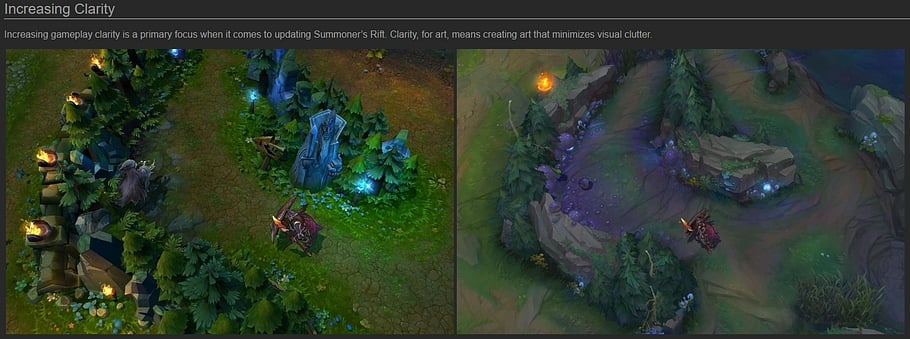 Love this! You've been putting a lot of work into this and it shows. The biggest thing that jumps out to me is that everything is equal in contrast and saturation, which makes it a bit "busy". This causes a bit of visual fatigue because the player doesn't have a clearly-defined thing to focus on, and the eye doesn't have…
 -
Failed Normal Maps from ZBrush
 I just recently got back into ZBrush, and have been trying to apply UVs to an existing ZTool. Despite following tutorials precisely, the normal maps I export out of ZBrush always have a sort smoothing error on each individual polygon. It almost looks like each polygon's UV coordinates are flipped or rotated, not so much…
 -
Weird Symmetry Hump, Clothing and Hair tips? {3DS Max}
 I'm currently tweaking the base mesh but before I start adding clothes and the such I have one problem and a few concerns for when I start animating. I've posted both smooth and unsmoothed pictures down below under my questions for a visual of what I'm trying to resolve. 1. When I toss a symmetry on the base mesh there's…
 -
Re: Preserve Edges Python or Mel Script
hi dude, I need to make a preserve edges to smooth the mesh and uvs and the same time, the 3 only smooth the mesh but not adjust the uvs -
Re: What are you working on? 2016

 @Chillydog3D Smooth ! What workflow test if I may ask? (seems like zbrush smoothed so I would say probo but not sure?)
 -
Re: Zbrush : hey im amateur
 I would invert the mask you had, shrink it a bit, smooth it, then inflate in the deformations tab and smooth it a little all over with the mask still on.
 -
Re: Facial modeling feedback please
 Sculpting anatomy is best represented with sharp angles, or else it quickly turns into a smooth ball. Once the features are locked in, it's time to smooth and blend together.
 -
Re: Weird seam in maya appears during rendertime
 looks like a hardened edge/different smoothing group. Have you tried making the edges all soft/assigning the same smoothing group?
 -
Re: What to delete from high poly when baking?
 yes it will change your low poly's smoothing, on a pixel-per-pixel basis (so the bigger your tex resolution, the better your smoothing).
 -
Re: Help to correct a technical error (3Ds Max - Render object)
Those are just mesh normal smoothing artefacts. Inside your edit poly find the smoothing group section and experiment with the buttons /read the documentation
>17084 results