Search
-
Re: Smoothing groups prevent me from making UV maps in 3ds Max 2012!
 Do you exit sub-object mode before adding the Unwrap modifier? You should. Sub-object selections are passed up the stack, so the upper modifiers are limited to just the selected bits.
 -
Re: Remesh in Zbrush Acting Up
 I am very new to zbrush, what is a skinning modifier? how do I disable a symmetry modifier? Now that I think of it the objects I have that are not working are either not closed objects or they are not symmetrical.
 -
Re: 3DS Max FBX exporter update?
 If updating doesn't work, try adding a Turn_To_Mesh modifier, or an Unwrap_UVW modifier before exporting. I seem to remember doing that for Max 2012 and 2013. Reference: https://dl.dropboxusercontent.com/u/2904948/Temp/FBXBinormals.png
 -
Re: Issue with lowpoly mesh (smoothing groups?)
 Hey, I would try Edit Triangulation in the Edit Poly modifier. If that doesn't improve things you could have a play around with the Edit Normals modifier.
 -
Re: UV Island Edge Splitting Questions [3DS MAX]
 in blender you can split the mesh along defined edges (sharp edges) using the edge split modifier. it is a modifier, so you can turn it on and off.
 -
Re: Beginner : Help me make a bunker
 You should play around with the "shell" modifier. You make a single poly thickness, and the shell modifier gives it actual depth and connections. It's awesome for this kind of thing.
 -
Making foliage from an object - editing normals
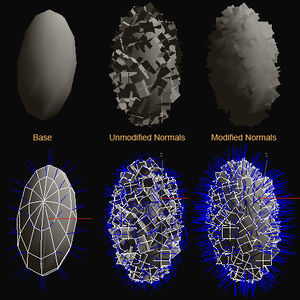 Does anyone know how to create the scattered polygons shown in the picture under the Modified Normals text in 3ds max? I know that this is from another thread but it didn't exactly explain step by step on how to create the modified version of the object.
 -
3ds max fur, render to texture bake.
 I am making this squirrel and wanted to use the Fur modifier and do a render to texture bake but I am not sure if that is possible...any ideas? I just see these amazing results from the fur modifier and wanted to bake it onto a map.
 -
Using FFD on a few vertex only
 Is there any way to use the FFD modifier only on a few vertex that I selected before adding the FFD modifier? When I try to do that, the FFD change all my model once I try to save or go on edit poly again.
 -
[MaxScript] Need help with Chamfer Segments
Hi all! Can someone help me modify this script to prevent negative value? Lowest value that I need is 1, not 0 or -1. ( local currMod = modPanel.getCurrentObject() ( if (classof currMod) == Editable_Poly then ($.edgeChamferSegments -= 1) else ($.modifiers[#Edit_Poly].edgeChamferSegments -= 1) ) )
>11680 results