Search
-
Re: First model in a LONG time
 You're going to lose a lot of that deatil when you drop this thing on the PSP. Unless its very large on screen its going to blur out of existance, particularly given how ridiculously huge your texture map is. First thing I'd do is hack your texture down to 128*128 at the absolute most. Large textures will blur nastily on…
 -
Re: after effects question!!
 ok I FD up up bad let me explain im brining in a image from adobe after effects its a pixel drawing roughly 100 X 100 or whatever, im then brining the video into premier to overlay dvd interface and such to burn to dvd easier. Now when I bring video into adobe premier and images it blurs them out no matter what is…
 -
Re: Several more Photoshop actions you may find useful(combine Nmaps, AO and more)
 Oh, nevermind that ,it is OK :) A more perfect solution is to rework the action so it uses a clean black and white render of the UVs as a base for the layer masks. Such texture could be easily created using TexTools Another possible solution is to add a layer style with "inner glow" set to the default normal map color…
 -
Re: What's up at Infinity Ward...?
 1200? Man, I can get a full game for that money. No way I'm paying for that.
 -
Re: [Chivalry] Agatha Knight - Court armour
 Haha, nice save on those 4 polys :D . That's ok, my helmet was exactly 1200.
 -
Taking an art test - is this situation odd?
 Hey, I'm a fresh graduate and I sent my work to a games company the other day who were after a "character artist", I won't say the name of the company, but the job listing is still up on the artstation incase anyone fancied searching it yourself and giving me their thoughts on it. The company got back to me saying they…
 -
[UT4] DM-Chamber

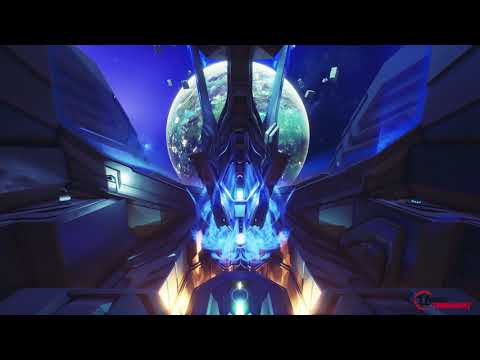 Hey guys. I made a map for Unreal Tournament called DM-Chamber. Download link It features trap room in the center of the map and zero grav pools. The goal of this project was to make fun and cool looking map with 100% custom art within 100 mb file size. For that I used custom vertex normal technique, deferred mesh decals…
 -
Re: Help with the Equation for converting Gamma to Linear.
A long time ago of your question and maybe you already solved it. but for those who still do not know it in photoshop there is a way to convert values from gamma 1 to gamma 2.2 or vice versa. With the color picker and with an exposure adjustment layer feeding the gamma correction either 0.4546 or 2.2 depending on the case… -
Re: How Do I get rid of seams?
It could be a gamma correction issue, you can check by applying a texture flooded with a 128, 128, 255 red-green-blue color. If there is still a discernible seam it is most likely gamma correction doing something funky. Gamma correction is confusing to say the least so here's some official documentation on it… -
Re: Zbrush: Can't sculpt after Projection Master - Stuck on rotate tool
 Exit edit mode and clear the document. Set the RGB and Z Intensities to 100, then redraw the tool onto the document and go back into edit mode. Any value less than 100 (even as high as 99) will cause that behavior. There's a bug with projection master (caused by saving projects in 2.5d mode, which includes quick saves)…
>14949 results