Search
-
Re: SC2 Turret wip.
 This is really nice. The thing that stands out to me is that the blue paint on the rounded base plate thing screams Photoshop. It looks a bit too much like it's been painted on using a digital application, rather than being real paint that's been worn down. Maybe try first blocking the colour in as a sharp-edged…
 -
Re: Is it possible to get a good bake without support loops?
 Share the mesh (zip, then attach here) and also, show a closeup of the normal map. It helps to state your software with version number. For example: Substance 3D Painter 11.1 for baking, and 3ds Max 2026.3 for viewing (or whatever you're using).
 -
Zbrush Brush for enhancing edges...?
 Hello I have a scan of a rock. Usually the various edges of the rock are not that sharp (happens to all scans to a degree). I would like to "enhance" the edges of the rock so it would be more "sharp", like a proper edge and not as a smoothed edges (due to scan blurrines to a degree). What Zbrush brush should i use for…
 -
Need Help! extruding problems! Autodesk maya
 hello peeps! i need help on how these things will not extrude from the inside? basically i made a scallop shape from cv curve tool then i used bevel tool to and set polygons and quads as output. then i select the faces as in the picture and i extrude it outwards the shape it always made a funky look on the inside when…
 -
Re: Fallout 76 Inspired Interior Hero Asset (Dev)

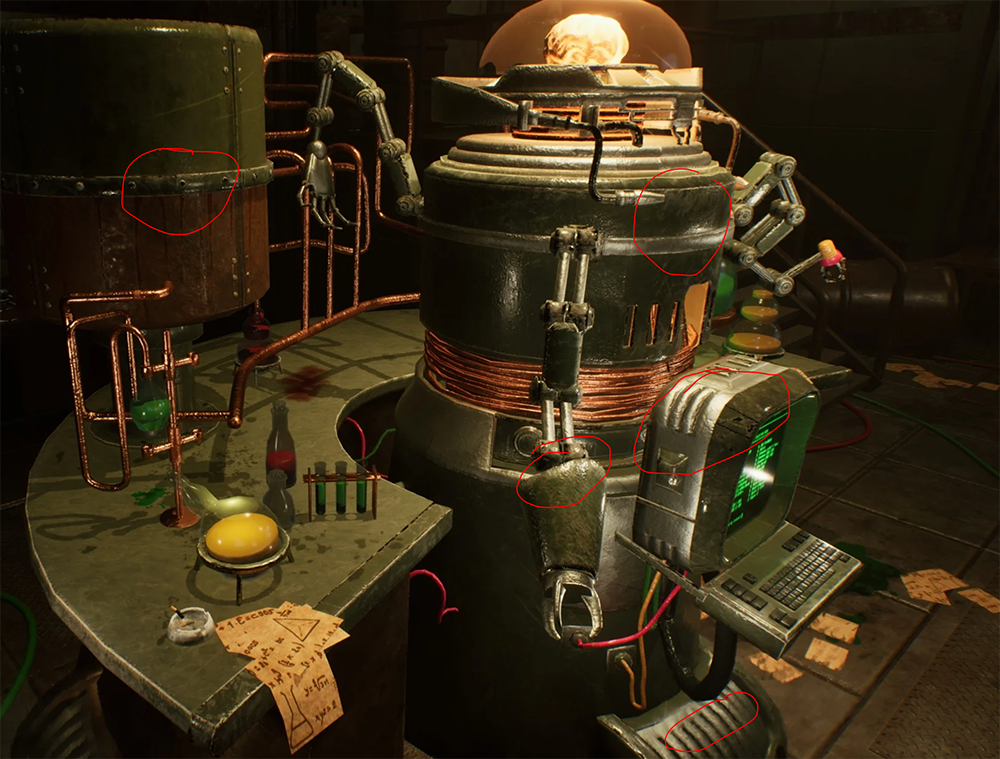 Hi! Cool to see an update. I must say though, the shading on the terminal still looks off, like the normal map is not working with the mesh shading. I would doublecheck against the shading in your texturing app that all looks as intended in engine. If you want a second pair of eyes on it, feel free to share files (for…
 -
Re: German WW2 Grenade
 You might get better results if you bevel your hard edges some more. Not even the real thing has that sharp of edges. Next time take special note of the different bevel widths on every edge. Not all bevels are the same width. You'll be able to push your work much further if you can reflect that. And generally if you're…
 -
Re: [UE4] Autumn Landscape WIP
 Really wonderful work. The texture blending turned out nicely and the waterfall is a great addition. I like the push for red, but it might be a little too strong and mono-chromatic. Your reference has much more yellow/orange. The only thing that really stands out to me is the left side of the tunnel where the walls meet.…
 -
Re: Article: Game Art Art
 But on games where the geometry you can use is very limited, this would lead into blurry lighting. The method that diamond3 described could give you very sharp shadows with not a lot of geometry. I've seen something like this before, on some mobile games. God of war on PS2 uses something like this, also. You can see that…
 -
Re: Traped (Game env)
This is incredibly badass as a whole. However, a lot of the textures are kindof muddy and blurry, and there's a serious look of inconsistent detail levels -- from a very sharp pillar to a muddy, blurry ground texture -- and sharp transitions. The whole is exquisite, especially in regards to the main room, but a lot of… -
Re: Gun Rigging Help Needed! - Blender
The video in your Drive is not shared with the internet, so it’s unwatchable. You should check the Sticky in this section about sharing animations/videos. If this is for importing into a specific game, it would be good to explain which.
>27682 results