Search
-
Re: Houdini Indie
 Yes you can delete history. Lock the node you wish to delete things up to, then delete everything above it. Or you can just right click a node in the network and export the geometry at that point. I prefer the second option as you retain the network/history which is actually immensely useful in Houdini. There is also…
 -
2 Uncharted Multiplayer Beta Codes
 R47A-9ABX-I98G BJJD-A4B8-R6PC I got a few extra at e3.
 -
Re: Star Wars - Redemption ( FanMade Project )
 Hello there ! Here's a video on what the v2.5 of the demo brings new to the gameplay. It's mostly focused on Mevenn's controls so you can feel a more "fury" version of the character (which is how I think of her since a few years now). I hope this will help ! Please find all the update's details here : Patch note SWR 2.5 :…
 -
Re: poops substance fiddling thread
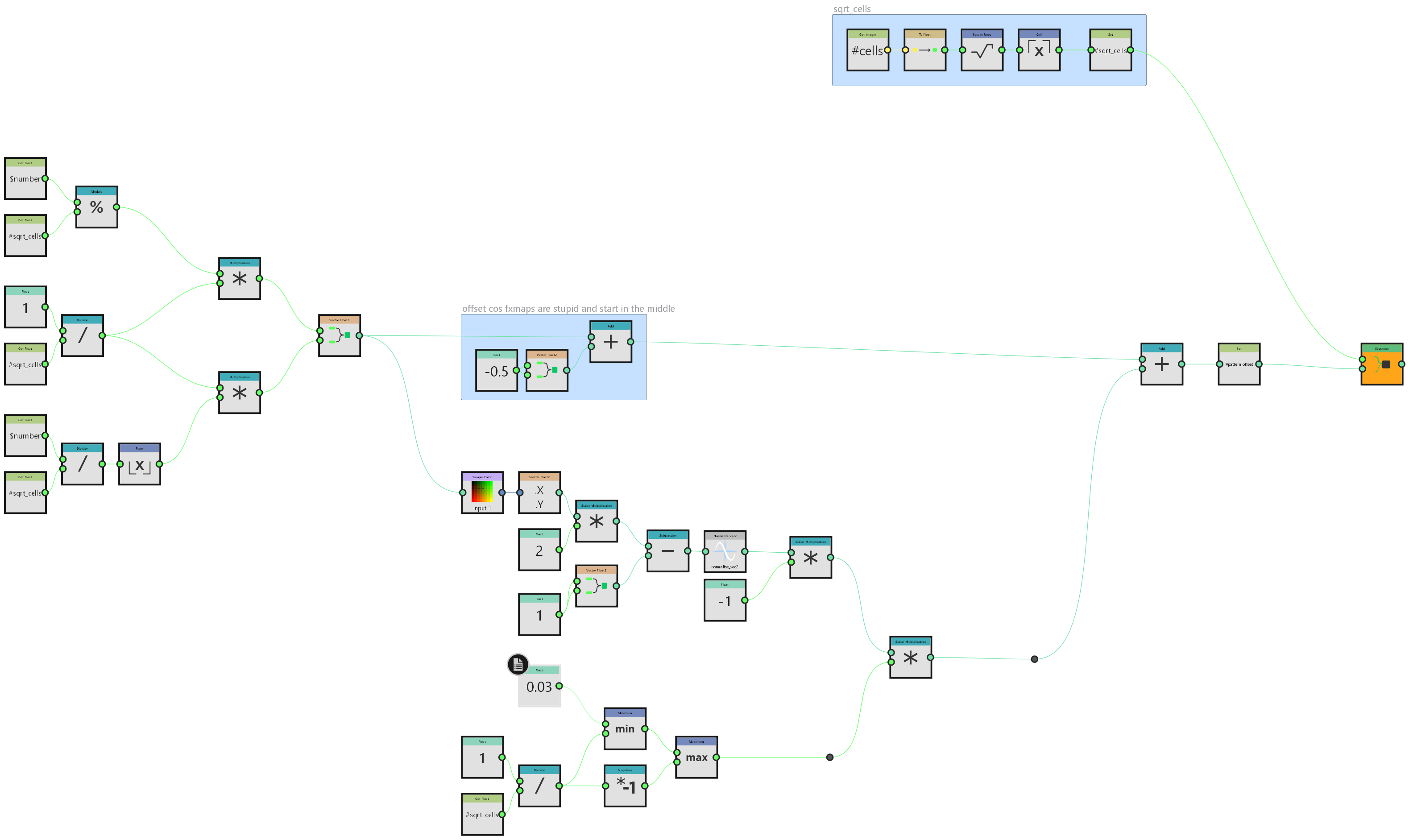 i did this primarily because I'm going to need it at work on monday but it's a neat enough trick that it's worth sharing here generally speaking I don't do a lot with fx-maps. most things can be done better in pixel processors if you apply enough maths but in this instance I will need to take advantage of their inherent…
 -
Re: Female Figure - Nude
 Nice practice, here is a paintover with notes. With size of feet, they should be the length of the forearm (from inside of elbow to wrist)
 -
Shape Splatter - Clips any value per default

 Hello guys, today I downloaded the newest version of SD to test the new Shape Splatter Node, but somehow I don't get it to work and I hope this is caused by me. Whenever I try to connect the nodes, the values of the shape node are getting clamped. The splatter node is set to default- so I changed nothing here. Is this a…
 -
[Blender] Floating graphic on object from an alpha png in Cycles
 I'm a beginner in Blender and am doing the BlenderGuru donut tutorial(doing the cup portion of the old one and geometry nodes sprinkles of the new one), but wanted to do something more by adding a Homer Simpson pic on the larger plate(surrounded by donuts on the edge, but irrelevant to this). Problem is I can't find why…
 -
Tardis Live Wallpaper
 Been working on a live wallpaper for android on and off again over the past couple months. It's currently a beta release and could use some more guinea pigs to test it out. Currently there are 2 options for the look of the wallpaper. The first mode is simply the tardis spinning in front of a background image or colour. The…
 -
Anisotropic material solution?
 So, I've been reading a bunch of threads and discussions, googling for hours now, looking for a way to replicate an anisotropic surface inside UE4. The answer so far is basically: none of the shaders in UE4 support this. This seems to be somehow related to deferred rendering (is it true? why?) You must code your own shader…
 -
Re: Render-to-texture alpha transparency / Marmoset issue
 If you're using the old Marmoset, you need to: 1. Place the opacity map (Black is transparent, white is opaque) in the alpha channel of your diffuse texture and save it as a 32bit TGA. 2. Change the Blend Mode of the material to something other than "None", most likely "Alpha" will work best. 3. Uncheck "alpha testing" in…
>37259 results