Search
-
Re: High Res Terrain Painting on Low Res Terrain
 I'm using a mouse and my computer being too slow is certainly not a problem. If you were to paint at a brush size of 1, using any of the circular brushes, it would show up as a circle of texture painted onto the terrain? Because I can only paint in squares with a circle brush and a circle brush only shows up as a square…
 -
Re: Head base mesh
 The edge loops around the eyes and mouth look good, but the jaw line and rest of the face need some cleaning up. You want to limit 3 and 5 vertex poles, the ones I circled can cause issues while animating (ignore the one circled on the middle left, I got circle happy) The cheeks edge flow should be similar to what I drew.
 -
Re: Spline modeling?
 Since you can just use the circle tool I'm not sure why it'd matter how many points it creates. Also there's times where I use a circle to create a round corner on a right angle since fillet doesn't always five desirable results if the adjoining segments aren't the exact same length, a circle made of quarters lends itself…
 -
Re: Gran Turismo 5
yea, its ridiculous. they have a seperate menu just to set up vibrations on the controller. you go into it and there is only 1 option. on or off. and pressing circle to back out should be just that, press circle, and it backs out to the last menu. i dont want to press circle to move the fake cursor the the back button then… -
[ZBrush] OVERHANGS WITH SMOOTH GROUP BRUSH/POLISH GROUPS

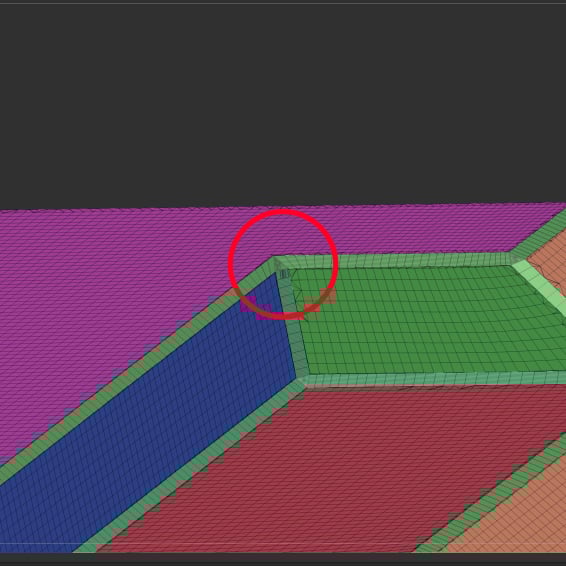 Hello all, I'm trying to soften BevelPro edges using the Smooth Group brush or Polish Groups (open circle) and both are producing geometry overhangs in certain corners. Should I be approaching this differently? I also tried to use the standard smooth brush which does a good job but leaves random artifacts all over the…
 -
Re: Gas Pump
You really need to smooth out the the main forms (circle at top and base) as the silhouette is very jagged right now. The rectangular insets could perhaps use a bit more geo as well. The black circle above the big rectangular inset could probably be removed and be faked with the textures as it doesn't change the… -
Re: Workshop # 1- alexl
 Nice method Earthquake, looks like a cleaner way to start things then what I did. I did my circle cuts by placing an 8 sided circle spline behind the plane that I wanted a hole in, turned on snap to vertex and started cutting into the plane following the shape of the circle. Required cleaning up afterwards though. Real…
 -
Re: blender questions
If you have only the scale gizmo active, then click on the white circle. If you have the move gizmo active as well, the white circle will move the object. If you have rotate gizmo active as well, you will only have this big white circle for rotating in screenspace. Trackball might be what you're looking for for the second… -
Re: extruding a cylinder from a square...
 build your square/cube whatever. Turn on Autogrid. Create a circle on your model where you want to extrude your cylinder. Turn its iterations down to whatever matches best with your topology.. at least keep 8 sides though as it smooths nicely. Turn on snap to points. Use the cut tool on your model, snapping to the points…
 -
Re: Cylinder with Holes (Editable with nice smoothing)

 I got it guys. I used a very special technique :smiley: I started with a 150 x 150 Segments Plane(I know very high, but for HP purpose....) I used Regularize to create the Circles. Then i deleted the Circle Faces and moved the border of each circle very close to the neighboor face. I bended it 360° and collapsed the…
>4044 results