Search
-
How to render only object and it's shadow?

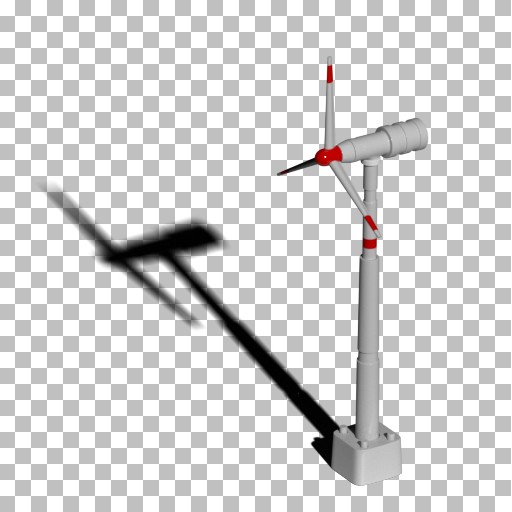 Hello everyone! I need to render only object and it's shadow (that casts on the plane) in the scene. In order to be able to paste fan and it's shadow like 2 different layers in photoshop. I need to do it in Vray and 3ds max. For example: from the whole scene I need to render only fan and it's shadow
 -
a few world objects for COH
 turns out i haven't made a post yet for some of the stuff i did on Company of Heroes. i dunno why. here's just a few objects.. hmm kinda old work now but.. on this one i didn't do the barrels, the sandbags, or the barbed wire: didn't make the L shaped pipes between the two barrels here again, ignore the pipe. don't know…
 -
Re: Texture map for multi object models
 In the latest version of max you can use one modifier on multiple objects but you can also join all the objects together, unrwap them, then split them apart again
 -
3ds Max-Object Highlighted When Not Selected
 I can't figure this one out. My objected is highlighted even though it is not selected. I've already tried Collapsing it with no luck. Can some one explain to me what I need to do...it's driving me crazy! lol Thanks
 -
ANSWERED: Question about importing multiple objects
Hi.. this is kind of a noobish question but i made a mesh that has separate parts and separate uvs... how can i do multiple import of those cause i only see the option for just one object on one set of uvs -
Re: New to baking normal maps for games objects
Seems like you're on the right page with most of these assumptions. Not sure exactly what you're asking so will ramble slightly. Your specs... Looks like you are using a software I don't. I usually bake in Topogun or ZBrush, but whatever works for you or your company is fine I'm sure. Moving obj or other files between… -
[CLOSED] 2D game UI + tile assets for late stage indie RPG
I'm working on a "remaster" of an old-school dungeon crawler called "Dragon Bane 2" as a personal/indie project. It's a dungeon crawler, with 3D grid-based movement and 2D turn-based party combat and inventory systems. The project needs a 2D freelance artist willing to work against a backlog of tickets to polish and extend… -
Normal Map on Cylindrical objects
 I am having the same issues over and over when I do normal maps on hard surface cylindrical shaped objects. I've been trying different solutions but nothing seems to fix it. Does anybody have any suggestions to fix some of these normal map problems? High Poly exported from Zbrush, Low poly and cage exported from 3ds max,…
 -
3ds max Link Moves Object
 Hi, I'm having a problem with the "link" tool. I want to link the eyes and teeth to the head bone of a CAT rig. Before doing that, I reset xform and make sure to break all (if any) links. After that I link the eyes/teeth to the head bone but the objects moves forward. And, if I try to undo that, nothing happens.... Any…
 -
Realflow Tutorial - Attach Emitter To A Moving Object
 Heya!! In my latest Realflow tutorial I show you how to attached your Realflow emitter to a moving object! Enjoy! [ame] http://www.youtube.com/watch?v=Ivaer_mwGTs[/ame] And thanks for watching! r
>26392 results