Search
-
3D - I need it back in my life - Some Friendly career/portfolio advice appreciated
 Sad events over 2 years ago our game 'Red Awakening' didn't receive the funding it needed to go fully into development and the team has to disband. I was forced into a different industry... alien to me. I just use AutoCAD like everyday and it makes me sad. I now strive to return to where i feel my heart is. Game Dev...…
 -
3DO not linking to DDO changes
Hey guys, I am trying to learn the Quixel suite and am getting stuck early on. The problem is that my mesh doesn't seem to receive any of DDO's input. I have tried multiple meshes. Here is exactly what I do. 1. Create mesh in Maya. Layout UVs. Triangulate. Export OBJ with all options (including normals) turned on. 2. Open… -
[ MECHA ] Сoncept art

 Hello everyone! I'm happy to share my new work with you – a Mech Concept art piece, my personal work.In this concept, I wanted to capture the spirit of a heavy, industrial, combat robot with clean, heavy lines. But I decided to add a bright accent just for fun :p The robot stands approximately 5 meters tall.It is armed…
 -
Re: 3D Environment Artist Potfolio Critique/Feedback (Stylized)
 Thank you so much to the both of you for taking the time to look through my stuff! And thank you for the encouragement ;A; @Ashervisalis My main inspirations are artists like Jasmin Habezai-Fekri (https://www.artstation.com/curlscurly), I like to look a lot at what Airborn Studios is putting out, actually. I guess I don't…
 -
Re: [Maya] GN Project Components To Live Surface
Hello, I have your script, but an error appears when you try to use it: "GN_ProjectComponentsToLiveSurface.py line 109: type object 'OpenMaya.MGlobal' has no attribute 'getLiveList' #" -
Polycount Store lives again

 Store link in the header, courtesy @r13 Our luvly GDC shirt design! Only one item so far, more to come.
 -
Re: Hominid Project

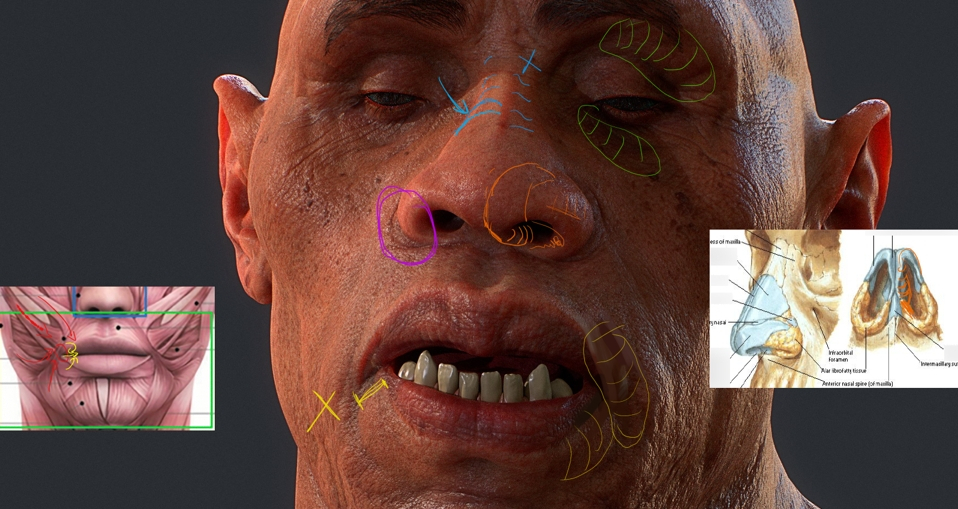 Okay! First I want to compliment you again on how good it looks! I wouldn't be writing a critique this if your work wasn't this nice, and I'm looking forward your to next pieces. I've got pretty much only anatomy pointers. I tried to color-code so they're easier to read but the text colors are changing once posted, haha.…
 -
This morning pc looks like this
 Refreshed a couple of times, no luck. Other bookmarks look just fine. I checked my Firefox version, it's the newest. Ideas?
 -
How can you make a cinematic that looks like a person is walking through a scene? (Unreal 4)
Hi there, I am currently making a scene of a village in Unreal 4 and I really want my cinematic to appear as if a physical person is walking through the village. I am using Cine cameras and the sequencer in Unreal however it never turns out how I want it to. Is there any other way to make a cinematic like this? Thank you :) -
Re: why does my uwv looks like that?
 UH??? 3dsmax start to be more broken than Maya XDDD... On 3dsmax 5.0 it was in the Edit UVWS windows, ---> Menu Options ---> Preferences ---> Line Color.... Probably a bug, it seems to not affect the color in the 2010SP1 version... :D :D
>120317 results