Search
-
Re: Help with outline Post process and UE4 water system
 that's probably where i'd start - simply don't include the water There is/was a node for testing depth behind a surface that looks like it's specifically intended for this purpose on (probably) 5.2. I cant remember what it was called but if you search for depth in the materials nodes it should come up
 -
Why crunch mode doesn't work: 6 lessons
 http://www.igda.org/articles/erobinson_crunch.php Great article from the latest IGDA newsletter. My favorate quote, and the one I have found to be true first hand. "They (managers) crunch because they have learned only the importance of appearing to do their best to instead of really of doing their best."
 -
Re: Where does photoshop fit into a production pipeline?
 Doesn't have all that much to do with whether a texture is tiling or unique. Textures are just images. For a long long time Photoshop was the best available image editor for our needs. Besides painting directly onto an image or manipulaitng photos into a texture it allows you to do a lot of automation by clever use of…
 -
Re: Re-topology is there anything on the horizon?
 Have you checked, that the basemesh is added into the first socket of your Wrapping node? It is recommended for quick computations, that your basemesh has not more than ~30k polygons since the more polygons your Basemesh has, the longer the computation time is. According to the developer, a 100k basemesh might take up to…
 -
Re: Help me refine my workflow when using imported photos in substance designer
 Set the size of your first node imputs (the first node you pluck your bitmaps into) to "absolute" or the size of your project in general (just double click on the empty side of your graph, top right is your size options) and change the resolution to what you want, e.g 1 or 2k. What is the size of your project? A good thing…
 -
Re: This is the last straw with Maya.
 I don't think I've ever had that error, but I've seen many new users come up with a variety of bizarre problems and it is almost always a result of user error. If you don't know what's going on then it's easy to do things that Maya doesn't like and that crap builds up over time and can screw up your scene. Keep your…
 -
Re: Normal maps messed up in Cycles (but not in Eevee for some reason)
 Seems possible, especially considering that there is a way to bring these same shading artifacts in Eevee - I did that just by plugging the normal map into an AO node and looking at the isolated diffuse color render pass I have a sneaking suspicion that the AO node may be utilizing Cycles for its raytracing (I doubt that…
 -
Re: Unity Metallic/Metalness not showing Smoothness Slider
 Stupidly, yes. Guessing they're assuming the gloss value will stay relatively well compressed in the alpha, with AO getting next best compression in the green. Metalness doesn't need that much to it, so it gets next best in the red. I've had to hack the Standard shaders to use RGB rather than RGA and that's a real pain now…
 -
Re: Sketchbook: Zaki Saati

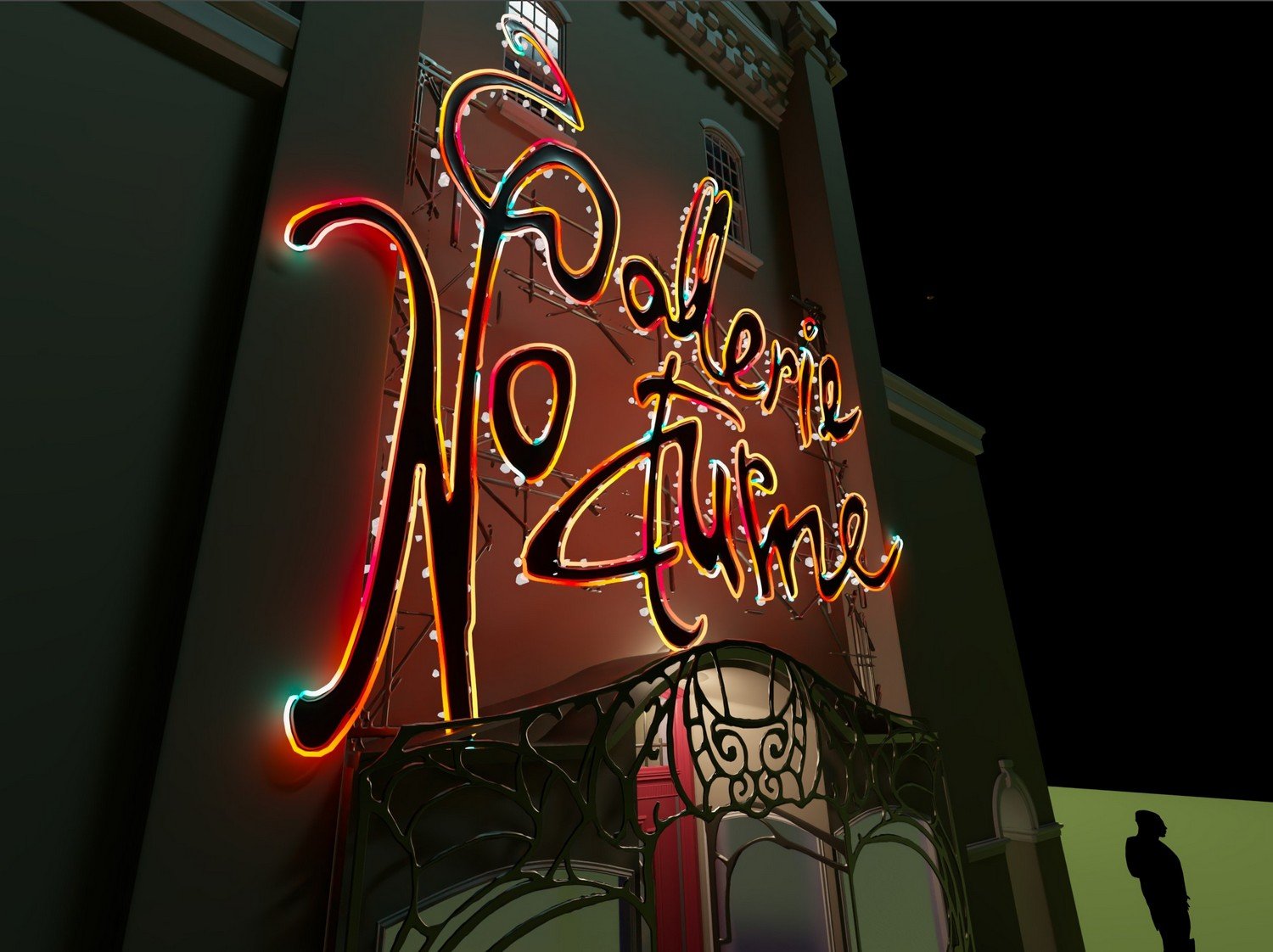 Finalizing the model of the logo and neon signs (that took a bit of time..). Used a bit of mash for the scatter effect. Here are some tests in Vray. Don't mind the ugly metallic support behind the logo, all temporary placeholders. I used a ramp node in the neon shader.
 -
Re: Why does my model look like this?
 - The quickest way to make sure normals are pointing the right way is to turn "Face Orientation" on in the Geometry > Show Overlays menu of the viewport in Blender. It'll highlight anything flipped in red. I'm under the impression the original tires have flipped normals, so when you flip the mirrored tires to match them…
>37266 results