Search
-
Re: [Zbrush] Sometimes changes scale of the tool and all the subobjects problem.

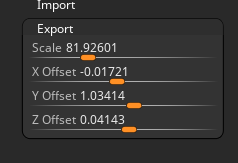 Hey, I was having this issue as well where suddenly it seemed like all my subtools in one specific ztl. file had changed scale. My problem was the values in "Export" under the "Tool" palette had it's values reset. Luckily I could go back to an older version of the ztl. and copy over those random values. Not sure where…
 -
Answered: Unreal Issue with 3D model export
Material is not applied - have to manually check "Build Adjacency Buffer" and click Apply Changes on LOD to fix -
Moved: substance unity 5 export issue (help)
 This discussion has been moved.
 -
Moved: Marvelous Designer. what is the ideal pose for exporting?
 This discussion has been moved.
 -
multi map exporter or displacement subpalette?
http://www.cggallery.com/tutorials/displacement/ Theres 2 Zbrush options in the select sculpting package and I have no idea what one to use or even what the difference is, can anyone help me out? -
Anyone capable of exporting a Maya file into STL?
I need to convert a file in Maya to .stl. So anyone capable of doing so? If so, I'd greatly appreciate it. -
Export Kismet into New Level
Since saving a Kismet sequence in a prefab doesn't work (crashes UDK everytime I try to load the prefab which is saved) is there another way to get objects with their Kismet sequences from one level into another? Copy and paste also crashes udk. -
Export softened normals in Zbrush?
 This feels like the most basic thing, but I haven't found anything about it or figured out a way to do it in Zbrush. Is there a way to do this? I want to skip the part of bringing in my HP into Maya just for the sake of softening the normals. It slows down my computer pretty bad and it wastes time. Thanks!
>17852 results