Search
-
Shader thread
 In light of there being a free version of ShaderFX now available for us to tinker with, I thought it would be a good idea to start a thread (sticky by chance, mods?) where people can post all of their shaders for the community to use. Right now they're kind of spread out in P&P and things like that. I'll post one I'm…
 -
[PAID] Freelance 3D Artist - Old Industrial Building
 Hi everyone, We’re looking for freelance 3D artists experienced in creating realistic 3D models. Task: create a model of the American Ice Company building. While modeling, use the main reference as a guide: https://www.abandonedspaces.com/wp-content/uploads/sites/58/2019/10/8324979959_98777faa2c_k-640x428.jpg Estimated…
 -
About Toon SHading
 Hi does anyone know how can I get the texture effect as Borderlands in Unity engine.Is there are a technique or good tutorial for it.
 -
Advanced Cartoon Shader - UDK
 Hi everybody! After seeing questions about cartoon shaders many times in the Technical Talk Thread, I decided to make an Advanced Cartoon Shader that everybody can download, try out, or use. You can download it from here. When You want to use it, You just need to create an instance from the original material, and change…
 -
Realtime Normals viewport shader!
 I have asked this before, and I used to use xoliul shader, but it does not seem to work for 3ds max 2013 and his website seems to be down :S I have found another one called 3-point viewport shader, but that will not install and their support email has not replied for afew days now. I have also been using Marmoset which is…
 -
Cannot change Shader.
Hi all. I've noticed something strange and it could be due to my GPU with only 1 GB of ram. But Im not sure. When I begin the project in non-pbr-spec-gloss and then change my shader to another shader, my object will become a flat textueless grey. No matter what I do, it will remain this way until I go back… -
Awful Shading Issues
Ok, I'm probably missing something simple here, but I'm getting terrible artifacts on a mesh that looked fine in Marmoset. Anyone know what's up? Thanks. -
Re: Low poly baking issues (NEW)
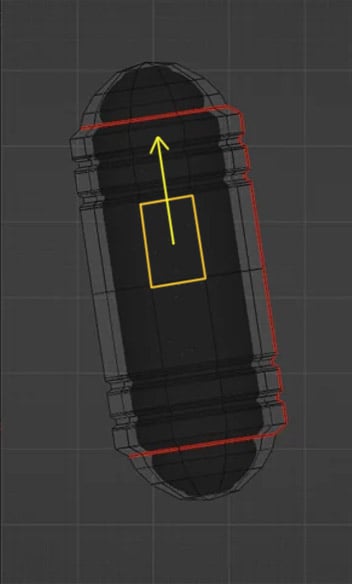 In Blender you can move edges, edge loops and vertexes along any edge direction ( with auto UV correction). So world or local coordinates , axis being tilted it's all irrelevant . You just hit G double time + Alt and hover over an edge you want as a sliding direction and get yellow track lines appearing representing…
 -
Shadow questions.
 I'm having a problem with my custom shader. Self shadowing shouldn't show on something that is cel-shaded, and yet I have no clue how to disable it and allow it to cast shadows on other things. What I'm getting. What I'm needing. Another question would be how can I affect the cel shading material from shadows See that just…
 -
Physically Based Shading in Cryengine ?
 Does anyone know if the latest version of Cryengine has PBS ?
>56833 results