Search
-
Re: Warrior Character (WIP)
 Working through the hair, having a rough time. I think the part that the arrow is pointing to is looking like my best results so far, I'll try to replicate it across the rest of the hair.
 -
Re: Global variable
 Consider putting that variable in the game state. It's replicated and easily available to all of your blueprints. Like Obscura said, you can get the gamestate and cast it to your custom gamestate to get the variable.
 -
Re: How do my models look?
 Ahh now I get what you mean, thanks for the paint over. so this is what everyone means by painting the silhouette? I will have a try at replicating what you have. :D
 -
Re: Answered: 1 Pixel Mask
 What version of Quixel SUITE are you using, Donofdon? The answer I gave him was a beta invitation back in November to see if he could replicate this issue in the SUITE 2.0 pre-release.
 -
Re: Maya to XNA
 thanks for the reply but I have actually been doing that already, in fact, I had one that worked but I can't replicate that and I have no idea why but I'm going to keep trying.
 -
Re: Deep UV? Is standard 3dS unwrap crap?
 I still haven't been able to replicate the same level of accuracy with Max 8's settings that I can with one click of UVhelp. Besides which, it's free and works in max 7,6,5.
 -
Help- Zbrush Live Boolean

 Live Boolean > Make Boolean Mesh > Appending does not create a combined mesh. It does seem to replicate which ever mesh I had selected when I ran the Make Boolean Mesh though. Anyone else running into this?
 -
UV scramble
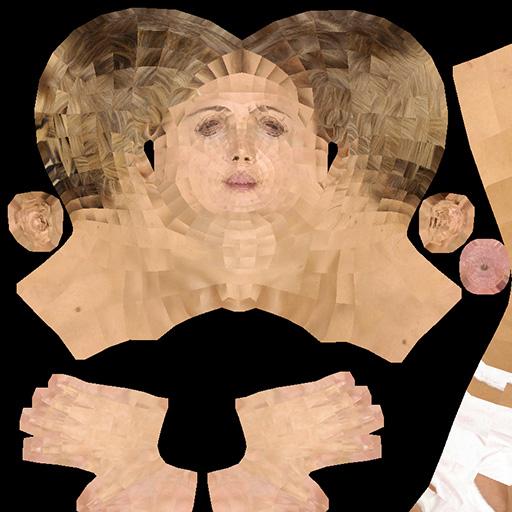 I was working on replicating this scrambled UV effect, posted about as a problem on polycount here, but since deleted. That thread chalked it up to modo and zbrush incompatibility- but Does anyone know how to to create this effect (of each polygon's UV being rotated) on purpose?
 -
Edge loop tool-3dsmax??
 Does anyone know if there is a way to replicate insert edge loop like in Maya in 3dsmax? Creating edge rings everytime before using the connect is repetitive especially for very complex and extensive modelling. Are there any plugins to make this tasks faster?
 -
Re: Sketchbook: Brosif

 Last project I did, going off of the concept work from my Friend, Dalton Zheng. Served more of a an exercise to see if I could try to replicate his intricate style in 3D
>2617 results