Search
-
Re: How to model very complex shapes ?

 I kinda understand what you are saying. I know that my question is ... well ... big ? Broad ? I don't know the word for it :P But, I am not asking how to do this step by step, I am asking about advices about my aproach. I don't know if this souds better thou xd Thanks you very much! I watched the lecture and it was great.…
 -
Re: The Monthly CHARACTER Challenge | October 2014 | the Soothsayer
 Of course i dont mind :) i smooth by tapping and i do it often, dont be afraid to smooth out areas and re-sculpt on top, i think thats what gives it a more natural look imo. so in general (and this is depending of course what phase of the sculpt im in) i sculpt the abs very harshly on a lower subdivision, maybe sub 2 or…
 -
Re: Sketchbook: Daniel Strickland
 Day 24: Let the Smoothing Begin! Starting with the biggest and baddest, the handguard and upper receiver have been dynameshed and polished. I also have started reducing the complex piece of the retractable stock. Yesterday I spent trying to figure out the smoothing process. I tried 3D Coat, didn't like how high I had to…
 -
Re: Edges - when to normal map them?
 Ok so, "normal mapping edges" isn't really a "Thing" lets get that out of the way first. You don't "normal map" just one area of your model, you bake a normal map from a highpoly to a lowpoly model. "Normal map" isn't a verb. I believe you're referring to either beveling/chamfering edges or using smoothing groups to denote…
 -
Futuristic Pistol
Hello again Polycount! Project Summary: For this project I will be creating a sci fi weapon based on a concept to add to my portfolio. This project is intended to help improve my modeling, high poly modelling workflow and texturing skill. Special thanks to Blazej Kaczmarek (Blaizoid) for giving his consent to use his… -
Re: Whisper of the Heart's Atelier

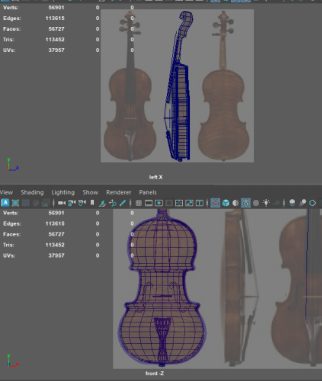 I decided to start with my hero asset so I can use it as a kind of quality bar. This model had me more focused on topology with a lot of surprise ngons or pinching issues. My polycount is at 13k when smoothed and combined though that's without the final details of the scroll and the violin strings. Also need to replace the…
 -
Re: Expert in a year - 3D artist
Hello, great start on your vehicle, first of all, I won't recommend using the smooth tool because when modeling a vehicle you are going for a specific surface shape and the smooth tool is quite random when it comes to the way it smooths, it does smooth your surface but it will make it lose its volume, in order to get a… -
Re: Space Marine Dreadnought
 There are quite a few tricks you could use to do something like that. One option is to use turbo smooth, and tick "smoothing groups". this will create a hard edge there (if you set separate smoothing groups, then add another turbosmooth ontop without smoothing groups ticked and it will smooth nicely. Alternatively you…
 -
Re: Handpaint Bread
What was your reference? Because you're off to a good start, but it just looks a bit unappetizing at a first glance (soft, smushy and somewhat shiny), but I might simply be expecting a different kind of bread. The softness might be due to the mesh bulging out between the cuts and the cuts sloping down too gently in some… -
Re: [3DS MAX] PolyUnwrapper 4.0 Released

 PolyUnwrapper 4.2 is out. It is a Free Update for all current users. http://www.polytools3d.com/polyunwrapper What's New + NEW Added support for 3ds Max 2017 + NEW Align Shells: Shells can now be aligned to the 0-1 space as a group + NEW Added Get Render size from current texture map + NEW Settings Manager UI + NEW…
>15014 results