Search
-
UV island selections in XSI
 Bit of a longshot - but does anyone know of a script for xsi that quickly selects UV island edges and applies a hard edge? At the moment I'm doing most of my modelling in Max and exporting straight into unreal - I've been using turbotools to quickly do an island to smoothing groups before normal baking which works…
 -
Re: Interior with Hero Asset WIP Log : Pirate's Tavern
 How about having a character brandishing the cutlass? Maybe they're cutting a cork off a bottle, and beer is spraying out!
 -
Re: Advice with secondary forms

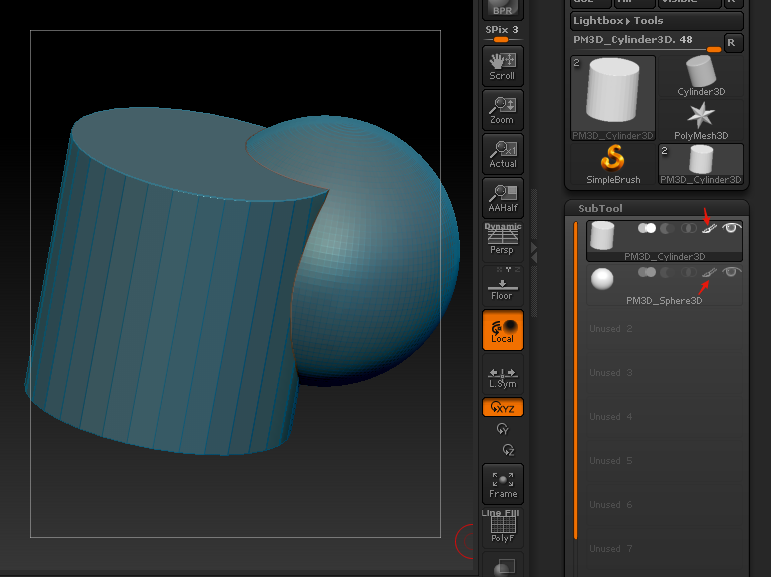 Yeah, I believe the Polypaint icon is toggled off. I'm always finding myself turning it off when it keeps turning on. However, if you FillObject both, even if no material or RGB is set, they'll both wind up with that same highlight. :) So both will need the Polypaint icon on.
 -
Re: Dmitry Parken getting ripped off...
 I'm going to go brush my teeth, or take a shower, or something, after reading that... Did it take you long to write that with one hand? Lol... back off the hardcore pr0n a bit man.
 -
Re: Sketchbook: Stororokw

 I implemented the FFT bloom so that it runs on the 3d scene now. I jacked up the intensity multiplier to 100 so it's more visible. You can see some cool things like the airy disk pattern and the lenticular halo surrounding the light. There are still some artifacts from doing circular convolution causing it to wrap around…
 -
Re: Work flow help
 1 draw a concept. 2 draw more of it until you have a clear idea of what you want to achieve, before even touching a 3D app. 3 Pick up a 30 trial of 3DSMax. 4 Read up on primitives creation and the edit poly modifier in the help files. You can also google for the Joan of Arc tutorial series. 5 Read up on the following…
 -
Re: Script/plugin for max similar to modo deformer falloff?
 Actually, scratch that. What I want is to be able to control the selected verts in the modifier stack using soft selection. IE The selected area I would like to soft select (NOT FFD, as the profile cannot be controlled as accurate as I would like) Obviously with the threshold you can adjust the affected polygons, but if…
 -
Re: xNormal - MASTER THREAD
 That's the way my friend and tutor suggests. I used to faff around with the smoothing groups so much, optimising them for the unwrap and then never getting a perfect result. So then I'm told, "The way most people do it now for UE4 is use one smoothing group, xNormal and mikk tangent space." So, even if it isn't the only or…
 -
Re: 3ds Max partally twist or rotate a spline
 People dont often know more than you mark... I got around this recently in a hacky fashion by using an ffd modifier under the path deform recently - its hardly precise but i guess you could use a twist modifier instead Id probably use a loft for this as you have control over the twist. Theres nothing stopping you…
 -
Re: Best way of getting 2011 Max file into 2009?
 Download latest version for Max 2011 here: http://usa.autodesk.com/adsk/servlet/pc/item?id=10775855&siteID=123112 Max 2009 here: http://usa.autodesk.com/adsk/servlet/pc/item?siteID=123112&id=16126683 Export FBX from 2011 and import in 2009, FBX is just a file format, just like 3DS, OBJ and ASE, there is nothing special…
>28362 results