Search
-
Maya 2019 Quad Draw Tool does not extrude properly

 Hello, this is my first time using Quad Draw Tool in Maya 2019 and I have a few issues. One of them is that I cannot extrude properly on some surfaces. As you can see in the marked area, I can't extrude untill the middle of the edge or something like that. Also, I can't even extrude the last edge. Same goes for drawing…
 -
Extruding surfaces in Zbrush
 I was wondering how to go about extruding in Zbrush. I usually just reverse mask the area i want to extrude and then use deformation to just move it outwards. It gets the job done for the most part, but it creates bad topology and jagged surfaces. Here's an example of it: I've encountered this problem a few times…
 -
3ds Max auto-planar unwrapping while extruding
 Lately Ive been looking into speeding up my workflow and improving iteration and testing of my assets in UE4, but one thing that really slows me down when it comes to designing buildings is that they can be time consuming and tedious to unwrap or edit everytime I make an edit to the mesh. Currently in Max, every new face I…
 -
Problem with extruding polygons
 I'm following a tutorial on modelling and at some point I have to extrude downwards to make the inside of a dumpster, tough as I extrude, 2 polygons remain and I can't figure out why.Attachment not found.
 -
Zbrush Extrude Problem
 Alright so im trying to mask a sertain part of my mesh to then extrude it and make it a seperate object, but its not quite working out :( This is what i end up with and im unsure how to fix it. And this is the mesh that im using to extrude from. Please help me.
 -
Re: extruding edges in 3dsmax for lowpoly fur
 Yeap, you can only weld open geometry to open geometry. You can't weld open to closed. It would create illegal geometry and cause all kinds of problems. Maya lets you do this and there is no end to the problems it causes. When you extrude an edge in max you actually get two edges and three polys. Its the same as chamfering…
 -
Maya Extrude Same Value?
 Hi guys switched from 3ds max to maya, In maya if we extrude and after that Again I want to extrude with the same value I have copy those value and paste it. This is pain in the A** anyone have the solution. Like kind of script would be fine.
 -
Need help with maya Extruding
 yo guys, so i was watching a tutorial and doing the same the thing as the tutorial did but in the part where the guy in the tutorial was extruding became a prob for me,the guy was extruding several edges together and when i do the same thing the edges gets seperated... can anyone help me with this? Thx
 -
Re: How The F*#% Do I Model This? - Reply for help with specific shapes - (Post attempt before asking)
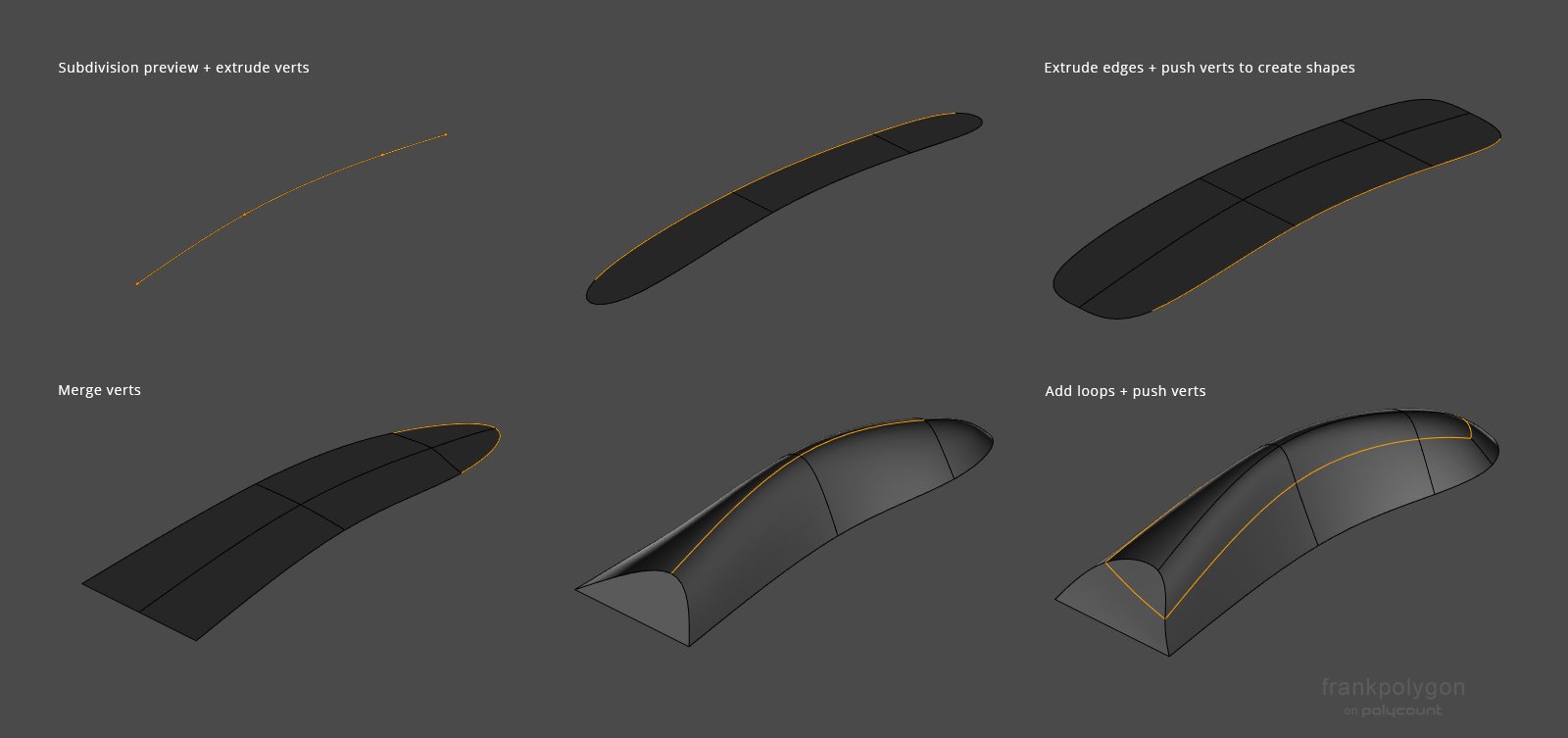 @Veer_P Not a problem. Like @sacboi pointed out, subdivision modeling tends to be an iterative process and there's a few different ways to establish the basic building blocks that define the shapes. The modeling approach used to create the very first shape in the previous example is usually called edge extrusion or point…
 -
3ds Max: edge extrude with local pivot
 I'm trying to extrude edge using Shift+Drag with a local coordinate reference system, but for some reason it doesn't work. I keep dragging, but the extruded edge doesn't move in needed direction. Is there something I do wrong or there's another way to do that? I made a video of it…
>3548 results