Search
-
Re: M1911A1
 There are many tutorials that capture everything you need to get flawless bakes. Understand how a lowpoly works, what transers well into a normal map and check the few clicks you need to know in, for example, xNormal.
 -
Re: Dota 2 workshop monthly unnoficial competition #8 - September
-
Re: Using hi-res Zbrush micromesh in game engine?
 I haven't experimented with micromesh, but if you can export it as high res geometry you could bake an alpha and normal map like you would usually in xnormal or where ever you like baking.
 -
What's the best way to texture Eyes?
 I sort of made up my own little workflow but I have a feeling its not really the best way to texture eyes. So I'll explain how I do it now, and if anyone can chime in and explain a better way, I would really appreciate it! Usually I make a sphere with 12 Segments. Then I delete the back half and unwrap it. I take that same…
 -
Re: Best practices when creating assets specifically for Nanite

 Under a million tris without long thin triangles is better. You can have 1-2 mil tri meshes too but UV ing those is a nightmare. You have two bake options, one is to bake the nanite mesh with itself or have one mesh under million tris and bake high on top of it. Above million its going to be an issue with file size…
 -
Mesh resolution

 on a AAA game, how much of the details are modeled VS normal map? Like on the helmet and the armour.
 -
Re: Barrel and Simple Pistol
 Your pistol highpolyy model is not really a high poly model. Where are the control loops? Your hard edges are literally sharp instead of a having a little rounding to help it catch the light. It just looks like a low poly model. You're not Smooth Mesh Previewing and converting any of the mesh. (Please read this. It'll…
 -
Re: The Monthly 'Newb' CHARACTER Challenge | May 2014 | Frogman, Demon, Illusionist
 JELLY-RAWCHIKEN-SEMITRANSLUCID FROG! :D (eyes are place holders) So I retopo'ed the body and baked this puppy with a temporary UV set. And everithing is all nice and pretty... except in the parts where it isn't: UGLY UV SEAMS in the normal! Oh dear how I missed you my old friends. Could have stayed away one more time, I…
 -
Re: [Shaders] Help creating masks for texture maps in UE5?
 I think the error at the "Pixel Normal WS" node is due to the input being the vector/normal of the pixel, which is then used to blend with a normal map which changes the input of the node. So probably this node can't be used with blends involving normal maps? Could blend by vertex normal (modified + height mask?) instead.…
 -
[WIP][UE4]Forest Road

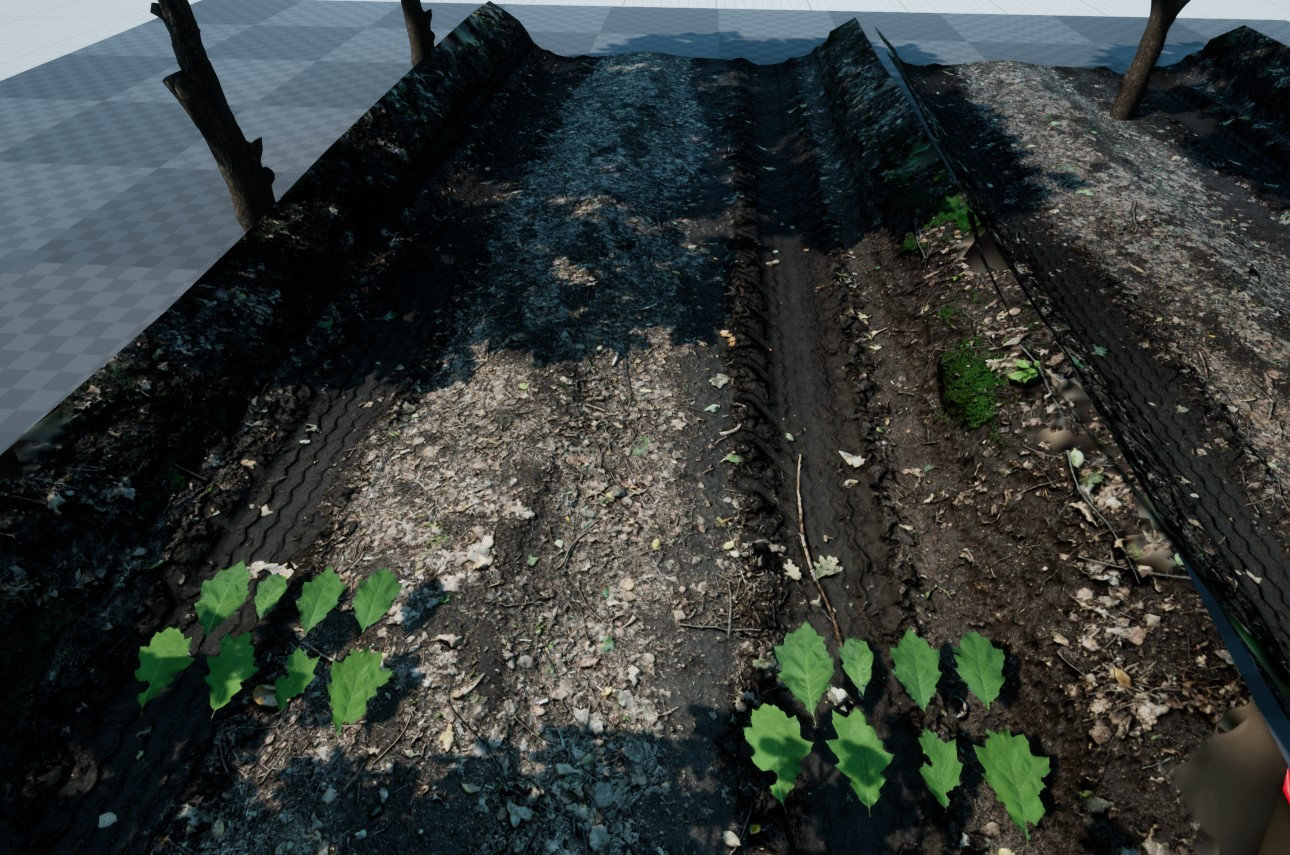 Hi, I am starting a new project - Wood Road - based on photogrammetry technique. First raw tests of 3d scanned road and some oak leaves. Road is 680 triangles with albedo and normal map, leaves are on a single plane with albedo and normla map.

>37663 results