Search
-
Re: odd bit of graffiti ...
 Don't forget that "Greece loves Peace" as well
 -
Re: XoliulShader 2
 @Graham don't trust the Y flip axis channel button, just go inside photoshop and flip the green channel of your normal map by hand (go to Green Channel select everything and ctrl+I) --> I think that it will solve your problems. As i told Y flip channel don't work as expected ! It flip the R channel of the texture instead…
 -
Re: UDK 3 - Strange Glass Lighting
 Try backing off a few steps and just getting the initial colors set. Turn off your opacity and specular and just get the diffuse in. See if its still green. Then work in the opacity, probably a map will do better than a straight number, since you have a lot of bits that are not transparent. But speaking of green: The…
 -
Re: Bad day for UVW unwraping (3dsmax) :(
 The green seams you start with are max's attempt at an unwrap. If you create your own, they show up in blue. Once you make your own seams the green ones are ignored. Uncheck the show seams button and the green ones will go away (I think that's the one you want, its either that or the one grouped with it. I'm on my phone so…
 -
Re: Making sense of hard edges, uvs, normal maps and vertex counts
 That would give you the best normal map... not worth it (texture space or UV wise). I would probably just have the outer edge hard; seam b/t green and purple-- giving you 2 uv islands. This would eliminate gradient in your normal map in the green area. Uv islands Green Purple, blue, red. (all one, soft edges in b/t)
 -
Re: Squigherder
 loved how u managed to get all this detail with just the diffuse map. makes me want to do one diffuse only too. only thing i would say is maybe try some subtle extra colors on his texture (greens looks toooo green, blue looks too blue). through some reds on the greens and blues and so on. ohh and a wireframe would be great
 -
Re: Mudbox normals coming out upside down.
 Programs don't all use the same standards as other programs. The green channel of Normal Maps is one of those things, where half the programs want it one way, and half the programs want it the other way. It's a simple fix in photoshop. Just open your normal map texture, go to the green channel, and hit ctrl+i (inverse). Or…
 -
Re: Middle East Environment - UDK W.I.P
 The scene looks promising I don't know how realistic you were hoping to get this but Ill put my two cents in just in case. What language are you using for the building signs? Its not Arabic. Also the trees are way too green and are more fit for a tropical place then a desert. This and this are an example of the type of…
 -
Re: any tutorials on grouping and spreading out vegetation realistically

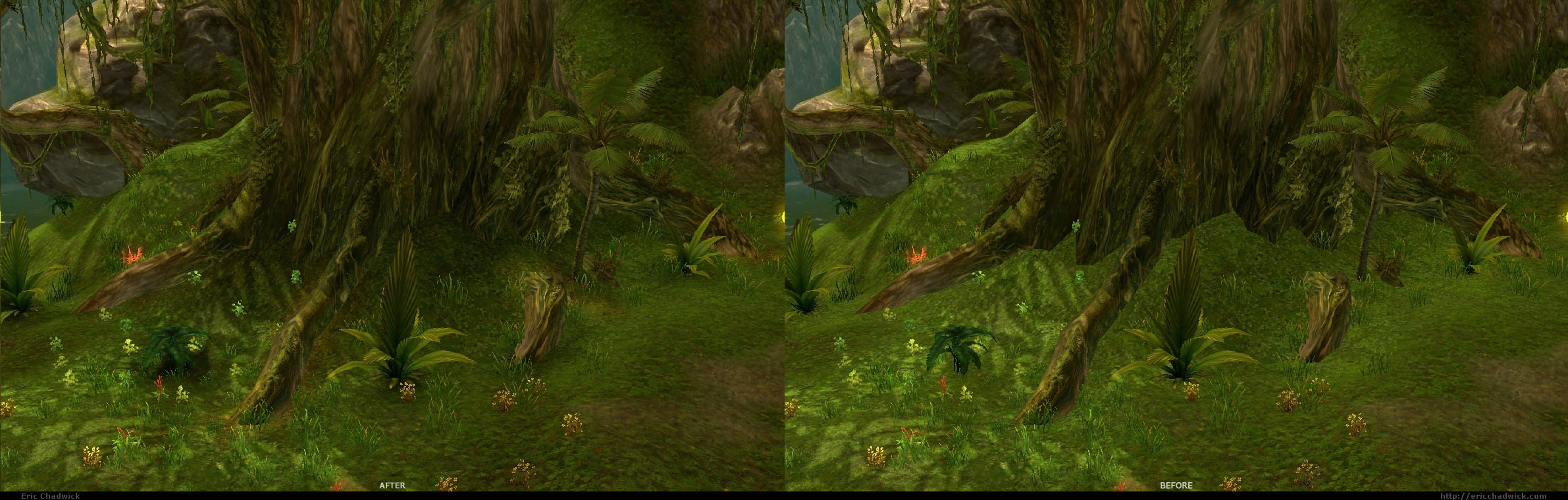 That's a great way to describe it. Also I found it helps a lot when I color the terrain surface to match the ground cover (grass) and vice versa. I don't put green grass on tan dirt, I put green grass on green terrain. The closer the colors match, the better the grass will look. Same with rocks and trees... I darken (or…
 -
Re: Overwatch Link (Fan Art)
 Dude this is awesome! I'm getting thrown off a bit with the green and blue color scheme, personally. I think that one of the things that makes Overwatch characters so iconic is that they have a vibrant yet simplistic color scheme (at least with the default skins). Widowmaker is purple, Pharah is blue and gold, Tracer is…
>10596 results