Search
-
Re: What Are You Working On? 2010 Edition!
 I think the ankle pops in the back too much. Maybe some more follow through/overlap on the foot will help with minor ease in/out adjustments. also the legs extend quite symmetrically, i think you should make sure the elbow/hands extend to the same distances here is a draw over
 -
Re: Low poly baking issues (NEW)

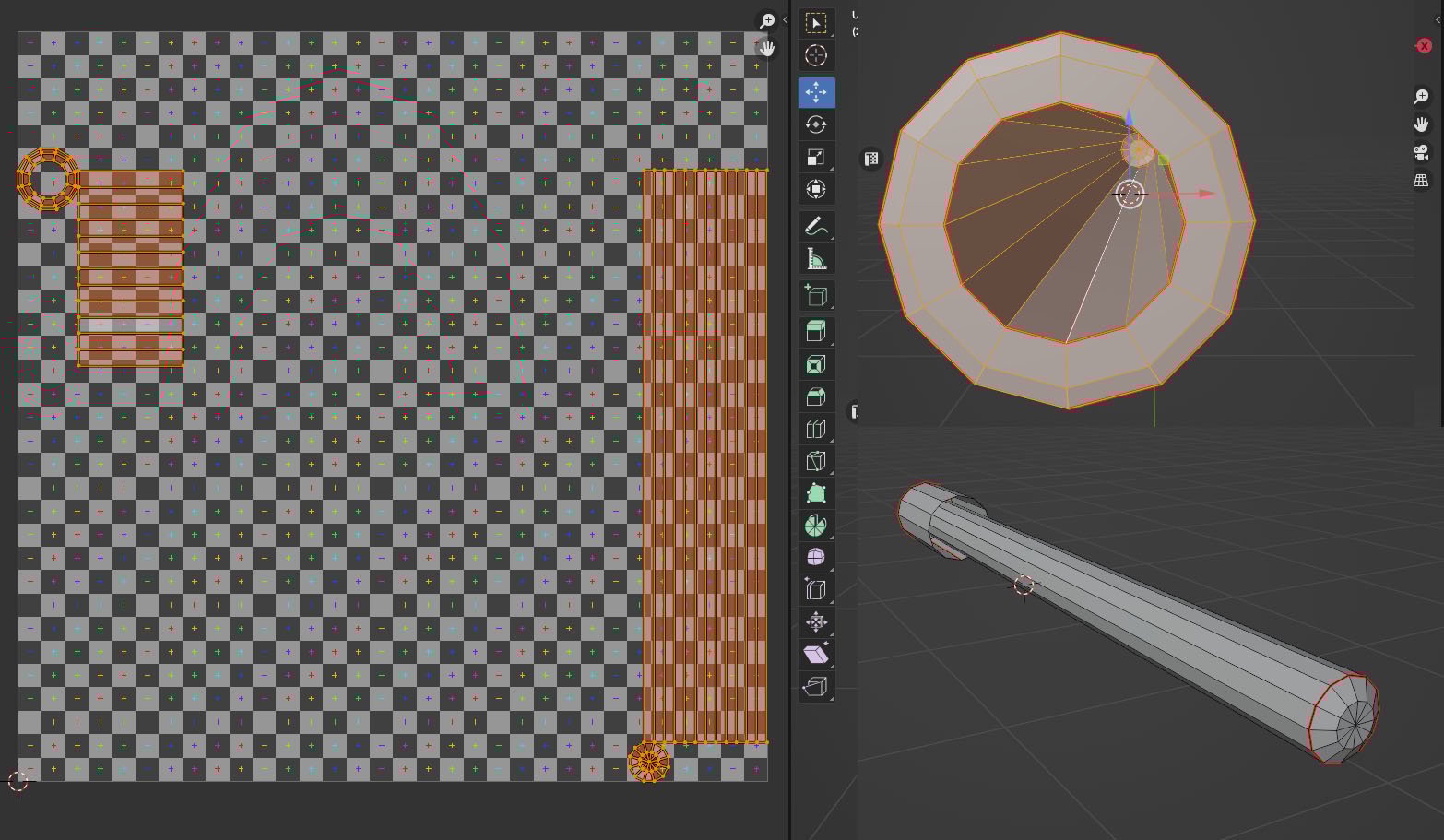 A new problem hoping for any help with, this time it's the inner gun barrel. UV's (only selected issue parts) Substance bake -The horrible join line running down the middle only seems to extend from the rear and doesn't seem so visible towards the tip. (I checked the UV's and they all sit within the tile map) -It isn't…
 -
Re: Three Armed Sloth
 Awesome work! I think you are losing a bit of the power the blade in the concept gives off with the teeth as yours are thinner and seem to be more uniform between in and out. Might be worth extending the blade slightly and extending the teeth width a little bit down the blade to get that back! Really cool stuff, love the…
 -
Re: [UDK] The Foundry
 First off great work! It would be cool to see the office area in the top left side of the screen shot to be extended or bigger. Just to push the cool color feeling in that area. Just an extended overlook of the whole foundry would be pretty neat. Just a quick suggestion. Looks great though can't wait to see where this goes.
 -
Re: Orc Warrior Head
 a fellow student had the urge to 'tweak' your orc I agree to a extend to what he said, in short what lacks at the moment are: - anatomy - colors - presentation - to big eyes - to agressive bump mapping - looks to friendly (shreck alike, mainly because of his to big eyes and mouth) - uncomplete head,- the neck is almost not…
 -
Re: Ghaku - Horn of Ruin
 There seems to be a lot about the details ( C-shaped connector.. so he looses the shoulder pas in battle or does his shoulder "carry" a a secret).. but about what for example his skin ? Is it more soft or somekind of hard and "crusty" (later in the callout it's only... grey.. so i guess "soft").. his hand seems to be only…
 -
Re: Modo 601
 Also to build off of what skurmedel said additional uses for tool functionality can be found by using shift while in a tool. For example if you don't want to drop the extend tool because you want to do that function again, you can hold shift and click off of the edge and pull. This will extend the edge another time. Rinse…
 -
Re: UE5 PBR Lightning
The sun 'is' 120k lux before clouds/atmosphere get involved iirc - don't quote me but i think the 75k that the sun position plugin provided by Unreal uses is probably in the right ballpark for actual light hitting earth (i will immediately concede to anyone who has done actual research into this - im doing the sums in my… -
Re: 3ds Max 2010 Is Here...
 Is anyone having trouble with the Extend tool (Border tool from PB). The tool seems to exit for no reason (did this in PB + max 2009 as well) however in 2010 when trying to re-initialise the tool, nothing happens. The cursor doesn't change. And when the tool exits, the icon for the extend tool stays on. Restart max seems…
 -
Re: Max 2010, how to create faces correctly?
just work with edges, so much faster as verts for extending faces or creating faces. Like select 2 counter edges and hit 'bridge'. Or select one edge, hold down shift and drag the edge to extend it to a new face. If you accidently create wrong faces maybe switch to wireframe mode? - so you know better on which vert you…
>7746 results