Search
-
Re: Videogame art 3d/2d: feedback/critique welcome!
 I wasnt happy with how that last mech pilot turned out, so i started again. The body still needs A LOT of work haha but im moderately satisfied with how the new pilot suit is turning out.
 -
Re: (WIP) Crashed Spaceship and Dead Astronaut

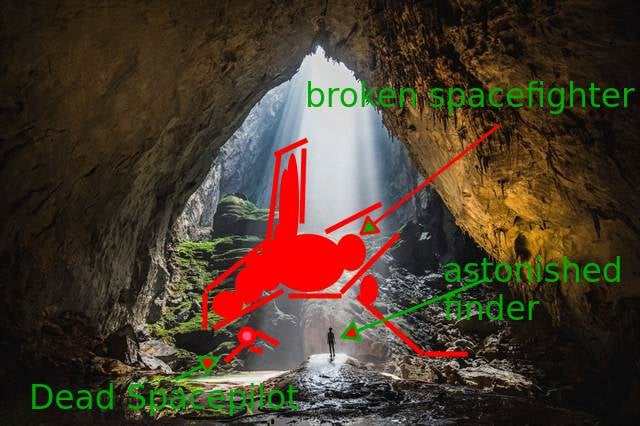 This is a tough one.. for any composition everyone will tell you: What's the story you want to tell/show. So when seeing this section of the cave i'm aksing myself: * How does the spaceship comes into the cave ? * Is this the entrance and is this by night ? * Is this shortly after the crash (so the spacecraft light the…
 -
Re: [P&P] - What are you working on? 2008 Edition
-
Re: 3dsmax question: Rotate mesh around a point
 different way to snap pivot to vertex; (Slighty edited version of this; http://www.scriptspot.com/3ds-max/affect-pivot-and-center-pivot) ( Try ( max snap toggle pt = pickpoint prompt:"Click to desired location." snap:#3d $.pivot = pt ) catch() max snap toggle ) added the max snap toggle at front and end so you dont have to…
 -
[Hobby/Volunteer/Unpaid] Looking for: 2D Top‑Down Artist/Animator
 Cosmic Void: Crew of the Lullaby Hello space-friend and pixel wrangler! 👋 We’re a small but passionate group building an emotionally rich cooperative 2D top-down space adventure, Cosmic Void, where 4-6 players come together aboard the PSS Lullaby to navigate hazards, manage ship systems, and uncover mysteries of the void.…
 -
Re: Help - Too many unfinished drawings!
 Thanks, Muzz. I've noticed I know the stuff, fundamentals, etc, I just draw on auto pilot a lot and my auto pilot doesn't know as much as I do. hehe. Priceless advice, thanks everyone for hopping in
 -
Re: IMM curve brush floating issue
 The tips here might help you. https://www.zbrushcentral.com/t/set-a-custom-pivot-point-for-an-insertmesh-brush/366439 (I searched the interwebs for "IMM Curve Brush in ZBrush pivot" to find it)
 -
Re: Struggling with Rigging an Art Easel
 How about you have one free-flying parent joint, a helper joint, and a scripted button to automatically keyframe all of its direct child joints (you only need to keyframe them, as their own children will follow along) with the inverse transform of how they are transformed after you change the pivot? In other words, you…
 -
help with Google Earth 3d query?

 Not sure although I think I am looking at the some kind of humongous violent Crystalline result? ( I was doing research on the sprawling network of tubes that go on forever in the industrial refineries in and around Houston ) take a gander please at the following Google earth link in 3D! ( as much as I ctrl click orbit the…
 -
Re: Max to Maya - Verts, Edge, Faces XYZ position
 ah ok I knew about the holding v and dragging but that would always require the use of the current pivot point which was the problem. I had no idea you could select a vert on 1 object, select a second object then select a vert on that object at the same time and snap. Gets the exact result I wanted :) As for the align…

>4227 results