Search
-
Re: MAYA Hide function not working!!!! UGH!!! HELP!
 I got pretty annoyed with the hotkeys for hiding/unhiding objects in Maya so I wrote a bit of code for better functionality. nameCommand -annotation "Hide/Unhide Selection" -command "string $lastHidden[]; string $hideselect[] = `ls -sl`; string $vis[] = { }; $count = `size $hideselect`; for ($i=0; $i < $count; $i++) {…
 -
Re: Jesse Moodys Web Site
 yeah i tried that but where do I paste it on the page? I am messing with some dreamweaver tutorials right now on css and server side stuff to create a specific *.css file for my site. So maybe that will help me with what you were trying to show me.
 -
The dark side of phobos
 Hey guys, Here are some remixes of doom 3 tracks (23 in fact). Pretty good stuff link
 -
Re: FlippedNormals - New CG Tutorial Site
 Thank you so much for sharing the Maya UV trick!!! I don't know why it works but I'm glad that it does! Overall I like the design of the site! Very clean, easy to navigate and the videos are clear and interesting (though I bit on the quiet side for me)
 -
dD0 Double sided Tecnique
 Is there any way to make this possible? like marmoset toolbag, you know how it woks, someone knows how?
 -
What's Solaris /side fx ?
Could somebody explain in a few words please. A new software? I have no time to see their one hour presentation. -
Re: Finding files with 16 bit at least height info?
 I would recommend asset libraries like these https://polyhaven.com/textures https://www.textures.com/library https://ambientcg.com/list?type=material&sort=popular But searching across all of them, I guess you could make a list of sites that provide 16bit files, then limit your search engine to trawl only those sites.
 -
Designer Filter to Painter. Exposed bool parameter appear as integer selector. Why?

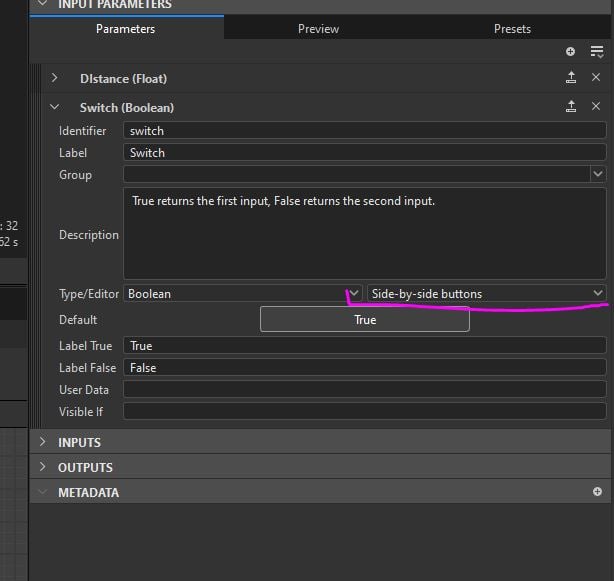 So this is how it looks like in Designer: Switch is set to "Side-by-side button". Designer Preview section also looks correct. But as soon as I import this to Painter that bool variable for some reason appear as integer selector instead of expected 2 buttons
>51323 results