Search
-
Re: I'm looking for an artist to collaborate on a webtoon project. Anyone interested?
 This is the first chapter for those who are inerested: https://docs.google.com/document/d/1iWNFo7VqnVYDwGmndYIE_U-zMkrAQzzHSy7r1WRBJOw/edit?usp=sharing
 -
Ryse Moss Tutorial

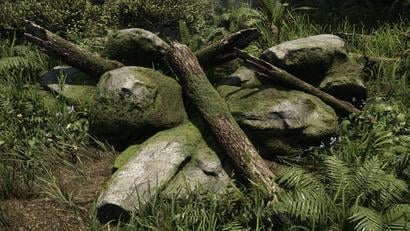 Ryse Moss Tutorial Hi, I'm Patrick Gladys - Environment Artist at Crytek in Frankfurt/Germany. In this tutorial I will show you how to create moss the way we did it in Ryse. Some people might think we used a shader for that, but in fact it was an old school trick we used on this to create the effect of a nice fluffy…
 -
PolyBoost 2.5 out!
http://www.polyboost.com/ Now works with max 9. Features: PolyShift Interactive transform tool to freeform shape an object by moving vertices around in screenspace with adjustable falloff effect. Makes it very easy to make quick changes to the overall shape of an object. Quadrify Remove triangulation in model… -
Last Knight is finally on Steam!
 My game Last Knight is now finally available on Steam! You might have seen bits of it here and there in the work in progress thread over the years. Recently it was the stylized 3d map I worked on: That is for a new game mode called Rogue Rider Adventure which is still now a work in progress, that is also why it launches on…
 -
Re: Hair Creation - Struggling with Specular

 Oh. :anguished: Hmm... Well, this is how it's looking without the padding... I'm not sure how old the tutorial videos are that I'm following, but I do remember Johan setting the Anti-Aliasing to x1 in xNormal. Not quite sure why. So naturally, I followed what he did. EDIT: Looking ahead at the next batch of videos, one…
 -
Re: Demon's Throne - Environment
 Sweeet!! Nice work so far...since you are following up with Sir. Adam's concept...I'll book mark this to see the project's progress.....:) EDIT1: Oshawa, ON? May I ask what college do you go to? Sorry for being Off topic. EDIT2: Please dont say UOIT.
 -
Re: This hydrant look familiar to anyone? :P
 This also means that the piece is inverted (wrong facing) and sometimes won't render correctly when using Mental Ray. I forget if you're using 3dsmax or not, but if you are, you can go: UVW editor window > Face Mode > Select > Select Inverted Faces. This will highlight the faces that need to be flipped. Common causes of…
 -
Re: unity shader Q, flashing one object?
 When you edit a material on an object and its linked to a Asset file it will change the asset file and have an effect on every other object using that material. If you want to create a unique instance in edit mode you can just copy the material asset and assign it to the renderer, or you can create an editor script that…
 -
Re: Set of Photoshop Actions.
 Well thumbs up for improving your workflow and sharing your actions. However, most of these are not very useful - at least not to me. Layer editing: Most of these are keybound by default, the others I've keybound myself. Image adjustments: Is there any particular reason you've chosen destructive image editing over…
 -
Re: Tips for Isolating xNormal errors?
 Hey Bartalon. I know you asked me to post an example if it happened again. It was working. After that, literally the only thing i did was move some components on the Z-Axis to prevent objects projecting onto each other. No mesh modification at all. Here is the version that I saved out just for you guys (free assets). I…
>35085 results