Search
-
Re: Alien: Isolation inspired environment
 On the issue of softening all the edges, I usually select and soften all of the edges (not the object) and then do filter selection based on angle to isolate the edges that are closer to 90 degrees and harden those. definitely beats going in manually and selecting every hard edge.
 -
Re: Maya LT Placement Tool
 Another option would be the snap together tool, if thats available in LT. I just discovered thst it work with multiple selections (select some objs., select placed object LAST) and you get a blue arrow, where the obj is being placed.
 -
Re: Maya - Rubish in U.V. Editor
 some basic information in setting up UV's in Maya here http://chrisholden.net/tutor/tutshelluv.htm Also, if you want to get rid of that dot in the center of the polygons window > settings/preference > preferences > Selection In Polygon Selection, Select Faces with Whole Face
 -
Re: Exporting textures to hand paint in photoshop

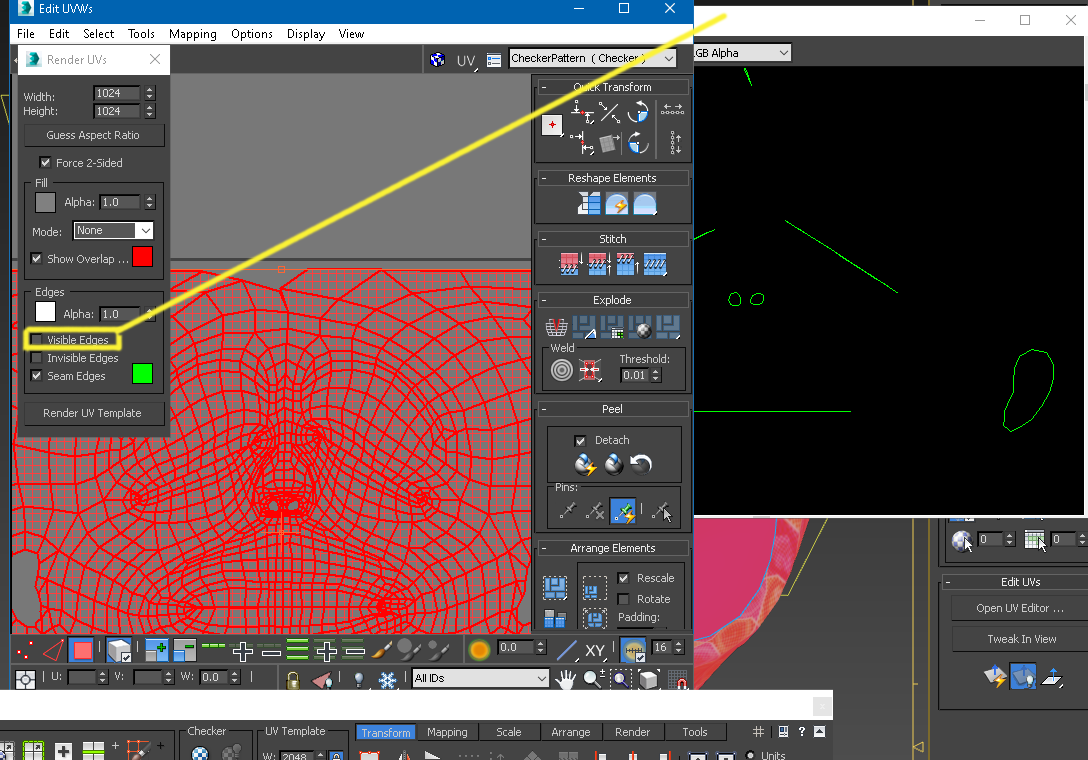 Yes like Joopson said, you just overlay your Exported U.v.'s over the textures in say Krita or "photohop". In max there is an option when exporting wireframe "u.v.'s" , you can take away the inner lines of the wireframes and keep the outter wireframes. Do not have 3dsmax in front of me nor on this p.c. but its selection…
 -
Re: [Max] Optimal Hotkeys?
in cases like that I would make a maxscript and bind it to a key since than I could have it do different things based on the selection type and what is currently selected. pretty easy to get info about the selection and string a few if and then statements to the key. -
Re: Multiple Objects onto a single UV map?
Just select them all and lay them out together. They don't need to be attached or anything. In maya, you don't have to do anything special, in max you select them all and apply an unwrap uv modifier to the selection, and lay them out. -
Re: Maya Triangulation Error
 Try running this while the object is selected (and NOT in a component mode), it'll break all faces and re-merge them: string $curSelObj[] = `ls -sl`; PolySelectConvert 3; //verts polySplitVertex; polyMergeVertex -d 0.0001; select -cl; selectMode -o; select -r $curSelObj;
 -
Re: Photoshop cs Keyboard Shortcuts
 Ctrl+H show's and hide's extra's which marquee selections are considered. So if you have something selected and you want to make some adjustments, but the marching ants are obstructing your view, hit ctrl+h to hide them while maintaining that selection.
 -
Re: How to count your polygons and tris?
 If you press "7" on your keyboard with an object selected, it toggles an in-viewport polygon counter on and off. If you have an Editable Poly object, it will tell you how many polygons you have selected in any particular area, it's in the Selection rollout in the Modify panel.
 -
Re: Maxscript model exporter troubles
 ok in further investigation it seems the problem is caused by missing TVerts. it seems the amount of TVerts is set by how many verts you have in the uwv's (for example by breaking poly's on unwrap uwv you get more) now, by needing all vertices in the mesh including redundant ones (num tris * 3) instead of actual all-welded…
>15392 results