Search
-
Re: Sci Fi UDK Game Level
 I really like that paintover. I think its overlit though, it would look pretty cool f you had shadows in those small inset things by the ceiling. But then again it all depends on the look you want to go for, anythings possible with sci-fi scenes.
 -
Re: [UDK] Helms Deep & Fort HornBurg
 Lovely piece of work. Started out great got better with each iteration. Loving your portfolio as well. Question about the texture flats: these wouldn't be intended for realtime use due lack of spacing for mipmapping, would that be correct? thanks and again, great f-ing work!
 -
Re: 3dsMax 2020 full list
 Quad chamfer has been in Max donkeys as well. The new Chamfer mod is a whole other beast, almost CAD-like filleting. No other DCC comes close to its features at this point. Don't even get me started on Modo. What a f**king mess that is.
 -
Re: Final Fantasy XIII Trailer
 I thought they co-existed in the same world... this is just getting confusing now. Versus does have that Advent children kinda feel, but some of those secondary characters brings me back to ff8 style... I don't know what the f is going on either way.
 -
Animation Sub-Forum
 In-case you`re on auto-pilot mode when cruising around polycount... The lovely mods were so gracious enough to add an animation sub-forum! http://www.polycount.com/forum/forumdisplay.php?f=98 I wonder if this has anything to do with the popularity of animation submissions for the Riot contest? hehe. THANKS MODS!!!
 -
Overwatch Fan Hero Concept - Vespara

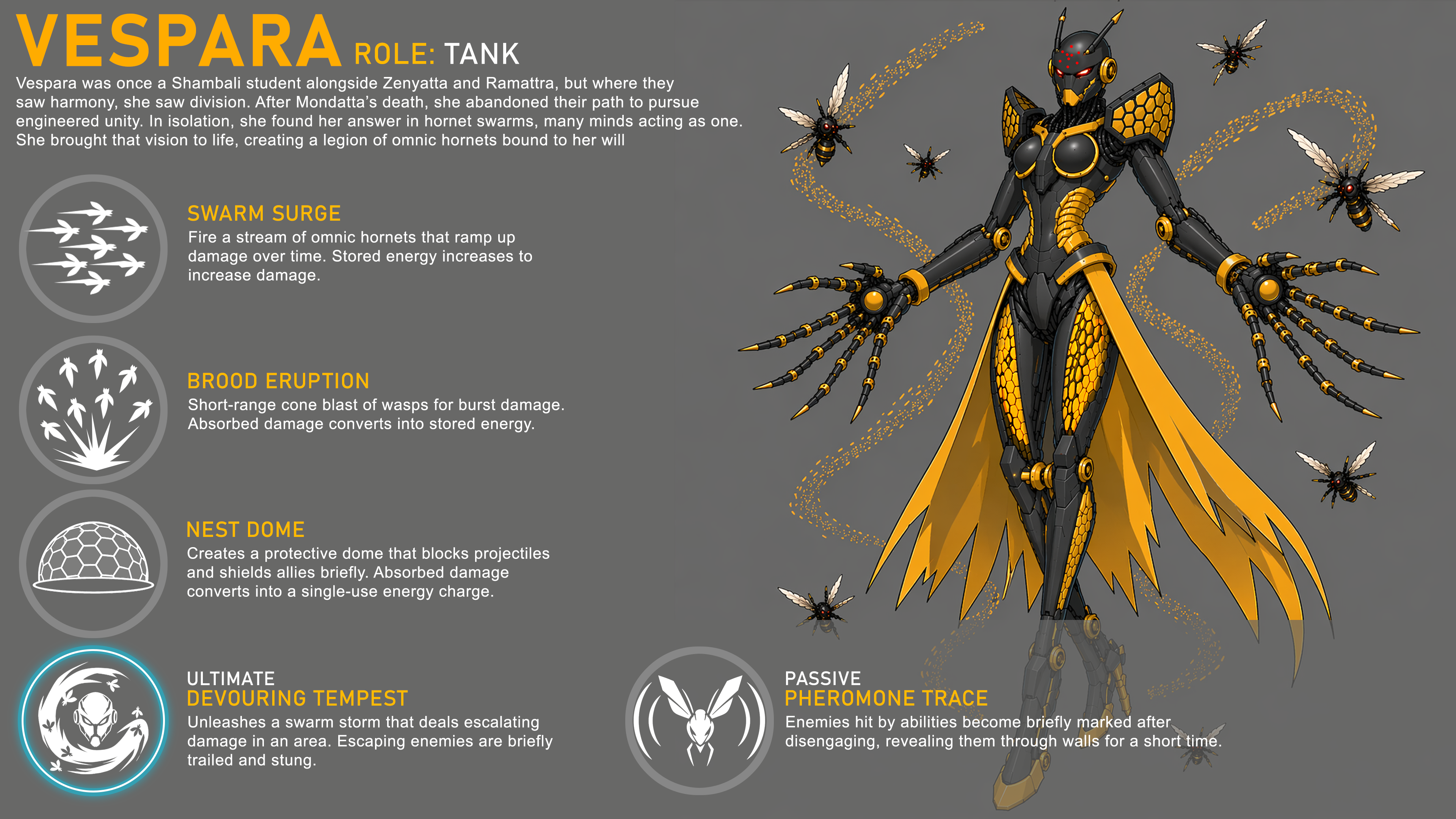 I’ve been developing a fan-made Overwatch character as part of a 3D character study for my portfolio. I’d really appreciate your thoughts on both the visual design and the abilities, as well as any suggestions you might have.
 -
Re: How to fix this UV stretching on rectangular uv strips.
Didn't we cover this in-depth in your other thread? :smile: I take it you used the R>F Headus trick I mentioned in that thread? Remember, if you try and stray too far from the natural relaxed shell, by forcing rectilinear, then you will encounter distortion. -
Re: First vs Recent
 Oh believe me I was not very good when I started, I got a lot of priceless screenshots on my hardrive... I've not seen your (very) beginners work Ysalex, but your latest stuff is f*cking amazing :) I envy your anatomical knowledge
 -
Re: Normal Faceting in Modo
 You can replace steps 4 to 7 in the 801 version of Swizzle's instructions by installing this; http://community.thefoundry.co.uk/discussion/topic.aspx?f=83&t=77919 Then selecting your UV map and hitting the "Harden UV Borders" button (rightmost button, top row). Much easier :)
 -
[3Ds Max] Switching between Front, Top, Left View
 When using the F, T, L hotkeys to switch between views, how does it determine where the view starts and is there a way for me to set where it starts since I use those hotkeys a ton and don't like when it starts super zoomed in or far out. THANKS!
>160427 results