Search
-
Re: [MaxScript] Polygon to mesh projection

 try this (convex only though so concave would need to split into convex then recombined after being wrapped individually)... -- creates a ray point along the edge fn getEdgeRay msh edg = ( ze = edg - 1; a = (mod ze 3) + 1; b = mod a 3; fverts = getface msh (ze/3 + 1); v0 = getvert msh fverts[a]; v1 = getvert msh fverts[b +…
 -
Re: Low Resolution Normal Map Issues
 Don't do option 2. EQ already covered that one. Would splitting the UVs among the hard edges add significantly more verts than the extra control loops you've added? This part of the wiki might be relevant. Also, is your normal map inverted in those pics? The edges seem... extra edgy.
 -
3ds max is picking on me ! :(
 I had two element's in this object, one is hidden. The one that is hidden I had booleaned before. the element shown below was not touched by the boolean. yet when i apply turbosmooth it seems to think that there are open edges or something somewhere. I have selected all the faces on the object and edges ect and moved them…
 -
Re: Sketchbook: wasabimilkshake
 Here are a few things I made about a week ago for the same project. Still way too much geometry in places. The pole is 8-sided, but it's probably unnecessary for the globe of the light to be 16-sided, even for UT3. Also, the UVs for this one were maximally unfolded using Maya's smooth UV tool, which results in more…
 -
Re: On every UV island, I have artifacts on Normal.
 if you already have uv cuts, you can use hard edges for free, but you dont have to if you add hard edges because you have too much lowpoly shading going on with sharp angles, you have to add uv cuts. yes hard egdes will add to the render vertexcount in that case
 -
Re: Massive noob question
Thanks for the replies guys! I thought I'd softened the curved edges and hardened the centred arch edges, and I had, I know I had. However, for some bizarre utterly inexplicable reason the normals were locked on it :poly105:. I tried unlocking the normals after resoftening and rehardening the egdes didn't seem to make a… -
Re: [3DSMAX] Something similar to Blender Mesh-machine Offset Cut?
That fits. Conversion between smoothing groups and not smoothing groups is kind of not possible (face boundaries vs vertices) For the OP - when you Boolean in max (maybe proboolean) it generates an edge selection where the objects intersect. I've used that to generate fillets/clean up/ make welds etc in the past -
Re: Help - Mesh is causing flipped normals across axes in substance (non overlapping UVs), nothing works

 Ok now I think I understand what you are talking about. First off let's be *very* precise. What you are specifically talking about is the look of the top and bottom edges of the embossed details. In other words, this whole thread is about this and only this (which if I am understanding you correctly comes from a 2D to…
 -
Re: Tachikoma (GITS SAC Season 1 Design)

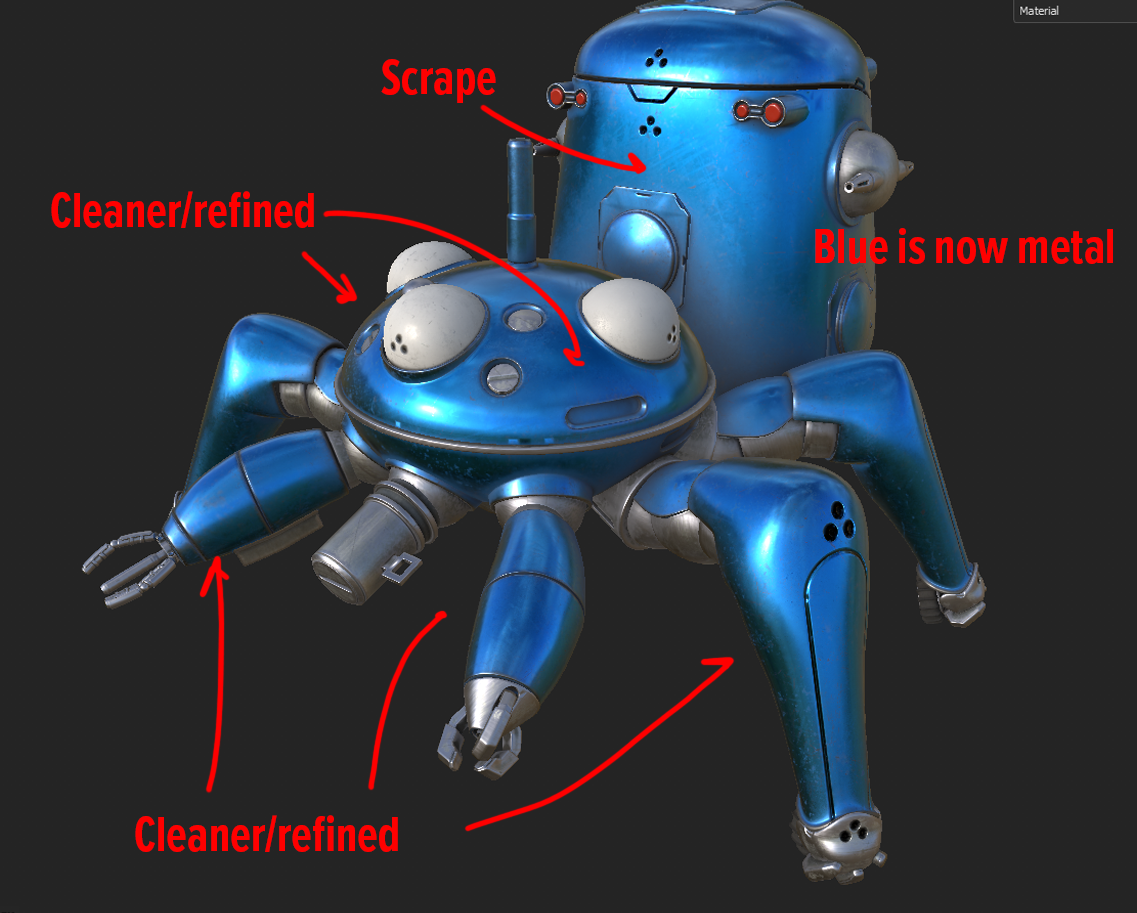 Here are the updates, with explanations. I believe this is much better. Going for subtle details that aren't too much, not too dirty, but enough to look believable. I placed some intentional scrape marks where things would have happened in the past. it's a large, round vehicle so the big thing in the back would get hit,…
 -
[3dsMax script] miauu's Script Pack vol.2

 miauu's Script Pack vol.2 is a set of scripts that will help you to make faster and easier some of the tedious task when you use 3ds Max. miauu's Script Pack vol.2 include: Attach and Link: Automates the process of linking objects to the surface of other objects. - attach point helpers or any objects in the scene to…
>27984 results