Search
-
Re: Blender Mega Thread
 Here's Jed's Ultimate Guide to Smoothing a Mesh in Six Easy Steps in Blender 2.73 for Xnormal. Not for anyone in particular, just for posterity really. Step 1: Make your model and layout the UVs. This is the hard part. Here I've just got an ico sphere. Step 2: Select the model in object mode, or go into edit mode and…
 -
Re: Overwatch - Soldier 76 Weapon

 The problem with doublesmooh is, that you have only one way to determine the edges, by using geometry density i would suggest to use quadchamfer instead, it needs a tad of cleanup here and there and might be instable at times. but it gives you nice and clean supportloops, making sure all your edges on a materials are the…
 -
[WIP] In the Face of Twilight - Zoe lore, EDGE Edition
 Topic by AngryDentist · · Home› Contests & Challenges Archives› Riot Creative Contest 2017› Riot Creative Contest 2017 - NarrativeZoe drifted through the dark rift between dimensions, in a place outside of the usual rules of time and space. Sitting upon one of countless craggy 'islands' of rocky debris, that floated about endlessly in a boundless black aether, she let out a sigh. “Welp...I'm bored!” She mused to herself. Sulking, she ventured…
 -
Re: script idea: Loop selection controlled by mouse movement
 Ooooh yeah more tool ideas!! On top of this awesome concept, something that would complement it very nicely would be the ability to select a certain 'rhythm' of edges along a loop (like : 1edge on, 2 edges off, 2 edges on, 1 edge off) and have the 'increase along loop' tool respect that rhythm for the rest of the…
 -
Re: [WIP] Industrial Neighbourhood - (Final Major Project)
 The props look really nice in the individual screenshots. Right now your building textures seem to be suffering from a case of a bit too obvious tiling in certain spots, especially the roof and brick pattern on the wall with the graffiti on it. Either increase the texture size to double the variation with more brick…
 -
Re: BRAWL2 [Character] Aiur survivor, shark2003
hey there! sweet stuff so far. enjoying the anatomy a lot here, could be sharper/refined but love the direction on the hardsurface i guess its mostly detailled blockout. but i feel like its a bit too soft-ish for blizzard type of work. it has this rubbery feel to it, edge quality is all over the place, some areas are very… -
Re: Maserati GT
Agreed, it is super shiny! Be careful with your edge loop distribution across different panels / objects. e.g. you can see where you have different numbers of edge loops defining the curve on the light and the rear bumper which is causing the bumper to have a different curvature and pull away slightly. You can get away… -
Re: Monthly Community Noob Challenge April 2015 (29)
 @Necrossx: when placing that circle, you may want to keep the edge flow going around the perimeter of the outer edge of that panel. Right now, if you add a control loop to the perimeter, you will be adding edges into your circle. Those edges will keep your circle from being round. I have blocked out the prop. I'm not sure…
 -
Re: Light tactical vehical

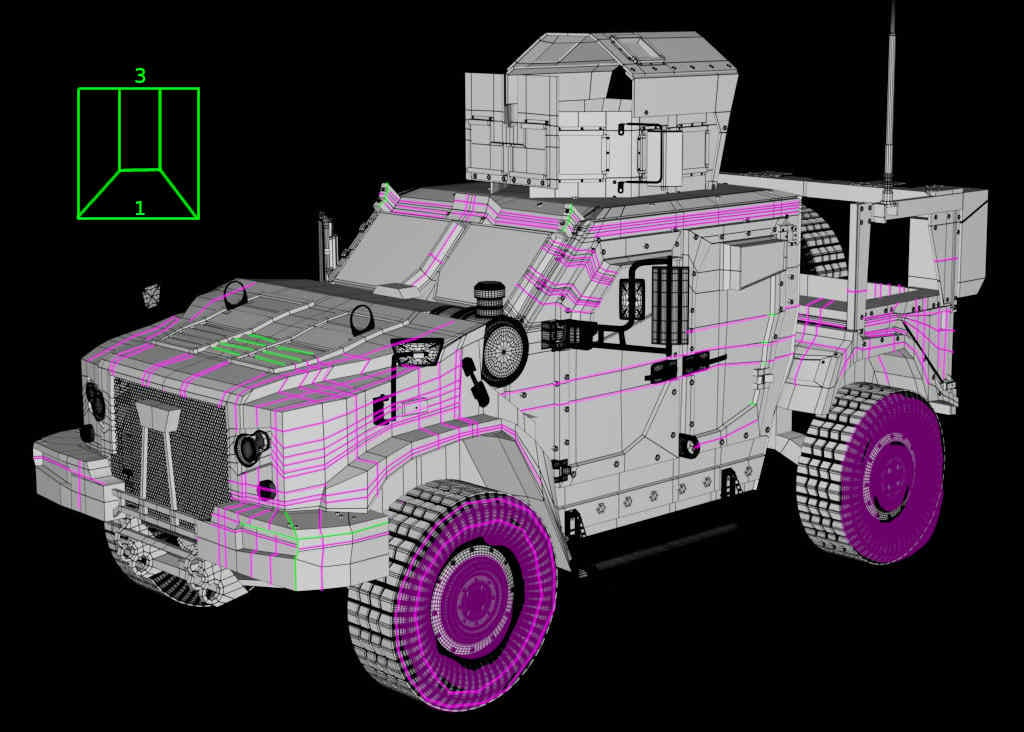 Some of the needed edge cuts seems to be distibuted all over the model ? Maybe good for concepting but this may should be optimized (for example showing the 3 to 1 quad transition) especially when there are so many planar areas (then even triangles are no problem).. the hood seems to need some of that details (green).…
 -
Re: Sci-Fi Crossbow
 I think your edges are too sharp in many areas. The concept itself has the issue that it consists of many geometrical shapes. Although this looks great in the concept you need to find out why those shapes work in the concept and, in my opinion, don't work the same way in your hp. With the sharp edges on your shapes your…
>27982 results