Search
-
Help- Zbrush Live Boolean

 Live Boolean > Make Boolean Mesh > Appending does not create a combined mesh. It does seem to replicate which ever mesh I had selected when I ran the Make Boolean Mesh though. Anyone else running into this?
 -
UV scramble

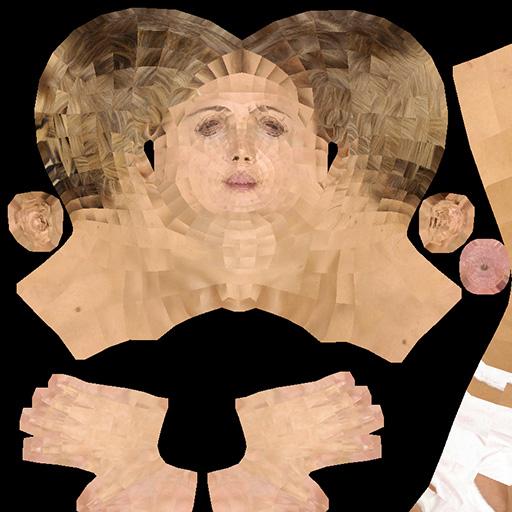 I was working on replicating this scrambled UV effect, posted about as a problem on polycount here, but since deleted. That thread chalked it up to modo and zbrush incompatibility- but Does anyone know how to to create this effect (of each polygon's UV being rotated) on purpose?
 -
Edge loop tool-3dsmax??
 Does anyone know if there is a way to replicate insert edge loop like in Maya in 3dsmax? Creating edge rings everytime before using the connect is repetitive especially for very complex and extensive modelling. Are there any plugins to make this tasks faster?
 -
Re: With or without orthographic modeling
So how to model a vehicle? Ship? Car or anything like this? Do i need to get as much as possible reference material, and analyze the form and try to replicate it? -
Re: Final uni project: Realistic bust [WIP]
 Cool! Ben Mathis just done a cool tutorial on eye shaders.. Wouldn't be hard to replicate it for unreal 3 http://www.polycount.com/forum/showthread.php?t=97962
 -
Re: Alleyway in Brussels
 I agree about the lamp and window, its always a good thing to not replicate the exact same scene as the reference and keep an designers eye in mind for composition etc.
 -
Re: Modo 501
 Download the trial and see for yourself :) Both do their job and Blender is free, so there is that. For me, modo just feels right. It's hard to replicate that feeling in other programs.
 -
Re: The Probe
 This looks amazing! Really interested in checking out blender. If you were to create this in Max or Maya would it have been way more difficult to replicate these shapes?
 -
Re: [CE/Max] 1994 Ford Explorer (Jurassic Park)
 This looks really awesome! Excellent choice of subject. :D I would love to see you create a cinematic out of it, maybe replicating a scene from the movie.
 -
Re: Scifi Slum in UDK
 For starters, your hard surface modelling technique is amazing. and thats pretty much it, as i'm busy trying to replicate some of your techniques in max with mixed results.
>19474 results