Clayform Sculpting App

2x playback speed
 Hey all. Started this over xmas break as an experiment and just kept poking at it.. The original question was how far I could get on top of open-source libraries -- there's a good number of them out there to build on. It's getting close to the point where I can actually use it to make stuff..!? I'm calling it Clayform.
What it is: a GPU based 3D sculpting tool built in Godot. So we get real-time viewport, post processing, modern material workflow, UI toolkit for free, then I've workshopped the brush engine & sculpting toolset for good feel (I come from zbrush). The ui/ux is a mix of maya + zbrush with opinionated brush-hotkey defaults. (alt + q,w,e,r,a,s,d,f)
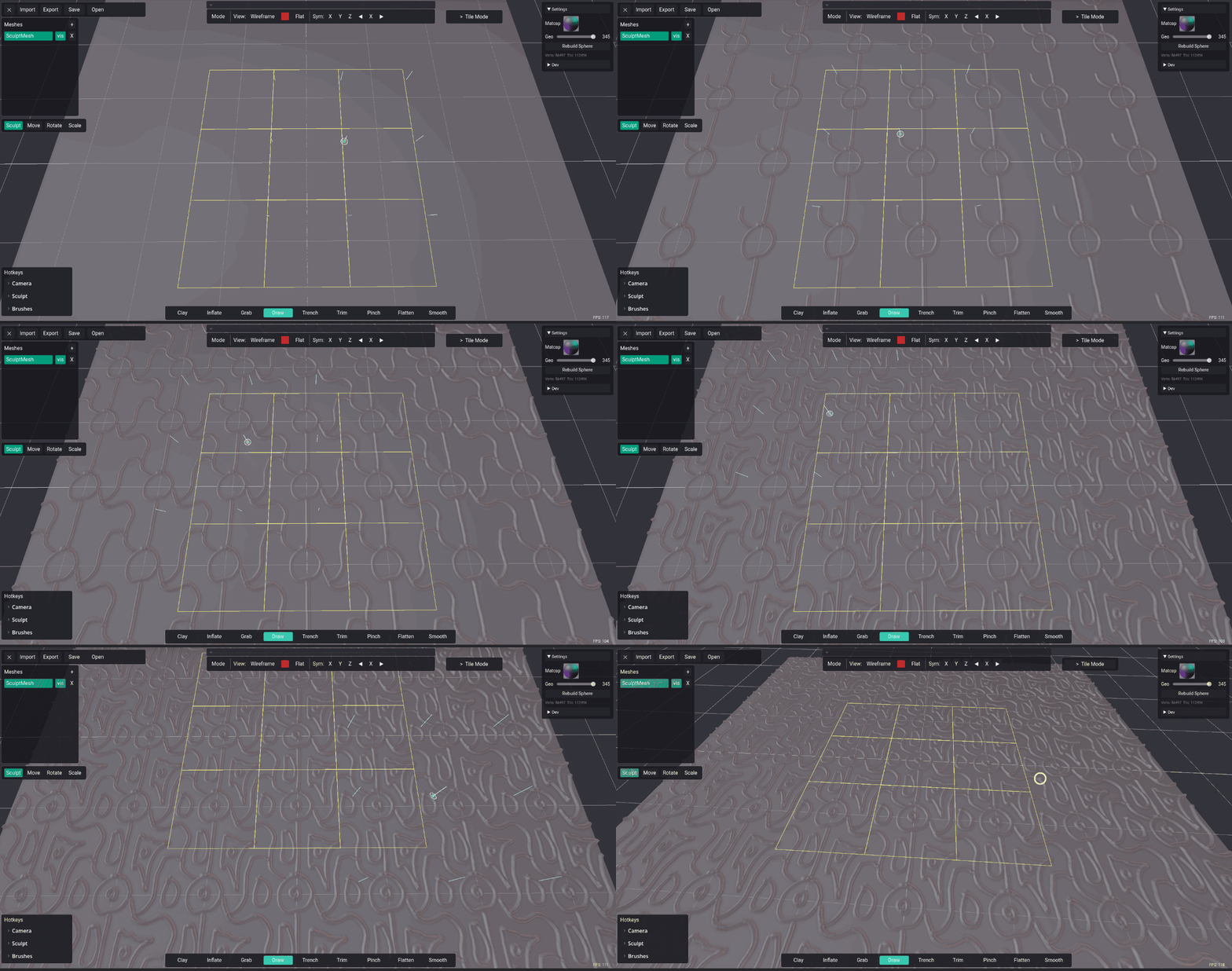
First clip is just sculpting around to show the general feel. Second is the part I'm working on now: a setup for sculpting tileable textures, where the center tile repeats in a grid around it so you can see how well it's tiling as you go. I'm thinking I'll approach it sort of like how 3DCoat does, at the start you choose what mode you want the program to be in, then I can customize the UI to fit that space.
In now:
- 8 core brushes with good feel (clay, trench, trim, standard, flatten, pinch, smooth, inflate)
- brush masking (zbrush-style UX: ctrl to mask, ctrl+alt to erase mask, ctrl+alt off-mesh to clear mask)
- brush context panel (space) opens brush-specific settings like strength, spacing, etc.
- symmetry sculpting (x, y, z)
- transform gizmo in local + world space (w/e/r hotkeys like maya, q is sculpt mode)
- undo/redo (ctrl+z / ctrl+shift+z; works across sculpting and gizmo transforms)
- mesh import/export
- sculptmesh palette / subtools (alt+click to switch, like zbrush)
- .clay file format that stores undo history per sculptmesh (no masking or camera history yet)
- tiling texture wrap sculpting (the second clip)
- made a cute clayform logo.. may have done that very early on..
Planned:
- posable armature sculpting -- I always hated zspheres being a destructive conversion into geo
- tiling texture previews on 3D shapes instead of a grid
- listen to the community and add stuff based on what we think is cool..
Got the windows build process working and tested an installed build on my own machine. Still a fair bit to go, but figured I'd put up a post and keep updating it as I go. Happy to answer anything about how it works.
It's alive!
What do you guys think of the logo? The idea is a play on words of lifeform -- clayform.

Curious to hear about feature requests!
-AM
Replies
@gnoop Since you mentioned tiling textures, what you think of this tiling texture mode? bit simpler than setting it up in ZBrush?
@fallenskyzero this will work on Linux out of the box
@Neox I've got proper 3D camera here, undos on mesh + gizmo edits + masking edits. Curious where you think camera movements should live, it's own undo history track similar to maya?
@zetheros Won't have any tool managment issues here. I plan to design the sculptmesh palette more similar to maya, create, move, parent, export directly from it, etc
@iam717 can write shaders for use while sculpting, since it's in Godot.. lots of potential since it's in godot, can likely write a C# plugin API to extend the software.
@Vexod14 pretty sure I can support some version of retopo manually, I'd really like to be able to model the base subdivision level and just reproject that back to the higher without even needing to retopo, you'd just use your edited base mesh..
What would you guys put in your ideal modelling/sculpting workflow? Some room for procedrual rock mesh generation as a headstart? Pie in the sky ideas welcome.
Sculpting for me has always been making geometry that wouldn't be possible to do with texturing; so anything that is tiling or that can be procgen is textures/materials work. Tiling 3d geometry is very cool, but I don't see why I would use tiling geometry when I could use substance designer, entirely bypassing the need for sculpting. Maybe for architecture/environment props? But then I would use a trimsheet and modular assets
as for sculpting tiling textures, imo sculpting organic textures is way more efficient in ZBrush than Substance.. I find myself noodling with nodes way longer on something that I could just sculpt directly. Designer is great for hardsurface stuff, especially if you have heightmaps to bring in. My intention with this tiling sculpt mode is to sculpt -> preview it's tile-ability over large areas -> export for baking in marmoset.
About your app maybe you could add "normal/AO/Curvature matcaps" and find way to directly output the center tile as separate textures of a chosen size and format ? So we wouldn't need an extra jump in another app to get the texture we want =D
Either way you're doing amazing stuff, I find it impressive as I'm an artist quite lost when it comes to coding ^^" I'd be curious to try your app one day !
@Neox still happy to hear your thoughts on the sculpting there and going back and forth from modelling/sculpting there. I haven't got into that, it's been on my todo list for ages.. I've read plenty about Blenders geo cap and lag in higher targets since it's all on the CPU -- have you ran into that yet? I imagine it's more of a, switch to modelling your low poly to sort things out, switch back to sculpting after once you've lowered things -- not sure if it works like that but seems like a good bet for a software that has it all.
Also I set this up to feel like ZBrush so alt is masking, ctrl+alt out of the mesh is discard mask, I just need to setup invert mask. Smooth is shift (is that what you mean?) I build mask and smooth to be their own brushes too, but they have special alternate hotkeys that mirror ZBrush so the muscle memory for some is just there.
Indeed, a solid and predictable Flatten would make a world of difference
Also, having intuitive control on the center of viewport rotation is probably quite important.
1. Activate the Smooth brush: Hold Shift to temporarily switch to the Smooth brush.
2. Access Brush Settings: Press Ctrl + Spacebar to open the Brush Settings pie menu.
3. Change the Operation: In the brush settings, ensure the operation is set to Smooth. (By default, holding Ctrl with the Smooth brush activates the Sharpen tool).
4. Preserve Volume: Check the Relax option (or change the Deformation mode) and set the Smooth brush strength to a lower value (e.g., around 0.3 to 0.5) to prevent it from shrinking your sculpt.
5. Adjust Brush Curves: If you want a falloff that mimics ZBrush's Alt-Smooth, adjust the curve under Brush Settings > Falloff to something more linear or custom.
As for the smooth, I'm also trying to make it more flexible -- I really dislike having to switch the smooth brush for different behaviors, instead you can just hit space bar while smoothing to get the settings for it -- focus/falloff can be set with the (z, x) hotkeys while brush size is (a, s) then the smooth behavior is in that dropdown at the bottom. The Strength is probably the main one I was after, in ZB the smooth always feels so weak, I have to keep switching to SmoothStronger -- I plan to add a retain volume option later, I have a this already added to the pinch brush so you can slide geo toward an edge to make it crisper without editing the shape, I just need to add the option to disable it for pinch and add it into smooth.
But the functionality of the alt smooth. That is actually evening out the surface based on the surroundings, its sort of a topo smooth but not just that
@sacboi will check those settings out!
@Neox want to do a smooth test? Send me chunk of a model you've done in Blender and I'll see what a pass with my smooth does? Also what matcap is that? I'll see if I can emulate it, atm I have PBR shaders but I also have matcap options, same as ZBrush
What do you guys think about making dynamic tessellation a central part of the workflow? Triangle sculpting till you have the idea figured out then quad remesh to finish it off? It'd replace the need of something like ZBrush's DynaMesh, instead of doing it every-so-often, it's just automatic but triangles until you want to commit to quads.
DT Test video here:
does that pie menu maybe come with a custom addon/extension?
(Blender is supposed to have it (Dyntopo) but I find it to be barely useable in it's current form as it requires just too much messing around with unclear settings, and comes with poor performance)
Also great to handle poles nicely
@pior hey how's this look?
Regarding dyntopo-style remeshing : I've been working on an asset with it over the past two days in order to better grasp the Blender Dyntopo settings and workflow and FWIW I find myself reaching for :
- the ability to reduce density by directly brushing it in
- the ability to increase density by defining a masked area and flood-filling it with a 2x to 4x increase of density to then sculpt over using regular brushes (without necessarily requiring any realtime dynamic remeshing).
Of course that's not to say that realtime remeshing wouldn't be useful - I just thought I'd bring up the fact that for performance sake, simply remeshing specific areas as needed for further regular sculpting is perfectly workable, and perhaps sometimes preferable.
Also, IMHO the biggest issue with the Blender Dyntopo implementation is the guesswork involved in order to pick the appropriate density value as the numbers aren't always self-explanatory. And the tooltips while accurate can still be a bit of a mind bender, with counter-intuitive behavior like "higher value means smaller edge length". Therefore showing proper units when relevant and having some sort of visualisation of the resulting edge lengths could be useful.