Home 3D Art Showcase & Critiques

Beginner 3D Model – Need Feedback on Topology

Offline / Send Message
Pinned

Hi, I’m a beginner learning 3D modeling for game development.

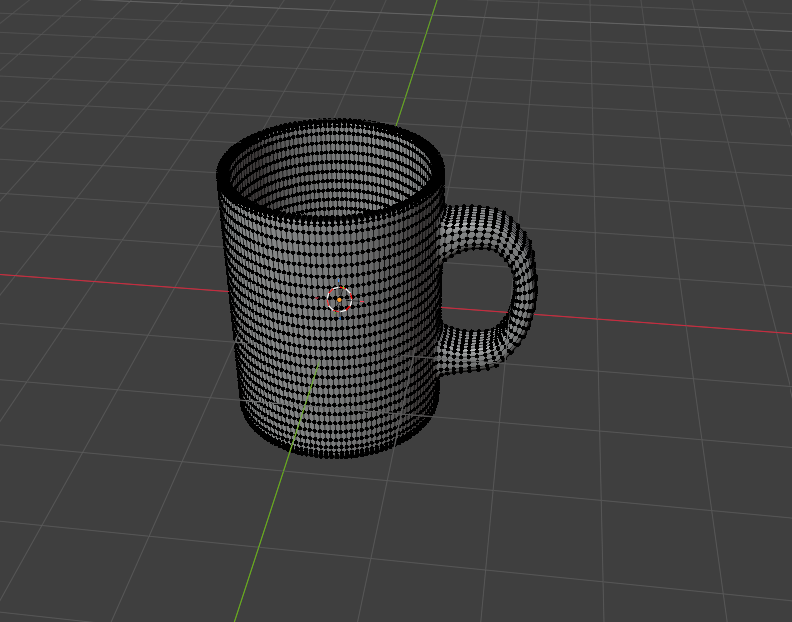
I’ve created this model as practice and I’d really like feedback specifically on my topology.

I want to understand:

  • Is my edge flow correct?
  • Is this model optimized for game use?
  • Are there any unnecessary edges or bad topology areas?

I’d really appreciate honest critique and suggestions on how to improve.
Thanks in advance!

Replies

  • Flat Face
    Offline / Send Message
    Flat Face polycounter lvl 15
    This is really overkill for a game but I can't really suggest much (detached handle example) without knowing the type of game and how you wanted to use the mug but as it stands I'd argue it's even overkill for a movie prop

    If it's a hero object in a first person game (like a gun in call of duty) then you want higher poly like this for (a bad) example, you wouldn't need any of the horizontal loops above, below or in the middle of the handle (the red lines) and fewer vertical loops, I went with 48 here but again depends on the use 

    Honestly though have a look at this wireframe, it's probably still overkill for most mugs in a video game and far lower poly, zoom out and imagine it in a game environment:

  • aniceto
    Offline / Send Message
    aniceto polycounter lvl 20
    Agreed with Flat Face. Definitely think about the context that you envision for this asset. Think about how much screen space it will take up and how the player will interact with it. e.g. will it take up the whole screen and will the player get to visually analyse it for as long as they want? or will it be a small prop that the player won't ever interact with?

    The main thing is, for optimised game assets, you don't want any vertices that don't have a specific purpose. If a vert doesn't help define the shape of the object, or it isn't used for a specific UV setup etc you need to ditch it.

    These examples might be extreme for what you're going for detail-wise, but should help illustrate what I mean about removing vertices that don't help define the shape of an object.


    It's a bit tricky to highlight on your mesh because its so DENSE, but at a minimum these highlighted edges look superfluous.


  • sacboi
    Offline / Send Message
    sacboi grand marshal polycounter
    At a glance, wondering if the OP had posted the wrong image given their context for this thread is game asset modeling practice so perhaps high poly version?

    Also this object is contiguous (one piece as in real life) lvl 1 sub surf/divided mesh hence imagine that the initial sketched low poly base topology would be fine.   
  • Modeller

    Hi, I’m a beginner learning 3D modeling for game development.

    I’ve created this model as practice and I’d really like feedback specifically on my topology.

    I want to understand:

    • Is my edge flow correct?
    • Is this model optimized for game use?
    • Are there any unnecessary edges or bad topology areas?

    I’d really appreciate honest critique and suggestions on how to improve.
    Thanks in advance!

  • Modeller
    Then How the developers (or modellers) manage to make these high poly surroundings in Games?

  • Joao Sapiro
    Offline / Send Message
    Joao Sapiro ngon master
    I think you need to take a step back and study first what you want to achieve cause i feel youre operating blind in those regards. The polycount wiki is an excelent resource repository, i recommend you start there ! Good luck !
  • zetheros
    Offline / Send Message
    zetheros polycount lvl 666
    @Modeller this is a PBR workflow; creating highpoly meshes and baking to lowpoly. 

    Tutorials, maybe like this one below (I haven't watched it) could get you on the right track, good luck

    https://www.youtube.com/watch?v=QbxtY4nHMuQ

    an overview
    https://www.youtube.com/watch?v=Ypm8PCILiDM

    https://www.youtube.com/watch?v=_xOKVGbZmEc
  • Flat Face
    Offline / Send Message
    Flat Face polycounter lvl 15
    Modeller said:
    (Image)
    Then How the developers (or modellers) manage to make these high poly surroundings in Games?


    As said above, good texturing with PBR materials, good lighting and 2dfx (like the smoke) and well optimised models.

    Here's a good quick example of high poly to low poly baked material use


    Source: https://www.reddit.com/r/blender/comments/1sgac0v/this_is_your_sign_to_learn_how_to_bake_normal_maps/

    Or better yet here's a game interior from GTA4, it's older but still uses the same bump/normal, etc, maps and I'd say that helps make the impact of the materials more obvious on the slightly lower poly models

    https://sketchfab.com/3d-models/ashley-apartment-f3d89f531ff74613ac9e6281962d2997

    click on the material inspector down the bottom right and compare the wireframe, matcap and matcap+surface to the final render (might want to change navigation to first person, interiors are rough to look at on sketchfab


    I might be biased because it's how I started but I'd recommend trying to make a model as a mod for an existing game so you know what level of detail you need and have the rest of the games models to compare, the GTA's are very mod friendly
  • Modeller
    Flat Face i saw those models, but aren't triangles considered bad in a topology then quads
  • Eric Chadwick
    Modeller said:
    Flat Face i saw those models, but aren't triangles considered bad in a topology then quads

    Nope!
  • Flat Face
    Offline / Send Message
    Flat Face polycounter lvl 15
    Modeller said:
    Flat Face i saw those models, but aren't triangles considered bad in a topology then quads

    Game engines work with triangles not quads/polys and automatically convert a quad mesh when it's imported, explained properly in Chad's link above (again look at any games mesh like the one I shared), you generally want quads for subdiv modelling and I guess some editing tools work better (blenders loop cut CTRL + R only works with quads for example).


Sign In or Register to comment.