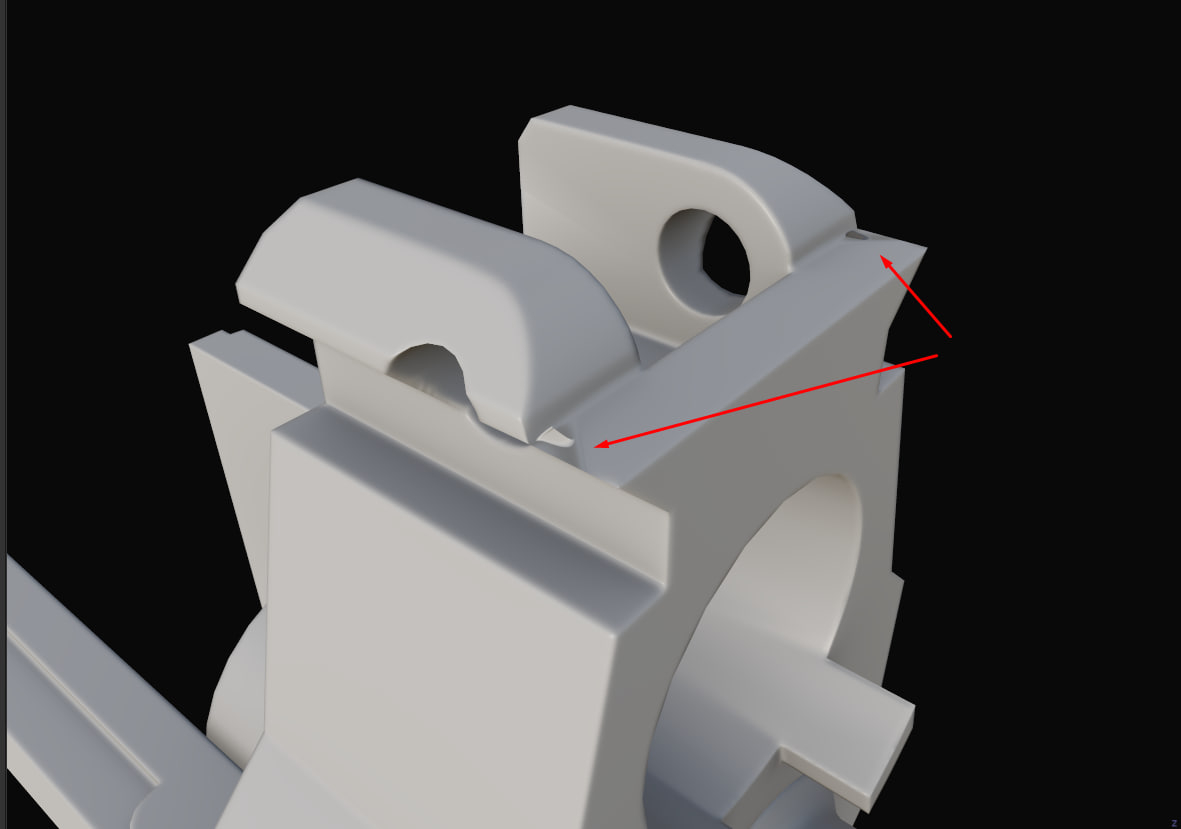
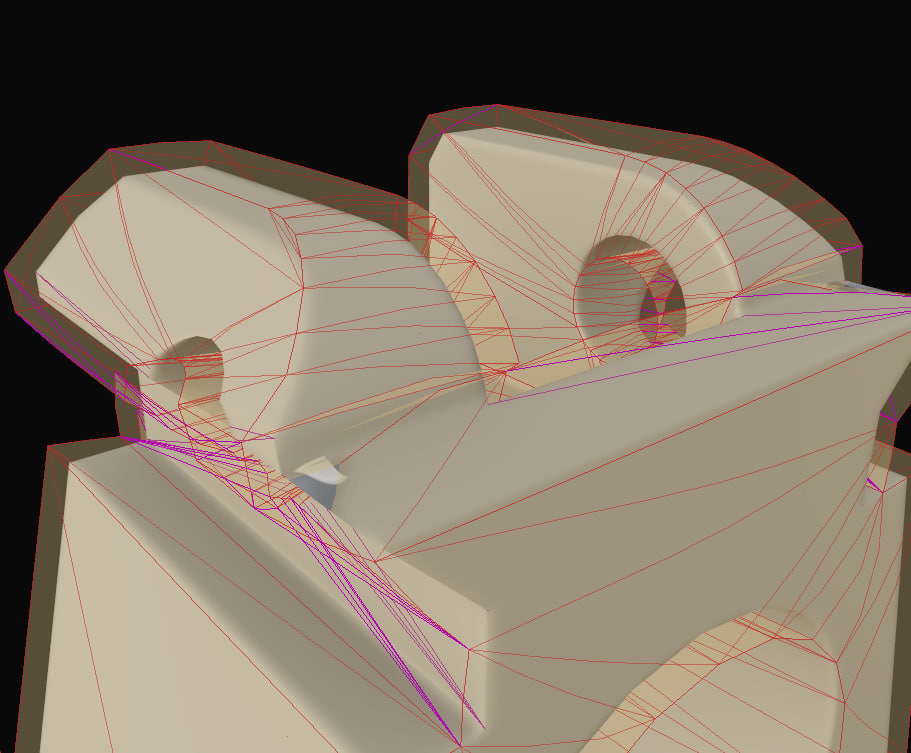
Hi! Looking at the screenshot, the low poly clips through the cage in that area, so I think you identified the source of the issue correctly. To solve, I would add some supporting geo around that steep edge and check how this affects the cage. Since you're using hard edges, you could theoretically add geometry just for the bake and remove it after, as the mesh shading should stay consistent. But I would keep it simple and just live with a couple more triangles.
Good that you attached the lowpoly, however having the highpoly as well would allow to fully reproduce.
Edit: I don't know what you're plan is for this asset and how much you're set on a specific workflow. With the low poly being prepared this way (hard edges + UV splits) another way you could look into baking down a bevel shader. Only did this in Blenders so far, but from what I read Toolbag has a bevel shader now too.
@Fabi_G Your advice about dividing and adding additional edges helped a lot! Thanks for your help. This is supposed to be a low-poly weapon for a game, so I think it should be fine if I add some geo for baking and then remove it?
Hm, ok. I just re-exported the mesh from Blender without adding any geometry and the cage is different than with the original fbx.
original - oddly also shows those pink edges as being sharp without UV splits, which isn't so when I checked in Blender re-export - there's still one sharp edge without UV split being shown, which is there in Blender (however it sits within a flat shaded area)
So perhaps you can just resolve this with different export settings. What software do you export from? Did you freeze all transforms? Perhaps I'm missing something. I'll just attach the fbx I exported so you can try it on your end.
@ I export from Blender. Do you mean the "Apply Transforms" option? I don’t have any active modifiers, and the model hasn’t been scaled, so I don’t use it. I only enable "Selected Objects" and "Triangulate Faces" when exporting.
Ah, the ol' T-cross intersection problem. Depending on how thicc your edges are on the highpoly, you might get away with FINEUGELING the vertexes around, little by little, axis by axis, solving problem after problem as they show them selves. I don't really have your highpoly to play around with it, so uuuuuuuuuuuugh fine I'll make my own So the problem is that you have two uhh faces uhhhh facing opposite directions, while using the same singular vertex/edge on the X axis. The faces require the cage to be pushed in opposite directions: Y+ & Y-. That vertex should stay somewhat in the middle of the intersection, lest it collide. COLLIDO NO BUENO. If you move it around to placate either opposite face, other stuff gets testy. IDK if messing with the Lowpoly is your desired solution, considering your UVs are already done, but.. Too many words. Imma try KANYEEEEUGELING these verts.
I would start by resetting these 4 verts, and manually walk them by XZ only until they BARELY clear that outside edge. Every millimeter you move them is going to cause problems for the other faces. When that's secured, move the outermost two of those verts by the X-axis ONLY to unclip the faces pointing down and out. I messed up! That first move forward was a mistake. LP is sticking out of the cage, meaning all the rays will miss the everything! I'm not going back to edit the post tho. nah. Keep failing forwards until win! Oh yeah! It is possible. Annoying as all hell when it happens for the first time. Even if you've captured everything now, that rearward facing face still might be borked due to the angle you put that last vert to.
If you wanna properly fix it, here's what you do: Add six(?) triangles to your budget. Aww, man, I managed to do it without messing up the UVs. All this for nothing. Anyways Beep bep

Replies
Good that you attached the lowpoly, however having the highpoly as well would allow to fully reproduce.
Edit: I don't know what you're plan is for this asset and how much you're set on a specific workflow. With the low poly being prepared this way (hard edges + UV splits) another way you could look into baking down a bevel shader. Only did this in Blenders so far, but from what I read Toolbag has a bevel shader now too.
original - oddly also shows those pink edges as being sharp without UV splits, which isn't so when I checked in Blender
re-export - there's still one sharp edge without UV split being shown, which is there in Blender (however it sits within a flat shaded area)
So perhaps you can just resolve this with different export settings. What software do you export from? Did you freeze all transforms? Perhaps I'm missing something. I'll just attach the fbx I exported so you can try it on your end.
Perhaps sharing your Blend file might give further insight. Perhaps someone else has an idea.
I guess you could also try exporting in a different format, see it if that leads to any different result.
Or add some supporting geometry and check that resulting cage/ bake looks good.
Depending on how thicc your edges are on the highpoly, you might get away with FINEUGELING the vertexes around, little by little, axis by axis, solving problem after problem as they show them selves.
I don't really have your highpoly to play around with it, so uuuuuuuuuuuugh fine I'll make my own
So the problem is that you have two uhh faces uhhhh facing opposite directions, while using the same singular vertex/edge on the X axis. The faces require the cage to be pushed in opposite directions: Y+ & Y-.
That vertex should stay somewhat in the middle of the intersection, lest it collide. COLLIDO NO BUENO. If you move it around to placate either opposite face, other stuff gets testy.
IDK if messing with the Lowpoly is your desired solution, considering your UVs are already done, but.. Too many words. Imma try KANYEEEEUGELING these verts.
I would start by resetting these 4 verts, and manually walk them by XZ only until they BARELY clear that outside edge. Every millimeter you move them is going to cause problems for the other faces.
When that's secured, move the outermost two of those verts by the X-axis ONLY to unclip the faces pointing down and out.
I messed up! That first move forward was a mistake. LP is sticking out of the cage, meaning all the rays will miss the everything! I'm not going back to edit the post tho. nah. Keep failing forwards until win!
Oh yeah!
It is possible. Annoying as all hell when it happens for the first time. Even if you've captured everything now, that rearward facing face still might be borked due to the angle you put that last vert to.
If you wanna properly fix it, here's what you do: Add six(?) triangles to your budget.
Aww, man, I managed to do it without messing up the UVs. All this for nothing.
Anyways
Beep bep