Home 3D Art Showcase & Critiques

Gothic 2 monastery remake

Hello,
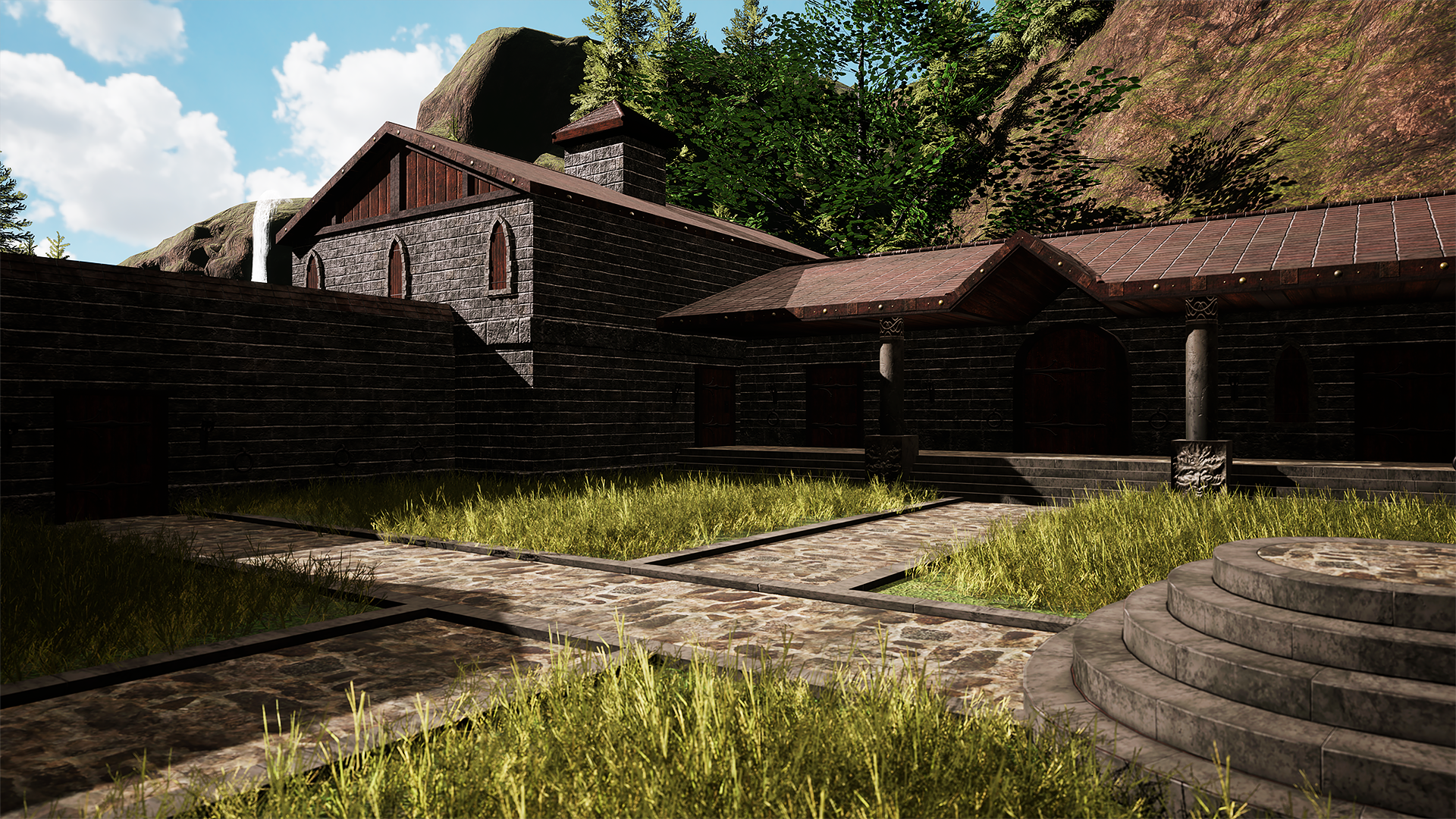
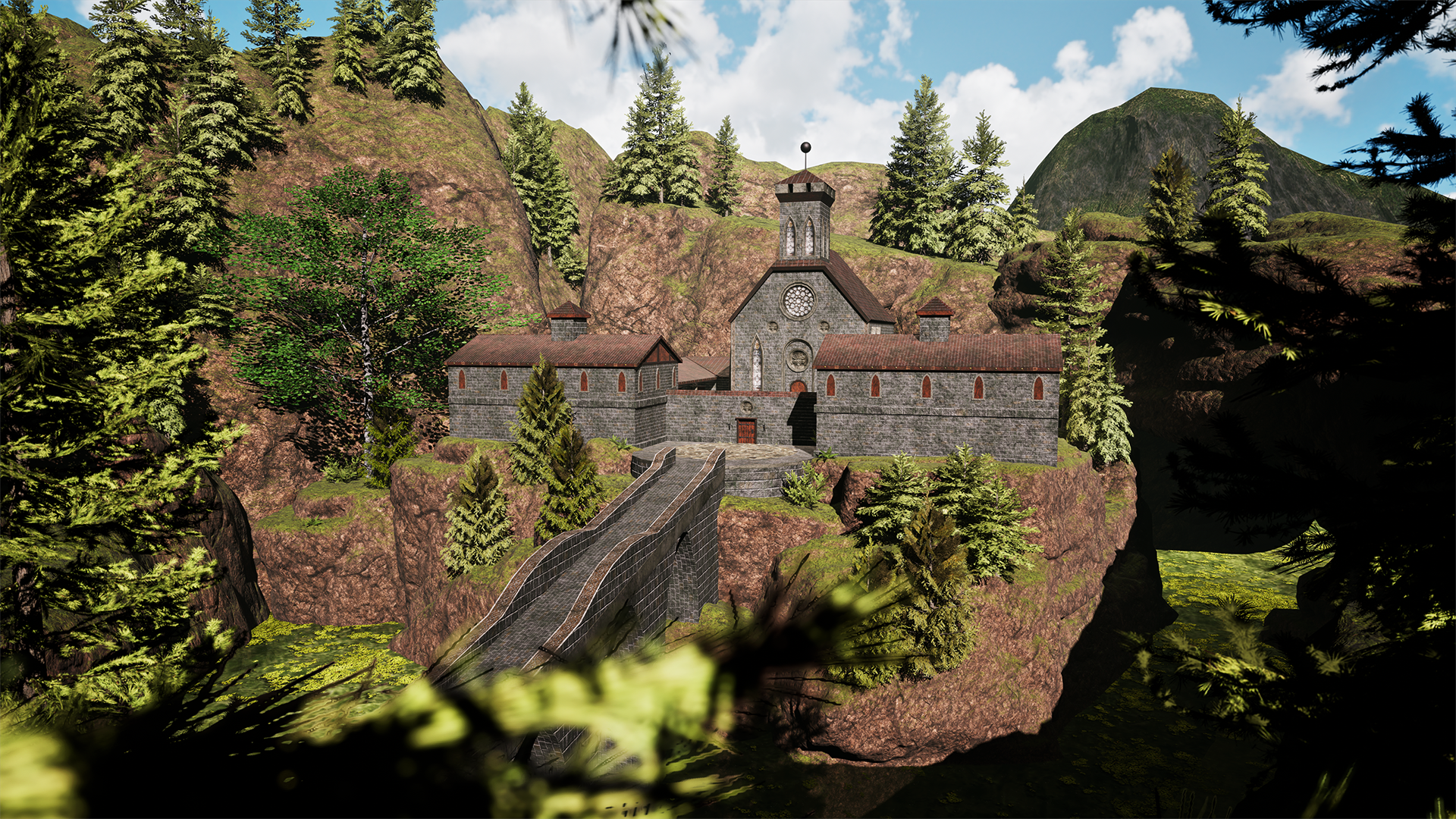
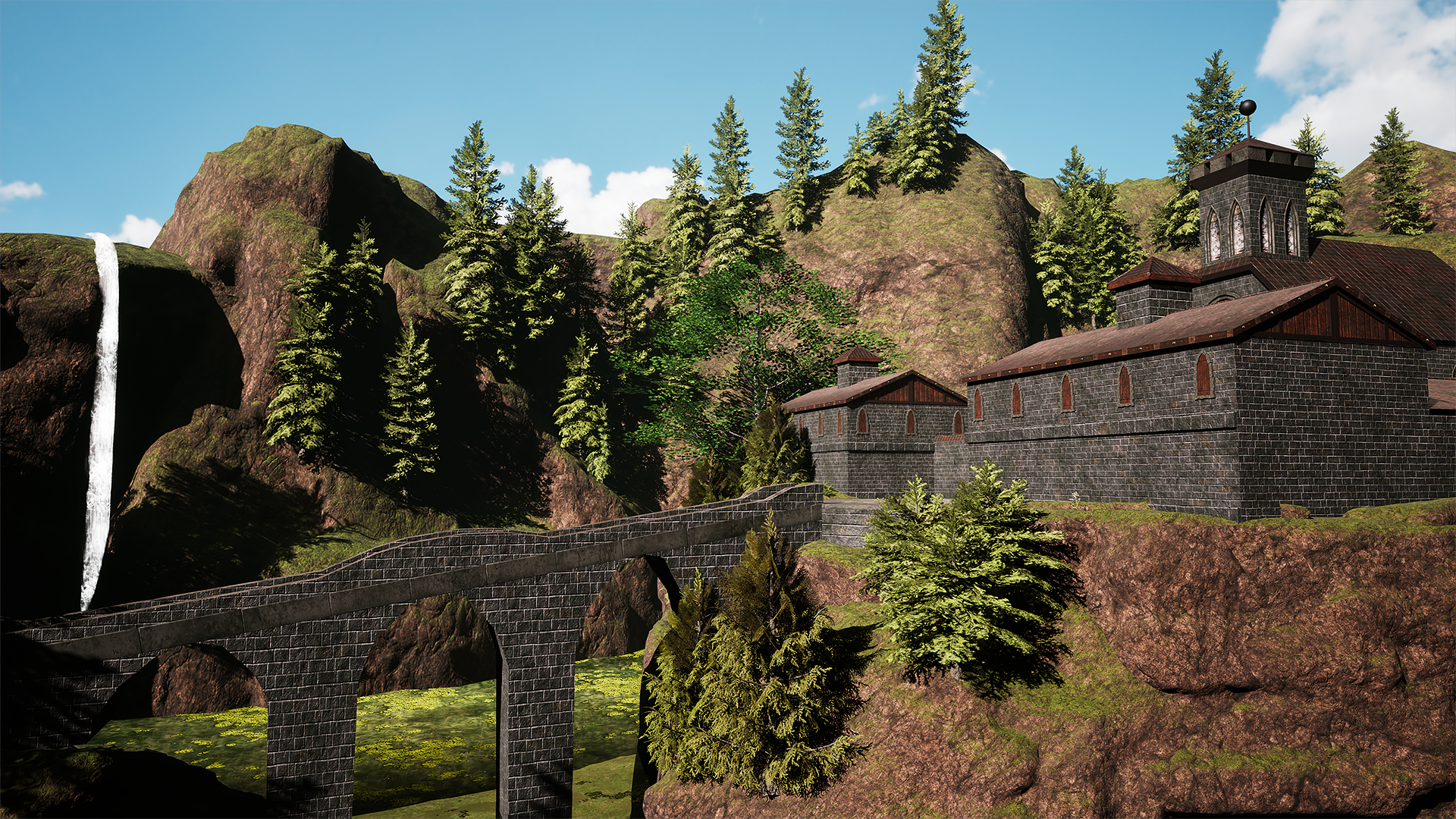
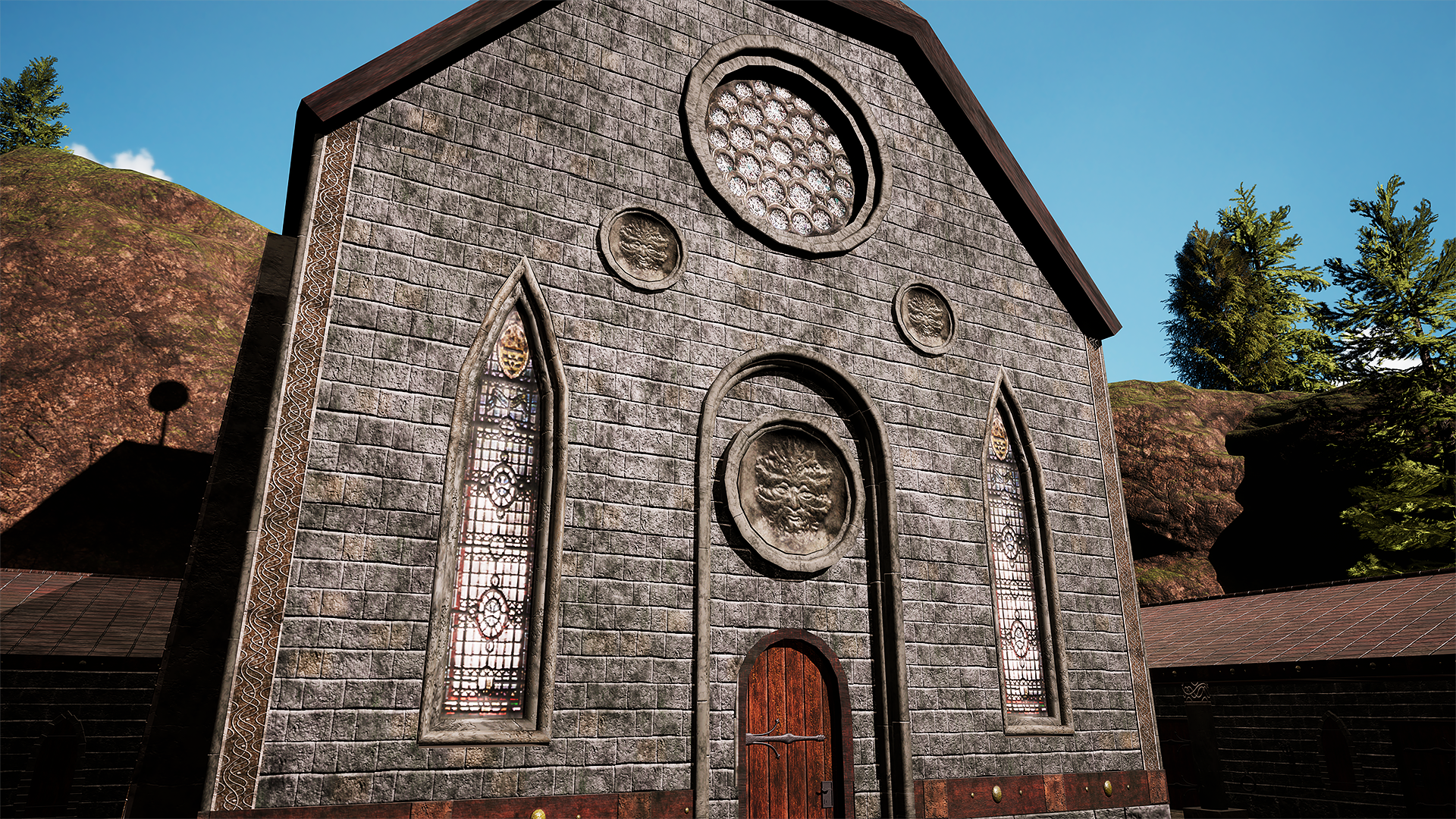
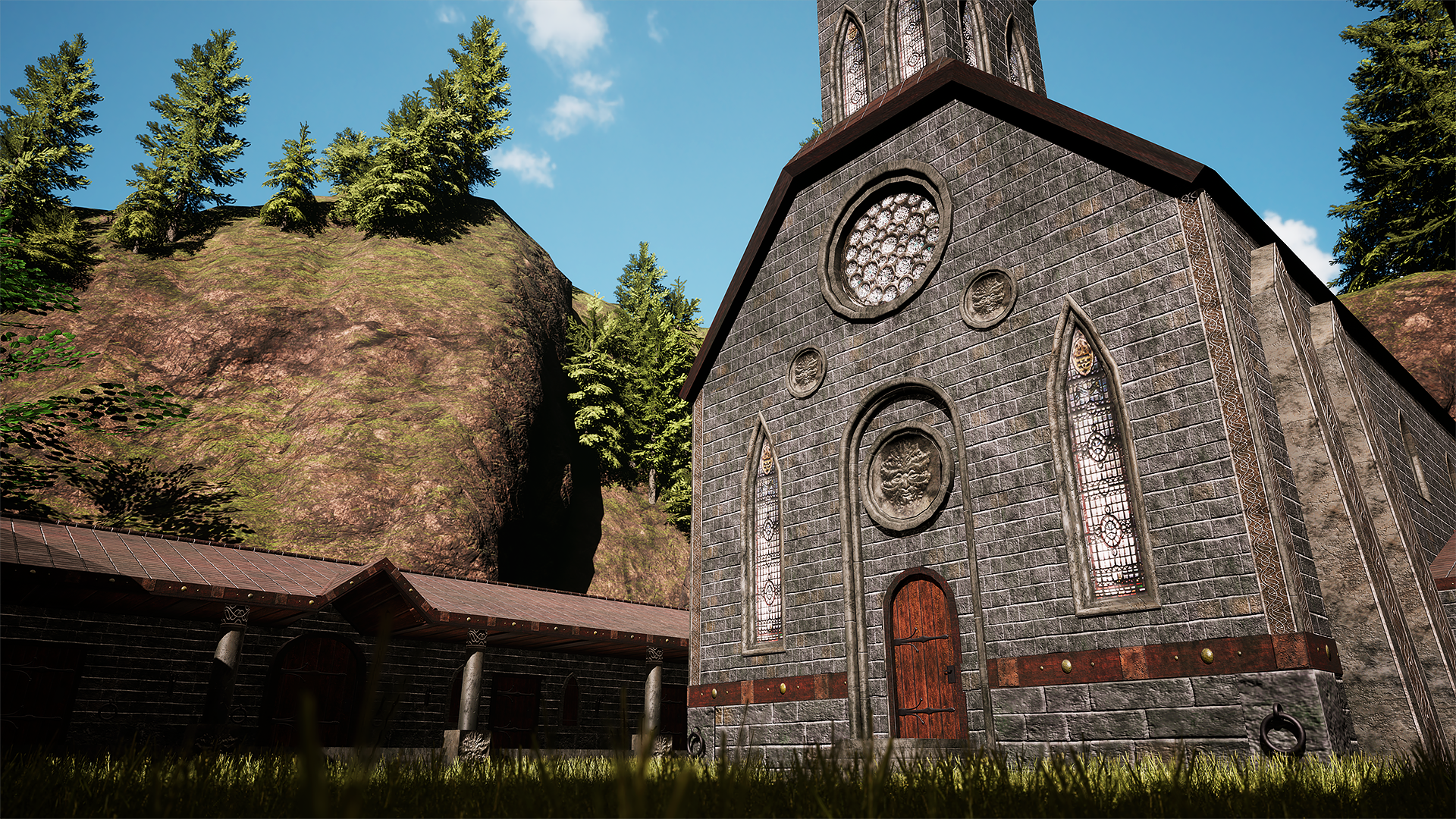
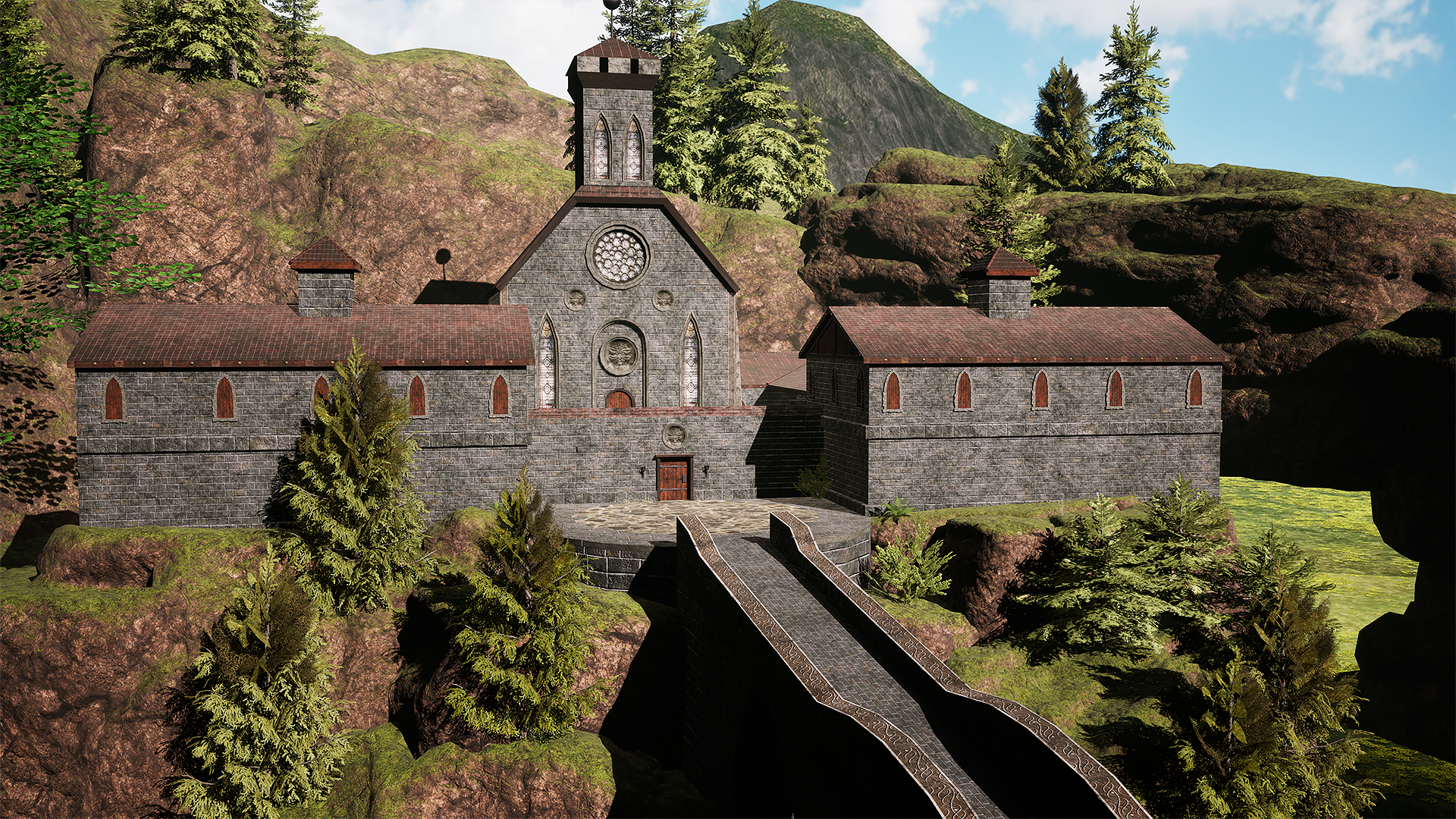
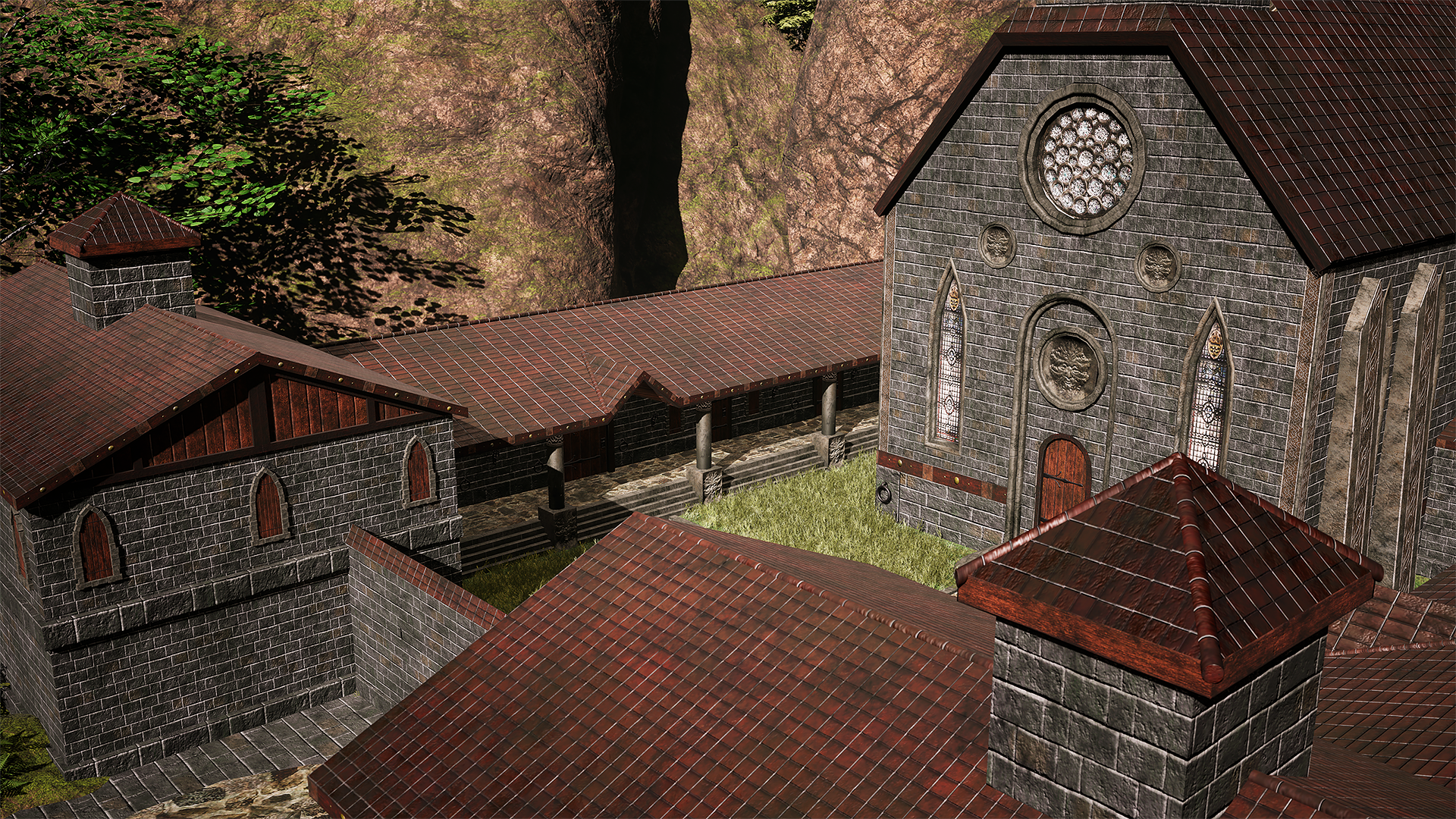
I would like to share with you my latest project. I recreated the monastery from one of my all-time favorite games, Gothic 2, as a personal project focused on improving my trim sheet workflow.

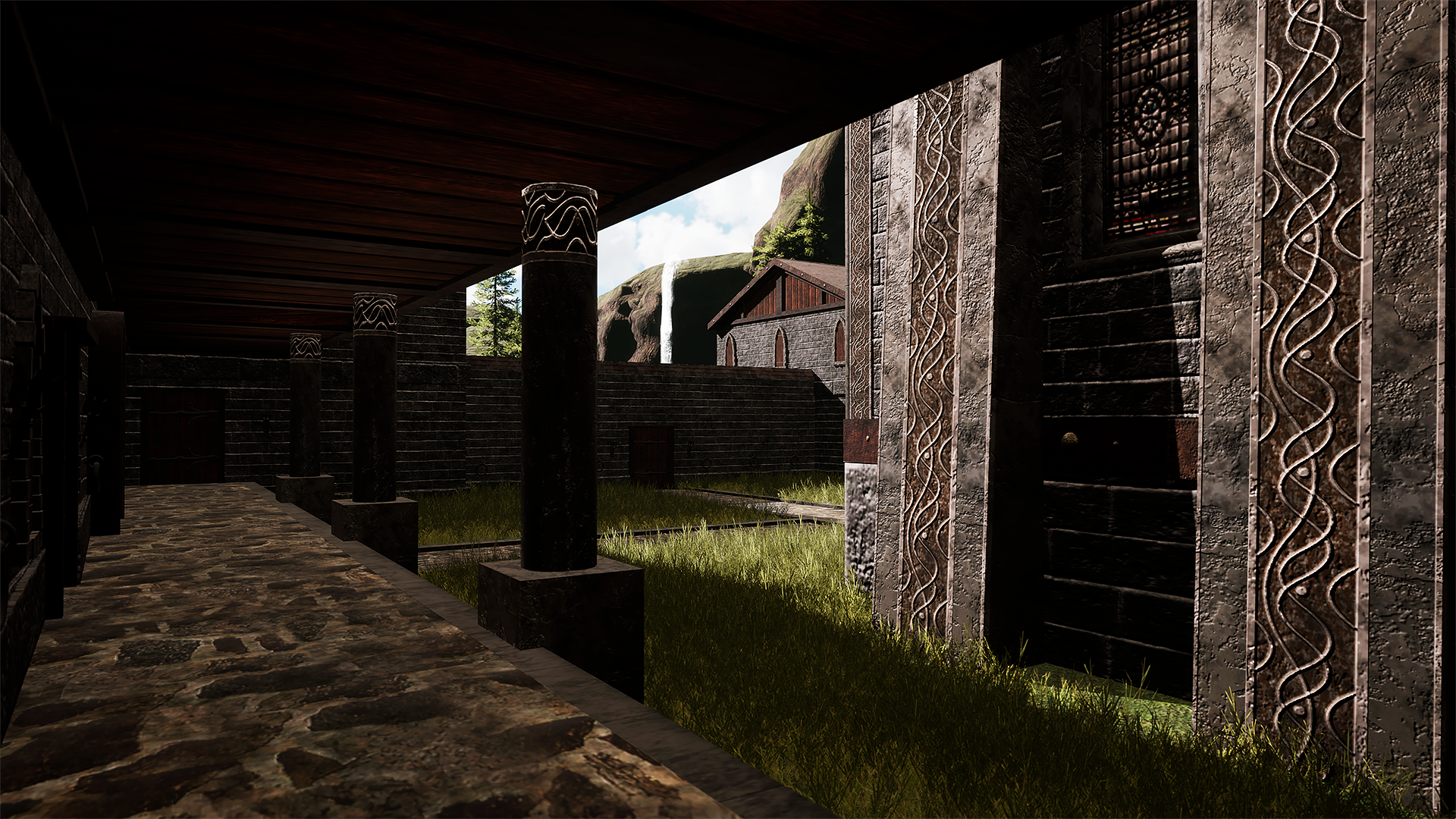
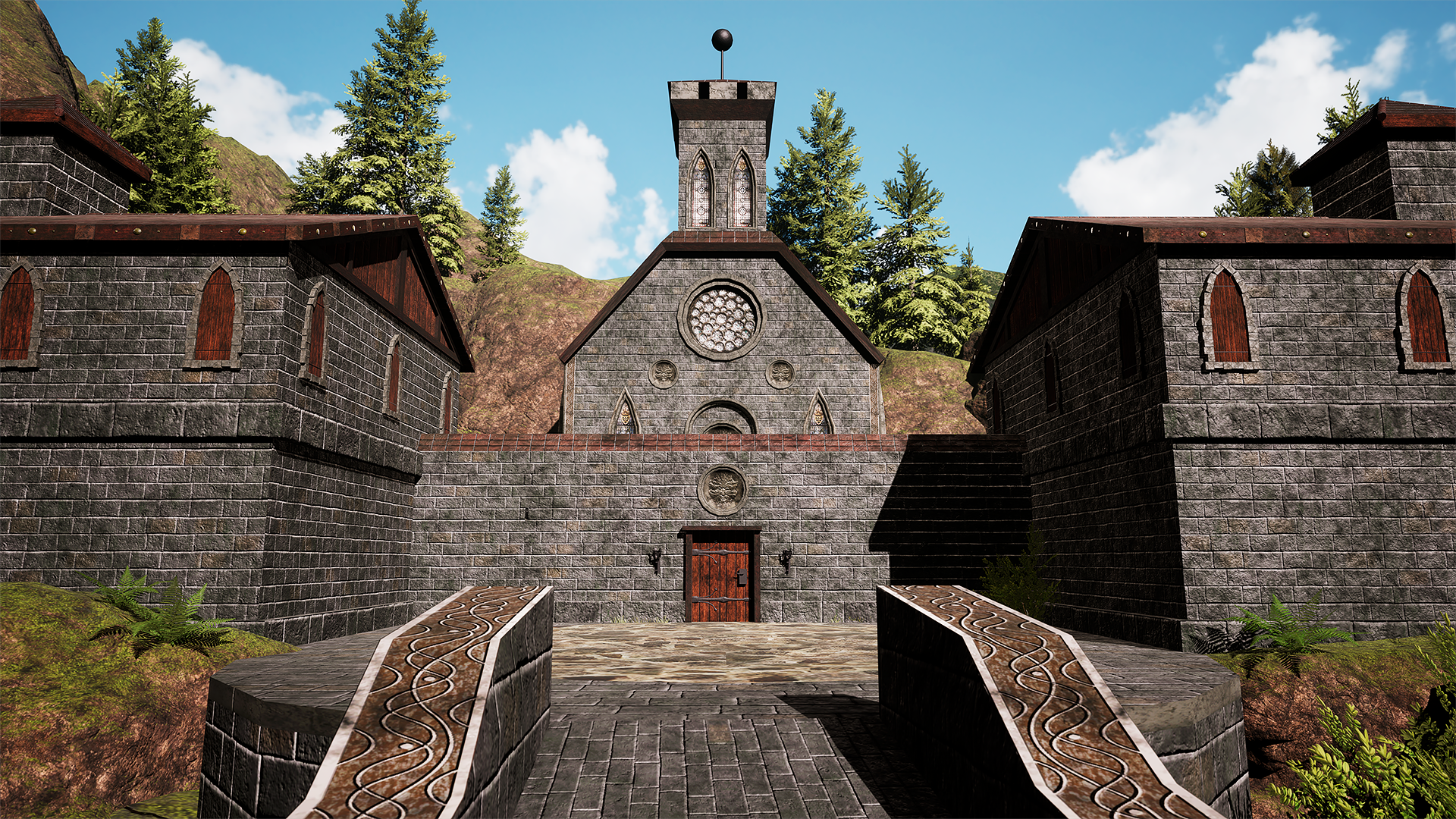
For this scene, I set myself the challenge of using a single 4K trim sheet for all major meshes — including the buildings, ground, church, doors, roofs, bridge, and more. The trim sheet was modeled in 3ds Max, with high-poly details baked down to low-poly in Substance Painter. I finalized the trim and textures in Painter and then rebuilt the entire scene in UE5. For the foliage, mountains, and water, I used selected Marketplace assets to complement the environment.

I would truly appreciate honest opinions, feedback, and critique. I love creating atmospheric environments, and my main goal is to keep improving. Please let me know how I could make this piece stronger visually. Which areas of environment design do you think I should focus on the most? And where do you feel my weakest points are?

Thank you very much for any response — it would really help me understand what direction I should take to improve. If you’d like to see more of my work to get a better overview of my current skill level, you can check out my ArtStation page https://www.artstation.com/jozefjajcay4.

I genuinely appreciate any feedback.

Replies

  • ziz
    Overall I think this scene is a great practice for TrimSheets! There is little texture stretching on your textures. Your lighting is competent and really helps making your environment believable!

    A glaring issue I can see are seems, and the modelling is too primitive. (By primitive, I mean it lacks mesh-level detail) This is causing glaring texture seams, and you need to hide them better, or make your seems on your trim sheet better. More modelling would make this better detailed, and also help the trimsheets. I've made this mistake myself when using trimsheets, where I relied on the textures too much.


    But I think a better look at references should remedy this problem, even a quick internet search for "medieval brick stone fence" can give you a lot of ideas. Maybe look into making specialised trimsheets for just fences?

    Overall I think this is a good start for trimsheets, mesh needs more modelling (greebling and and mid-level resolution)

    Hope this helps! :)
  • Fabi_G
    Offline / Send Message
    Fabi_G godlike master sticky
    Hi! I think ziz makes a good point, the environment would benefit from some more geometric detail. I would look at the silhouette of things, that those don't read overly low res/ facetted. Situations that silhouette the most would be probably edges/ corners. I think generally having more geometric detail around camera/ player height will suggest more detail than there actually is, some trims and skirts can help here.

    Other than that I would look at the original environment and take some notes, looking for real world references wouldn't hurt either. While the original has low res textures, the environment has variance and organic feel. Looks like different type of building materials are being used and they have some gradients (due to construction, weathering, overgrowth).


    Perhaps you can get closer to this by A - introducing more materials and B - blending/ modulating textures using masks (vertex color commonly). While I think it's good you thought about optimizations, I would prioritize hitting the visual target. Could also check out some sample projects, how they're doing things. Perhaps some resources you can reuse (shaders, tools, lighting setup).

    A big part of the end result is obviously lighting. I think currently the shadows are quite dark as if there is little to no indirect lighting. In the screenshot I found there seems to be some fog, which allows for some further separation of subject and background. A way to fake this would be fog cards. Something that puzzles me in the renders, is how those highlights on the stone edges even in shadows. Wonder if it's due to light setup or something with the shader.

    I think you created a solid base to iterate on, it's quite a few subjects you're taking on at once. If you feel like it's too much, you could pick one part of the environment and refine it (entrance area, court area, bridge). Then apply all those learnings and assets to the rest.

    Keep it up :+1:
  • Polygon_seal
    Thank you very much for your responses and for your amazing tips. I will try to follow your advices and i will come back (hopefully) with better results. I would just like to make few things clear so i can be sure that i understood everythimg correctly  :)

    ziz said:
    Overall I think this scene is a great practice for TrimSheets! There is little texture stretching on your textures. Your lighting is competent and really helps making your environment believable!

    A glaring issue I can see are seems, and the modelling is too primitive. (By primitive, I mean it lacks mesh-level detail) This is causing glaring texture seams, and you need to hide them better, or make your seems on your trim sheet better. More modelling would make this better detailed, and also help the trimsheets. I've made this mistake myself when using trimsheets, where I relied on the textures too much.


    But I think a better look at references should remedy this problem, even a quick internet search for "medieval brick stone fence" can give you a lot of ideas. Maybe look into making specialised trimsheets for just fences?

    Overall I think this is a good start for trimsheets, mesh needs more modelling (greebling and and mid-level resolution)

    Hope this helps! :)
    Thank you Ziz,
    I see on the pictures what do you mean and when you pointed out on this seams it really doesnt looks nice. I can also imagine that i would make this seams better in my trim sheet but what exactly did you meant by adding more geometry? I mean , i am using very primitive  shapes thats true ...its because i am trying to keep polygons really low...i understand that i could add more geometry withou bigger impact on performance but how exactly could i change geometry on this bridge for example? Do you mean maybe some chamfer Or something like that ?  


    Fabi_G said:
    Hi! I think ziz makes a good point, the environment would benefit from some more geometric detail. I would look at the silhouette of things, that those don't read overly low res/ facetted. Situations that silhouette the most would be probably edges/ corners. I think generally having more geometric detail around camera/ player height will suggest more detail than there actually is, some trims and skirts can help here.

    Other than that I would look at the original environment and take some notes, looking for real world references wouldn't hurt either. While the original has low res textures, the environment has variance and organic feel. Looks like different type of building materials are being used and they have some gradients (due to construction, weathering, overgrowth).


    Perhaps you can get closer to this by A - introducing more materials and B - blending/ modulating textures using masks (vertex color commonly). While I think it's good you thought about optimizations, I would prioritize hitting the visual target. Could also check out some sample projects, how they're doing things. Perhaps some resources you can reuse (shaders, tools, lighting setup).

    A big part of the end result is obviously lighting. I think currently the shadows are quite dark as if there is little to no indirect lighting. In the screenshot I found there seems to be some fog, which allows for some further separation of subject and background. A way to fake this would be fog cards. Something that puzzles me in the renders, is how those highlights on the stone edges even in shadows. Wonder if it's due to light setup or something with the shader.

    I think you created a solid base to iterate on, it's quite a few subjects you're taking on at once. If you feel like it's too much, you could pick one part of the environment and refine it (entrance area, court area, bridge). Then apply all those learnings and assets to the rest.

    Keep it up :+1:
    fabi_g thank you also for your tips...i never heard about fog cards and it looks like interesting technique...because normal fog is hard to control sometimes. Vertex color could help a lot to make some variations in the scene thats true...

    Do you know where i could find quality sample projects ? it could be really helpful to get inspiration from high quality projects.

    And yes lighting ...i was strugling with this for a while ...i see that shadows are too dark but when i tried use higher indirect lighting,  shadows were fine but rest of scene was crazy shiny like during nuclear explosion and i couldnt find sweetspot. so what i have done is that i put in the "hallways" inside monastery rectangle light without shadows to soften these shadows...that could be also reason for the highlights on the stone edges even in the shadows...maybe not best idea but i really couldnt soften these shadows without impacting outside of monastery. So is there any way how to do that please ? 


  • Eric Chadwick
  • Fabi_G
    Offline / Send Message
    Fabi_G godlike master sticky
    Ah, you have hidden your reply well :sunglasses:

    Fog cards
    I find they can help to elevate vistas, but to my knowledge shouldn't be layered too much due to the increased cost of the pixel on screen (Overdraw).

    Sample Projects 
    I would follow the path Eric suggested. I haven't tried this one, but going by its description it could be interesting: https://www.fab.com/listings/814a6736-866c-4d6a-a619-a9397f379d2b

    On Polyhaven they have this smugglers cove collection, featuring a modular fortress, as well as an Unreal scene:
    https://polyhaven.com/collections/smugglers_cove

    Lighting
    Unfortunately it's difficult to give any specific pointers on lighting setup without looking at the project. If you're able to share it, I can offer have a look sometime this week and, to the best of my abilities, document some suggestions for you.

    Also don't forget to check the polycount wiki for links of articles that are related to environment art. While they might be old, many things still apply.

    Edit: There's probably quite a few projects documented on Polycount you can dig up through the search function using keywords like 'Environment' and 'Finished'. 
Sign In or Register to comment.