[nDo 2 - Photoshop] Sci Fi Panel

Hi Polycount,
I'm Sam, 15 years old, a young French CG Artist with a taste for video games. I made a couple of videos on YouTube about the process to create a Sci Fi Panel Floor, with nDo & Photoshop. I didn't used any reference, just my imagination...
LINKS :
Part 1 : [ame="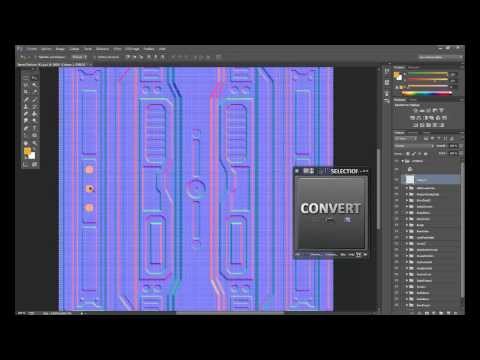 https://m.youtube.com/watch?v=XpwtuVix5SQ&feature=c4-feed-u"][SpeedTexturing] - Photoshop & nDo2 - Sci-Fi Floor Panel [Part1] - YouTube[/ame]
Part 2 : [ame="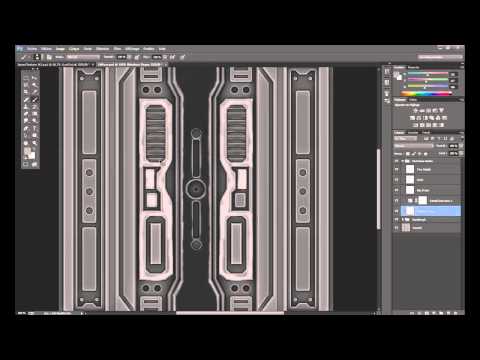 https://m.youtube.com/watch?v=V4q5srfHaEs&feature=c4-feed-u"][SpeedTexturing] - Photoshop & nDo2 - Sci-Fi Floor Panel [Part2] - YouTube[/ame]
The Part 1 cover the creation of the Normal Map, just with basic shapes.
The Part 2 cover the creation of the Diffuse Map, handpainted.
It may be amazing to be criticized by Polycount's Members.
Hope you enjoy my work,
Sam.
I'm Sam, 15 years old, a young French CG Artist with a taste for video games. I made a couple of videos on YouTube about the process to create a Sci Fi Panel Floor, with nDo & Photoshop. I didn't used any reference, just my imagination...
LINKS :
Part 1 : [ame="
https://m.youtube.com/watch?v=XpwtuVix5SQ&feature=c4-feed-u"][SpeedTexturing] - Photoshop & nDo2 - Sci-Fi Floor Panel [Part1] - YouTube[/ame]Part 2 : [ame="
https://m.youtube.com/watch?v=V4q5srfHaEs&feature=c4-feed-u"][SpeedTexturing] - Photoshop & nDo2 - Sci-Fi Floor Panel [Part2] - YouTube[/ame]The Part 1 cover the creation of the Normal Map, just with basic shapes.
The Part 2 cover the creation of the Diffuse Map, handpainted.
It may be amazing to be criticized by Polycount's Members.
Hope you enjoy my work,
Sam.
Replies
Could it be possible if you could give us some renders of your sci-fi panel? Preferably inside of a game engine like UDK or CryEngine?
This would help us to spot problems or flaws in your texture more easier.
So far it looks very nice I must say
I'll post a render as soon as possible !
Just two quick renders on Marmoset Toolbag, with a thin compositing on Photoshop.
Feel free to comment
I think you have made a pretty good design, but if you want to push it further, it would really benefit from purpose. The grids/vents/whatever it is, is one of the few details that seems to have a purpose or meaning. If you make the holes in the grid actually holes (painting them dark or something) they would seem to be there for a reason. The same with some of the other stuff
I tihnk you are really heading the right way!
I totally (is it English ?) understand, some others artists already told me the same thing.
I'l' keep this feedback ans post new wips on Polycount
Keep it up!
Ed
For the specular, I generated it, but I've just missed it on Marmoset...
Do you have any reference that I can use to improve my work (I Know polygoo.com, peperart.com, Lonewolf and PhilipK's website)
Thanks !
Some good reference as well...
http://www.hourences.com/
http://www.philipk.net/tutorials.html
Matt -
@Matt :
Thanks for the links !
I'll try to add realistics details using photo textures of thin scratches.
Maybe I should start another WIP using all tips you told me ? (Avoid useless details, make diffuse map less boring)
Do you have a wacom tablet yet for doing your textures? If not i would highly recommend it so you're able to push your skills up to the next level. I get one for my nephew this christmas. He's 14 and also starts doing game art.
And, yeah I'm using a Wacom pen tablet, really cool to paint thin details
The only things I would say are:
-Use some real world reference (can be anything, from computers, to machines, to small things such as bolts), so that it looks more functional and less like a bunch of shapes put together.
-As mentioned before have a look at the other maps (spec/gloss), and have a go with those.
And maybe while you are at it, maybe make a small scene out of it.
And maybe a look at philipk's tutorials on texturing and modularity:
http://www.philipk.net/tutorials.html
http://www.philipk.net/tutorials/materials/metalmatte/metalmatte.html
http://www.philipk.net/tutorials/modular_sets/modular_sets.html