Script: Align Verticies

This is my very first script and I wanted to share it on here. Hopefully I can get some feedback.
There might still be some bugs, and some of the code might be able to be optimized further, but again, this is my first script so I don't know all the commands. And maybe someone did this already, or there is some special way to do this in max. That's ok, it was a learning experience for me.
Basically I find that sometimes I want to align a set of verticies (like on the mirror of a model) to a specific value, but manually doing this in max is tedious, and it you select a bunch of verticies and enter a value manually in max, it will just average the positions.
So this could be useful if you wanted more precision.
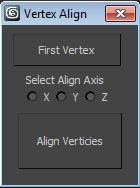
Anyway here is a screen of the interface:
Code:
Usage: Select one vertex as the basis (what you want everything to align to) and click 'first vertex'. Then select the align axis and then select all the verts you want to alien, and click align verticies!
If anyone has any suggestions or improvements please let me know!
There might still be some bugs, and some of the code might be able to be optimized further, but again, this is my first script so I don't know all the commands. And maybe someone did this already, or there is some special way to do this in max. That's ok, it was a learning experience for me.
Basically I find that sometimes I want to align a set of verticies (like on the mirror of a model) to a specific value, but manually doing this in max is tedious, and it you select a bunch of verticies and enter a value manually in max, it will just average the positions.
So this could be useful if you wanted more precision.
Anyway here is a screen of the interface:
Code:
rollout VertexAlign "Vertex Align" width:136 height:160 --Code by Francois Stelluti - www,francoisstelluti.com
(
	local FirstV, FirstSel, VertPos
	local obj = $

	button btn1 "First Vertex" pos:[11,9] width:108 height:32
	radioButtons rdo2 "Select Align Axis" pos:[24,48] width:97 height:30 labels:#("X", "Y", "Z") columns:3 default: 0
	button btn2 "Align Verticies" pos:[16,88] width:104 height:56

	on btn1 pressed do
	(
		if (obj.selectedVerts.count != 0) then
		(
			FirstSel = obj.selectedVerts[1].index
			FirstV = polyop.getVert obj FirstSel
		)
		else
		(
			messagebox "No Verticies are selected" --Make sure a vertex is selected
		)
	)

	on rdo2 changed state do --get position of initial vert in selected axis
	(
		if (rdo2.state == 1) then
			Vertpos = FirstV[1]
		else if (rdo2.state == 2) then
			Vertpos = FirstV[2]
		else if (rdo2.state == 3) then
			Vertpos = FirstV[3]
	)

	on btn2 pressed do
	(

	local vertSel

	if (rdo2.state == 0) then
			messagebox "An align axis must be selected"

	vertSel = obj.selectedVerts

	for i in 1 to (vertSel.count) do -- number of selected verts
	(
		local vert1

		if (vertSel[i].index != undefined) and (vertSel[i].index != FirstSel) do (
			if (rdo2.state == 3) then (
				vert1 = polyop.getVert obj vertSel[i].index -- get position of next vert
				a=polyop.setVert obj vertSel[i].index [vert1[1],vert1[2],Vertpos] --set position of next vert
				)
			else if (rdo2.state == 2) then (
				vert1 = polyop.getVert obj vertSel[i].index -- get position of next vert
				a=polyop.setVert obj vertSel[i].index [vert1[1],Vertpos,vert1[3]] --set position of next vert
			)
			else if (rdo2.state == 1) then (
				vert1 = polyop.getVert obj vertSel[i].index -- get position of next vert
				a=polyop.setVert obj vertSel[i].index [Vertpos,vert1[2],vert1[3]] --set position of next vert
			)
		)
    )
)
)
createDialog VertexAlign 136	160
Usage: Select one vertex as the basis (what you want everything to align to) and click 'first vertex'. Then select the align axis and then select all the verts you want to alien, and click align verticies!
If anyone has any suggestions or improvements please let me know!
Replies
Works great. Selecting verts and clicking an axis.
Or am I missing something?
Whatever, it was a learning experience.
wouldnt it be enough to check which state is activated in the "on btn2 pressed [...]" section?
its minor, but a design choice which could take a lot longer in a more heavy script...
Lots of little things I would change, but the biggest one is just doing less in the
loop. Try to figure out what can live outside the loop.
I change a few things, then a little more, but this is how I would have created it. For 2000 verts I was able to speed it up about 150 milliseconds.
rollout VertexAlign "Vertex Align" width:136 height:160 --Code by Francois Stelluti - www,francoisstelluti.com ( local FirstV local obj = undefined local pGetVert = polyop.getVert local pSetVert = polyop.setVert button btn1 "First Vertex" pos:[11,9] width:108 height:32 radioButtons rdo2 "Select Align Axis" pos:[24,48] width:97 height:30 labels:#("X", "Y", "Z") columns:3 default:1 button btn2 "Align Verticies" pos:[16,88] width:104 height:56 fn getObj = ( if selection.count == 1 then obj = selection[1] else undefined ) on btn1 pressed do ( if getObj() != undefined do ( vertSel = obj.selectedVerts if (vertSel.count != 0) then ( FirstV = pGetVert obj (vertSel[1].index) ) else ( format "No Verticies are selected.\m" --Make sure a vertex is selected ) ) ) on btn2 pressed do ( t = timeStamp() if getObj() != undefined and FirstV != undefined do with undo "Align Vertices" on ( local vertSel local vert1 local targetPos local vIndex vertSel = obj.selectedVerts vertSelCount = vertSel.count rdoState = rdo2.state for i in 1 to vertSelCount do -- number of selected verts ( vIndex = vertSel[i].index if (vIndex != undefined) do ( vert1 = pGetVert obj vIndex -- get position of next vert case rdoState of ( (1):vert1.x = FirstV.x (2):vert1.y = FirstV.y (3):vert1.z = FirstV.z ) pSetVert obj vIndex vert1 --set position of next vert ) ) ) format "%\n" (timeStamp()-t) ) ) createDialog VertexAlign 136 160monster: Wow, thanks a lot for taking the time to rework my code! Yeah I knew it wasn't efficient, but my goal was just to make it work. Again, I am new to maxscript.
I'll have a closer look at it tomorrow.
And in case anyone is wondering, I was doing some modeling today and ran across a situation where this script helped me. The traditional align functions mentioned above wouldn't have been as good (because it isn't relative to a specific vertex).
Thanks for being open to suggestions. If you ever have MaxScript questions you can message me.
rollout VertexAlign "Vertex Align" width:136 height:160 --Code by Francois Stelluti - www,francoisstelluti.com ( local FirstV local obj = undefined local pGetVert = polyop.getVert button btn1 "First Vertex" pos:[11,9] width:108 height:32 radioButtons rdo2 "Select Align Axis" pos:[24,48] width:97 height:30 labels:#("X", "Y", "Z") columns:3 default:1 button btn2 "Align Verticies" pos:[16,88] width:104 height:56 fn getObj = ( if selection.count == 1 then obj = selection[1] else undefined ) fn getoffset x y = ( d = y-x if x > y then ( if d > 0 then d else -d ) else ( if d > 0 then -d else d ) ) on btn1 pressed do ( if getObj() != undefined do ( vertSel = obj.selectedVerts if (vertSel.count != 0) then ( FirstV = pGetVert obj (vertSel[1].index) ) else ( format "No Verticies are selected.\m" --Make sure a vertex is selected ) ) ) on btn2 pressed do ( t = timeStamp() if getObj() != undefined and FirstV != undefined do with undo "Align Vertices" on with redraw off ( local vertSel,vert1,n,offset local rdoState = rdo2.state vertSel = obj.selectedVerts --Get the intended plane axis case rdoState of ( (1):n = [1,0,0] (2):n = [0,1,0] (3):n = [0,0,1] ) --Flatten the verts to the plane polyop.moveVertsToPlane obj vertSel n 0.0 --The verts were averaged, get the average vert1 = pGetVert obj vertSel[1].index --Get the offset to the target location case rdoState of ( (1):offset = [(getoffset FirstV.x vert1.x),0,0] (2):offset = [0,(getoffset FirstV.y vert1.y),0] (3):offset = [0,0,(getoffset FirstV.z vert1.z)] ) --Move the verts to the target location polyop.moveVert obj vertSel offset ) format "%\n" (timeStamp()-t) ) ) createDialog VertexAlign 136 160Just a few questions about your code. If I don't select any verticies (btn1) i don't get an error message. You used the line "format "No Verticies are selected.\m"" but shouldn't there also be a messageBox to display the error?
And why is 'redraw off' and 'undo "Align Vertices"' when pressing btn2?
Thanks again.
Btn2 - Redraw Off means the viewport won't redraw until the script is done. This helps the script run faster because the viewport doesn't update while the script runs. I'm pretty sure redraw is off when MaxScript does a for loop, that's why I didn't have it there before.
Undo "Align Vertices" On will create a single undo operation for all the steps in the code it encases. If you notice in your original script if you move a vertex, use your tool, then undo; it undoes the tool operation and the move at the same time. The "Align Vertices" string puts a label in the undo list.
I've been trying to get a mashup of this align script and maiuu's weld to last on a hotkey with modkeys and I am stuck.