Home Technical Talk

How to make side sewing on clothes?

polycounter lvl 14
Offline / Send Message
NAIMA polycounter lvl 14
Hi I was trying to make some kind of sewing on cloth made of leather ... the way I did was by simply drawing some masks for each sew and then inflate or extrude somehow , but , the result is not that good ... is there any other sugested way to make this?

this is the kind of item I want to reproduce ....

http://i538.photobucket.com/albums/ff341/GeekOrthodox/Conan/ValeriaOutfit.jpg
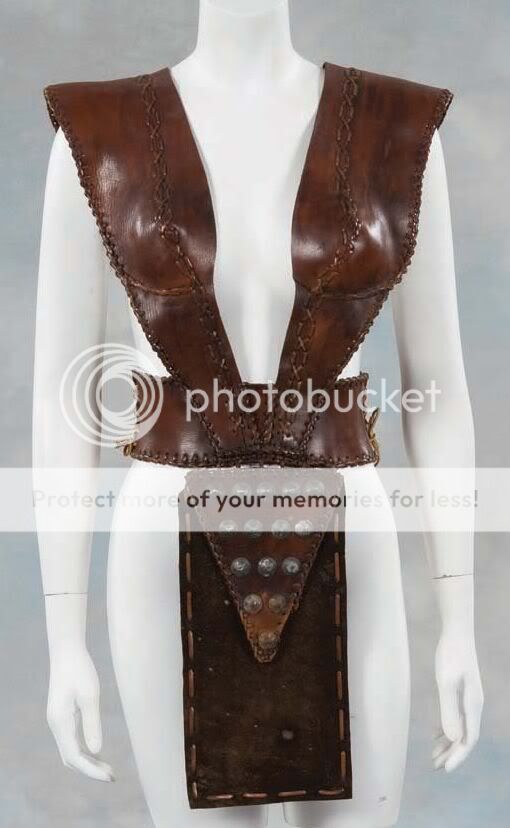
see the sewing on the borders? I also tried to make it 3d like making some single sewing and duplicate all along but , its painfull and stressing tedious method and it's hard to aling each sew on the right orientation for the borders...

Replies

  • cryrid
    Offline / Send Message
    cryrid interpolator
    Curve mode could work, or some patient lazy mousing. You could also try masking along the UVs
  • Mark Dygert
    Select the edge, convert it to shape/spline, call it path.
    Create a helix spline shape (or any other piece of stitching geometry).
    Path Deform the helix over the path.
  • NAIMA
    Offline / Send Message
    NAIMA polycounter lvl 14
    I tried masking and extracting but , the result wasnt good and not convincing anyway , maybe if the sews where smaller coudl but those are quite big and visible , as for the in 3dsmax path thing , I can select an edge and convert to path?
  • cryrid
    Offline / Send Message
    cryrid interpolator
    No need for extracting, just a typical mask. The only requirement is to have the geometry in place to sculpt the details in the first place.

    Just to be a bit clearer though, are you talking about the X-shaped stitching along the very edges on the top piece, or the straight stitching on that flappy thing?
  • NAIMA
    Offline / Send Message
    NAIMA polycounter lvl 14
    both of them ... I am not sure how to do the best approach ...
  • Joshua Stubbles
    Offline / Send Message
    Joshua Stubbles polycounter lvl 20
    There is no "best" approach, it's whatever is best/fastest for you. They both work so try them both and use the method you like the most. Zbrush also has some detail type brushes too, which lay down a stitch-like pattern on the mesh as you draw.
  • cryrid
    Offline / Send Message
    cryrid interpolator
    The bottom one I'd do straight up alpha+lazy mouse.
    The side stitching would depend on the exact effect I'm aiming for (how much detail). Either UVs for basic stitching, or I'd have two torus's tracing along the edges. These could be placed with zspheres even.
  • NAIMA
    Offline / Send Message
    NAIMA polycounter lvl 14
    cryrid wrote: »
    The bottom one I'd do straight up alpha+lazy mouse.
    The side stitching would depend on the exact effect I'm aiming for (how much detail). Either UVs for basic stitching, or I'd have two torus's tracing along the edges. These could be placed with zspheres even.
    This one last is the one I was trying to do now , using some toruses and some modeled stitches on the fornt part but, not sure yet how to align best without having to hand move each of the toruses , I tried with no success to extrude a spline path from an edge loop ....
  • dreatern
    Offline / Send Message
    dreatern polycounter lvl 6
    I'll put here the answer i had placed in your previous thread cause it has more to do with your question here
    dreatern wrote: »
    Curve can be used to sculpt and polypaint. curve with alpha can be extremely powerful, without the need to mask before sculpting certain things. like the sewing you asked in other thread

    Any brush can use curve, including mask

    with curve is possible to do things with precision. before, some things was easier to do with projection master. Now with curves we can do almost everything "live", without projection master

    look at zbrush documentation ZBrush4_R2_whats_new.pdf start at page 39
  • cryrid
    Offline / Send Message
    cryrid interpolator
    The zsphere method would turn each sphere into the stitches, so you'd be able to move them as easily as you would a normal chain (though hand-moving them manually in an external application doesn't sound all that hard either)
Sign In or Register to comment.