Home Technical Talk

Textuing/ making AO with Xnormal for base.

greentooth
Offline / Send Message
HAWK12HT greentooth
Hi all, I am making modular environment and have gone through every tip, help and tutorial available. The method i have chosen and seems more effective is making texture sheet first and than re using that texture in effective & creative way for making meshes. However i am finding it hard to make AO from my line work using Xnormal.

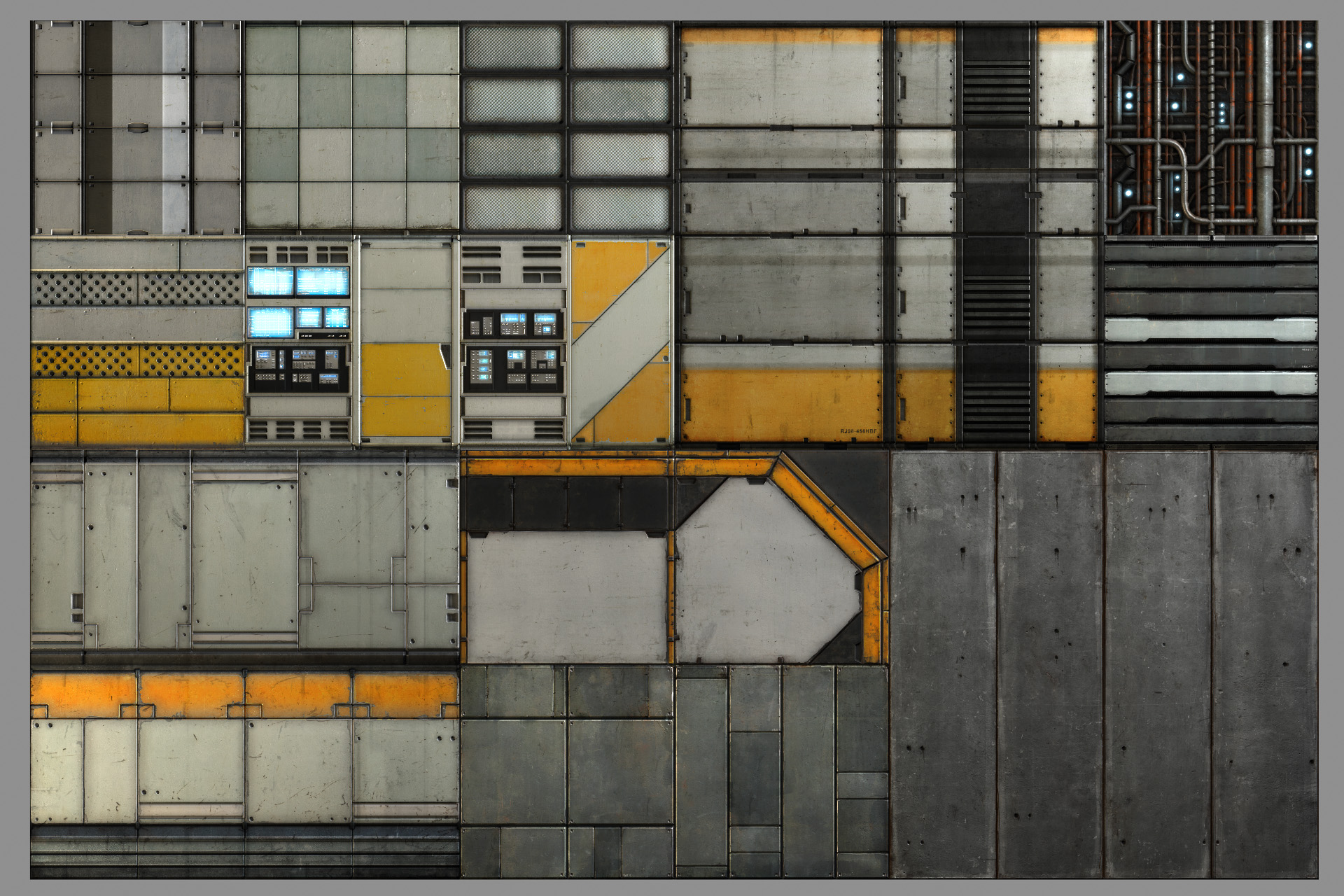
Just an example what im trying to make but without AO its harder to paint and visualise crease, indents etc. Imagine drawing line on white paper as a layout that you need to fill with different colors and materials :D (Im sorry hard to explain
this situation in english) but when u color its all messed up, even with the layout drawn on paper.

http://www.philipk.net/portfolio/textures/pk02_scene.jpg

This is what i have done so far
25th_Feb_FKMd.jpg


25th_Feb_FKMb.jpg

Replies

  • HAWK12HT
    Offline / Send Message
    HAWK12HT greentooth
    My process: I first make a rectangle and play around with bevel emboss to get right feel than apply Xnormal Height2occlusion (this is the main problem) as most time i dont get nice results hence i cant "multiply" on my base metal, which you can see is dark metal on picture above. Than from there its simple painting scratches and details, :D imagination is the limit at this stage. But without that nice AO that i want to make using my linework in photoshop Im just stuck with plain shape and losing time in guessing :( where i put details like grundge, rust, scratch etc.

    I also can make plates in 3d app and reder AO from them and than its easy, but thats not what im after in first place, cause in that method im limited to just how many greebles i make in 3d rather than on the fly design in CS and making its AO than painting on top of it.

    Any sound advise and feedback would be highly appreciated :)
  • passerby
    Offline / Send Message
    passerby polycounter lvl 14
    bake high poly stuff to a plane to base your textures.

    or use ndo2 start with the normals and use the normals to AO function in ndo2
  • HAWK12HT
    Offline / Send Message
    HAWK12HT greentooth
    Ah i see, hmm might try making normals in Xnormal than desaturate than AO :D. Let see if it works in Xnormal cause i cant pay for NDo2
  • HAWK12HT
    Offline / Send Message
    HAWK12HT greentooth
    Yup baking is the common method then textuing im just breaking the rules :D
    cant bake highpoly stuff cause than i ll b limited to using them over n over, i want to use line tool and other CS tools to get shapes i see fit to my design. I hope you get what i mean :).
  • cptSwing
    Offline / Send Message
    cptSwing polycounter lvl 13
    another (oldschool) trick that i find preferable to photoshop bevels is to use layer adjustments such as drop shadows and a teeny tiny bit of edge glow to make crevices darker and edges pop a little.
  • passerby
    Offline / Send Message
    passerby polycounter lvl 14
    HAWK12HT wrote: »
    Yup baking is the common method then textuing im just breaking the rules :D
    cant bake highpoly stuff cause than i ll b limited to using them over n over, i want to use line tool and other CS tools to get shapes i see fit to my design. I hope you get what i mean :).


    your just as limited making shapes in PS, and reusing those too.
    when baking stuff down, you dont need to limit yourself to baking down a full wall or anything like that, just bake down interesting shapes, and surfaces detail, that you can later play with.

    also ndo1 is still free iirc, which is quite helpfull if you want to work on in PS, since you can do things like make panels from selections, and build normals from a hand painted hightmap very quickly
  • HAWK12HT
    Offline / Send Message
    HAWK12HT greentooth
    Yes true you cant make too complex stuff in CS either, but im aiming for simple box like stuff typical old sci fi pannel work. At this point im not worried about normals at all, but the think you mention "normal to AO" from nDo might be my solution.
    by interesting shapes I hope you mean Greeble meshes :D, that my friend i have made enough for my requirement :)

    Hmm nice CptSwing, i may will give it a shot too. :)
  • passerby
    Offline / Send Message
    passerby polycounter lvl 14
    ya i was just kinda pushing you towards a baked and ndo workflow becuswae yo gave pbillipks artwork as exemples, and i know that texture set was made mostly by baking highpolys down to planes.

    these 2 tuts explain what he does with most of his metal textures. http://www.philipk.net/tutorials/materials/metalmatte/metalmatte.html http://www.philipk.net/tutorials/ndo/ndo.html
  • HAWK12HT
    Offline / Send Message
    HAWK12HT greentooth
    Aha i see, just saw nDo2 edge bevel option on site and figure those shiny specular highlights in Philip K diffuse are similar lol :D. Good i ask here other wise i was like o O how much time he spend making those highlights :D.

    Thanks for inside info :)
  • HAWK12HT
    Offline / Send Message
    HAWK12HT greentooth
    Passerby, That nDo flow is awsome thanks :D I now love CS x10 times more :D. I didnt have to leave CS until i was done with my texture :D.

    Ty all
  • warby
    Offline / Send Message
    warby polycounter lvl 20
    those bright roughed up edges will cause a lot of aliasing ... just saying ...
  • HAWK12HT
    Offline / Send Message
    HAWK12HT greentooth
    @Warby so what u suggest i do? remove them or lower the contrast, I want the feel of metal grinding and real harsh white scratches. :)
Sign In or Register to comment.