Home 3D Art Showcase & Critiques
The BRAWL² Tournament Challenge has been announced!

It starts May 12, and ends Oct 17. Let's see what you got!

https://polycount.com/discussion/237047/the-brawl²-tournament

FPS Hands

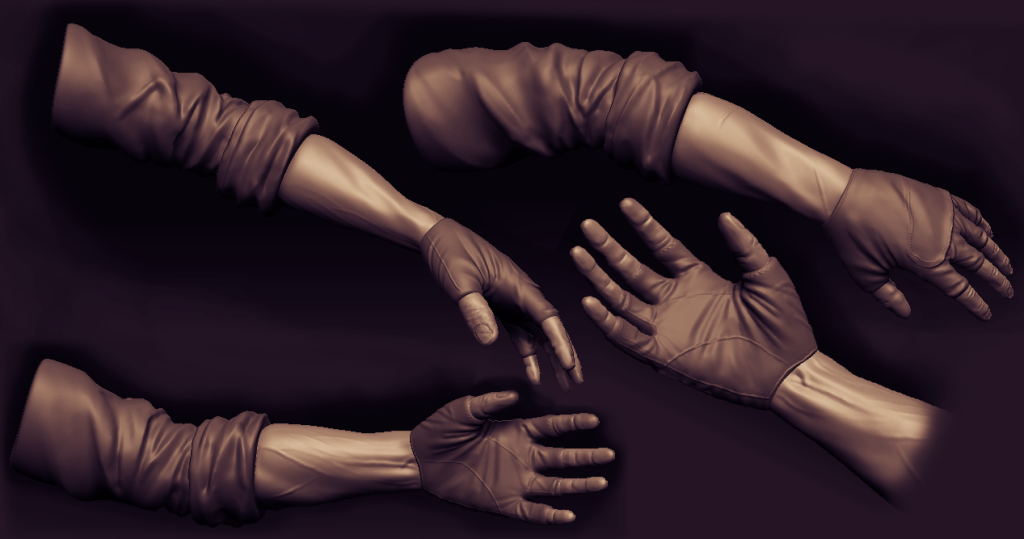
So I wanted to improve my sculpting and texturing, so thought I'd focus on a smaller piece than an entire character for now. With that in mind I wanted something which could be potentially used or useful to someone, thus I made a Hand set, starting with a base, using shell modifiers on sections of the mesh. I used the mudbox base mesh as the proportions are pretty spot on, any poor subdivision deformation can be easily fixed

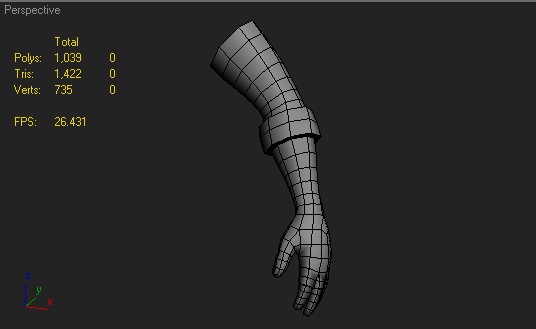
basejuan.pngbasejuan.pngBasejuan.png

Now I have 3 seperate subtools on this, the sleeve, the glove and the skin sections, but I was curious as to how I could make this be a bit more impressive, and also if my folds and such are, well.. good :)

renderjuan.pngrenderjuan.pngRenderjuan.png

edited with some better resolution images

Question: In zbrush how is it possible to apply a bump map to the model, I've seen it done before where the person loaded a noisy texture, applied it to the model and it had the effect of placing alphas, but all at once and consistantly, any ideas? thanks :)

Replies

  • Cap Hotkill
    Offline / Send Message
    Cap Hotkill polycounter lvl 13
    Those Folds are awesome Ihazard!
    Love the sculpting work!
  • n88tr
    i'd make the forearms bigger, it'd look more masculine
  • X-One
    Offline / Send Message
    X-One polycounter lvl 20
    Unless he's jacked up on roids or something, the forearm size is fine. That said, some of the musculature of the forearm looks off.
  • Cap Hotkill
    Offline / Send Message
    Cap Hotkill polycounter lvl 13
    Yeah, it feels that the muscle starts were the shirt ends...
  • Ihazard
    yeah I was thinking of maybe tightening up the creases on top of the sleeve to make it look as if its hanging off a bicep/shoulder, needs more muscular flow :) thanks guys
  • Lonewolf
    Offline / Send Message
    Lonewolf polycounter lvl 19
    looks great, and yea you should fix that forearm

    also, i'd make the gloves more interesting

    :)
  • TheDarkKnight
    Offline / Send Message
    TheDarkKnight polycounter lvl 15
    Ihazard wrote: »

    Question: In zbrush how is it possible to apply a bump map to the model, I've seen it done before where the person loaded a noisy texture, applied it to the model and it had the effect of placing alphas, but all at once and consistantly, any ideas? thanks :)

    Looks awesome and about your question :

    What you can do, is unwrap your low poly, then you can load an alpha and under the Masking tab, under the tooltab, you can press mask by alpha.
    If you have a tileable alpha you can increase the HTile and VTile under the alpha tab to make it smaller if its to big

    That's the way I always do it :)
  • aharmlesspie
    Offline / Send Message
    aharmlesspie polycounter lvl 14
    Ihazard wrote: »
    Question: In zbrush how is it possible to apply a bump map to the model, I've seen it done before where the person loaded a noisy texture, applied it to the model and it had the effect of placing alphas, but all at once and consistantly, any ideas? thanks :)
    On the right side in the standard UI there is a "Surface" drop down. If you click the noise button it will add noise to the model, but it won't apply it until you choose "Apply to mesh". The great thing about this option is that you can edit the curve of the noise to achieve a ton of different effects, AND its resolution independent until you apply it permanently!

    P.S. I'm still on 3.5R3 T_T. I want 4 SO BAD.
  • Ihazard
    I'm on 3.1 still, time to upgrade I think :poly136:

    the forearm fix I'll do first, but on the gloves front i was thinking of doing these Oakley gloves, they have some interesting textures on the fingers, and the hard surface details look like a nice challenge to try in zbrush too :)

    oakleyMTBgloves_lg.jpg
    oakley-gloves-tan.jpg

    rendernew.png

    quite hard to get those holes in the fingers with the cut-offs :poly127:
  • Ihazard
    lowpolyjuan.pnglowpolyjuan.pnglowpolyjuan.png


    test retopo and bake :D
  • StealthSilver
    You should smooth out the sleeve wrinkles as they look quite lumpy at present. One method I use is to delete the top couple of SubDiv levels then re-subdivide them. They should be smoothed out, so you can go over them with pinch to retain the sharpness.
  • Ihazard
    done :)

    started a bit of texturing to see where things can go with this, using xoliul's max shader:

    sleev1.png
  • vj_box
    Offline / Send Message
    vj_box polycounter lvl 16
    Shaping up real good Ihazard. Love the way the hands are posed now. Feels very convincing. I guess the glove texture needs some work. You also planning a first person gun model or something?
  • Stromberg90
    Offline / Send Message
    Stromberg90 polycounter lvl 15
    Love this sculpt, realy nice :)

    I do agree with StealthSilver that you should smooth out some of the wrinkles.
    And i actualy like it better before you added the holes in the glove.
  • Ihazard
    the texture is just bases and AO pretty much, slight colour and patterns on areas, but that's it for now. & I think the mod I'm working for might use them as a replacement for their pre-existing hand rig :)

    and stromberg, I might rebake that section and even redo it entirely, I'm not sure just yet, will keep you posted though. And I wasn't sure about the holes either, I'll remove them and see what you think :D
Sign In or Register to comment.