Home 3D Art Showcase & Critiques

Looking for feedback on texture realism and overall silhouette

triangle
Offline / Send Message
rafiii triangle
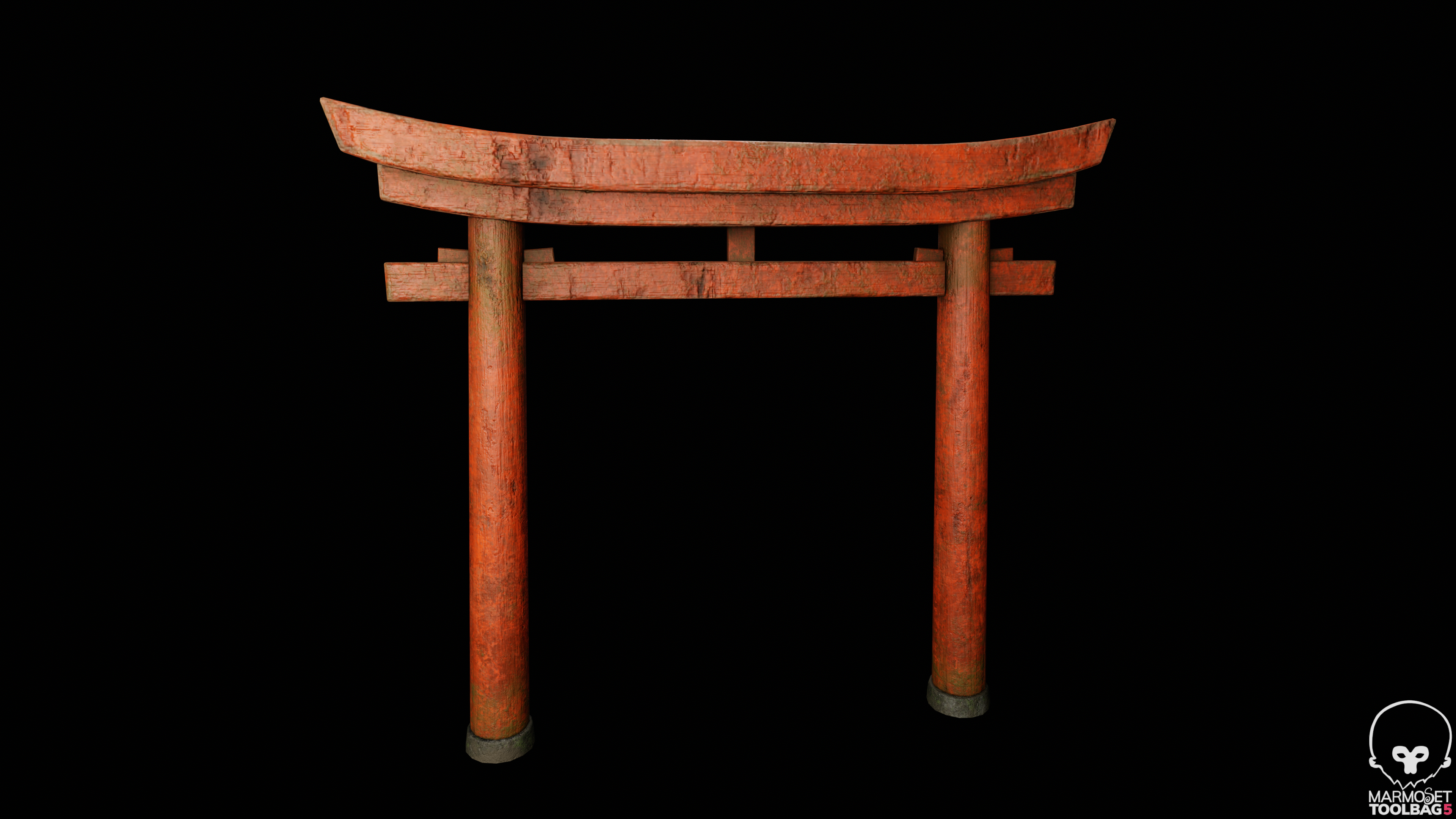
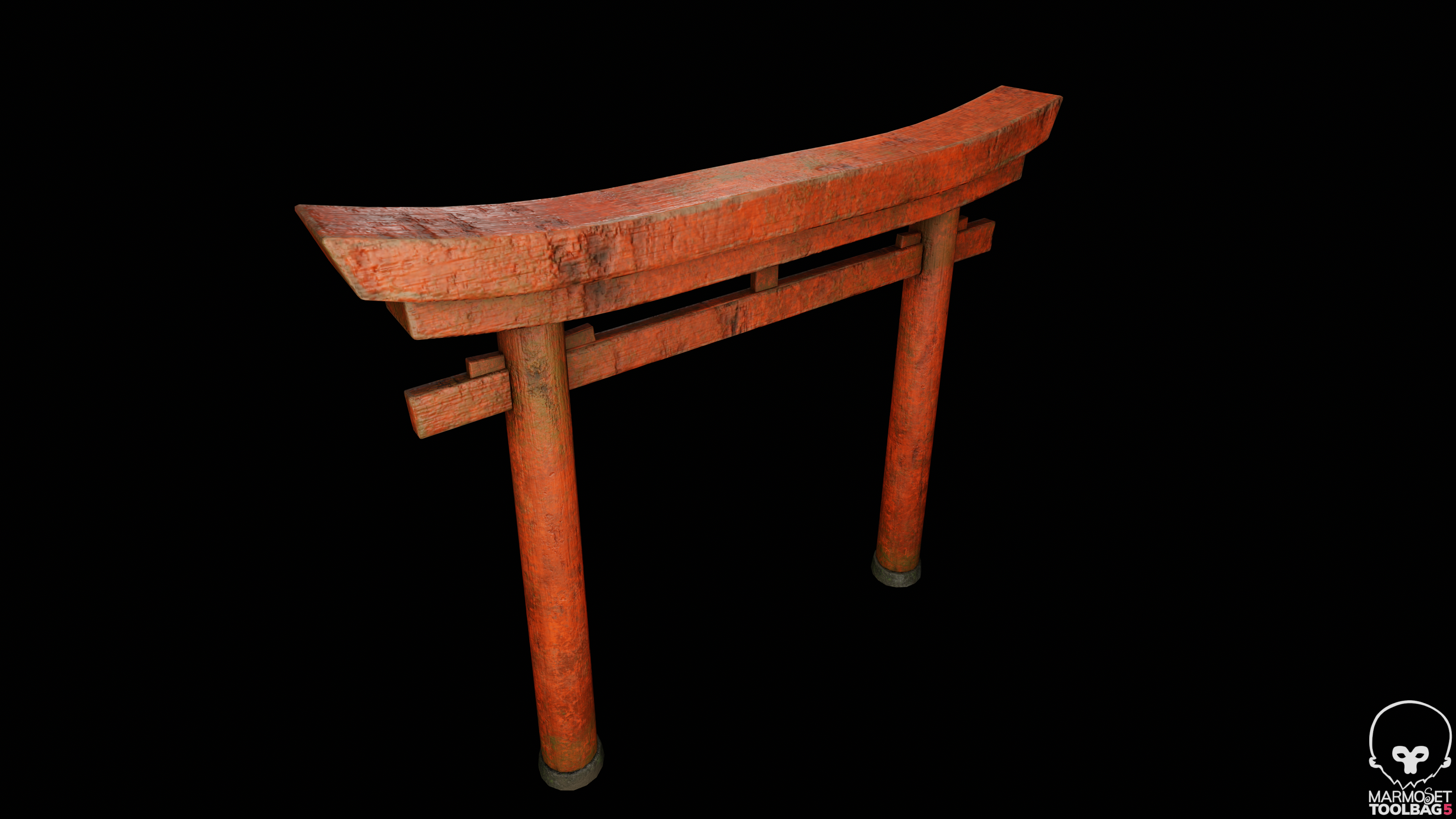
Hey everyone! This is my first textured 3D prop. I’d love some honest feedback—what parts of the model and textures are working, what feels off, and how I can improve realism. Any tips are really appreciated!

Replies

  • Noren
    Offline / Send Message
    Noren interpolator
    It looks good overall, but I don't quite understand what kind of damage you are trying to portray in some places. Do you have a reference? 
    Are the deeper holes rotten and painted over? It looks dented in with a blunt instrument, perhaps because it's an overlay and the underlying structure doesn't change.
    The roughness could change a bit more in places with dirt or lichen.
    The damage could probably be more localized and more logically placed. For example, have deeper dents on the lower edges of the lower beam, but not the upper edges (in case this is an environment where people might actually accidentally bump against it with stuff, it also looks you might have gone for something like that, but it could also be coincidence). Maybe it was ruined and later salvaged etc.
    The paint is gone at some edges, which looks good, but it still seems a bit evenly distributed. Maybe the top would be worn more or one side is exposed more to the elements because of dominant wind direction.
  • rafiii
    Offline / Send Message
    rafiii triangle
    Noren said:
    It looks good overall, but I don't quite understand what kind of damage you are trying to portray in some places. Do you have a reference? 
    Are the deeper holes rotten and painted over? It looks dented in with a blunt instrument, perhaps because it's an overlay and the underlying structure doesn't change.
    The roughness could change a bit more in places with dirt or lichen.
    The damage could probably be more localized and more logically placed. For example, have deeper dents on the lower edges of the lower beam, but not the upper edges (in case this is an environment where people might actually accidentally bump against it with stuff, it also looks you might have gone for something like that, but it could also be coincidence). Maybe it was ruined and later salvaged etc.
    The paint is gone at some edges, which looks good, but it still seems a bit evenly distributed. Maybe the top would be worn more or one side is exposed more to the elements because of dominant wind direction.
    Thank you for your detailed feedback. Really appreciate it.
  • Fabi_G
    Online / Send Message
    Fabi_G godlike master sticky
    Hi! To Noren's point, best share a bit more context. Reference images used help others to understand what the target is and what specific marks you're aiming to recreate. Do you intend this to be a game/ real-time asset? Shots of wireframe and UVs layout will allow for feedback of those aspects. How many texture sets are being used at what resolution, any use of trim sheets or tiling textures?

    At a glance, the texture seems a bit low res. If you reach the limit with your set resolution and/ or plan to have more structures of that kind, tiling textures/ trim atlases might be the way to go. Perhaps you find some useful examples on the wiki Modular Environments 
  • rafiii
    Offline / Send Message
    rafiii triangle
    Fabi_G said:
    Hi! To Noren's point, best share a bit more context. Reference images used help others to understand what the target is and what specific marks you're aiming to recreate. Do you intend this to be a game/ real-time asset? Shots of wireframe and UVs layout will allow for feedback of those aspects. How many texture sets are being used at what resolution, any use of trim sheets or tiling textures?

    At a glance, the texture seems a bit low res. If you reach the limit with your set resolution and/ or plan to have more structures of that kind, tiling textures/ trim atlases might be the way to go. Perhaps you find some useful examples on the wiki Modular Environments 

    Thanks for the feedback  @Fabi_G , Here’s some context:

    • This asset is intended for a real-time/game environment.

    • I’ve attached the reference images I’m aiming for.

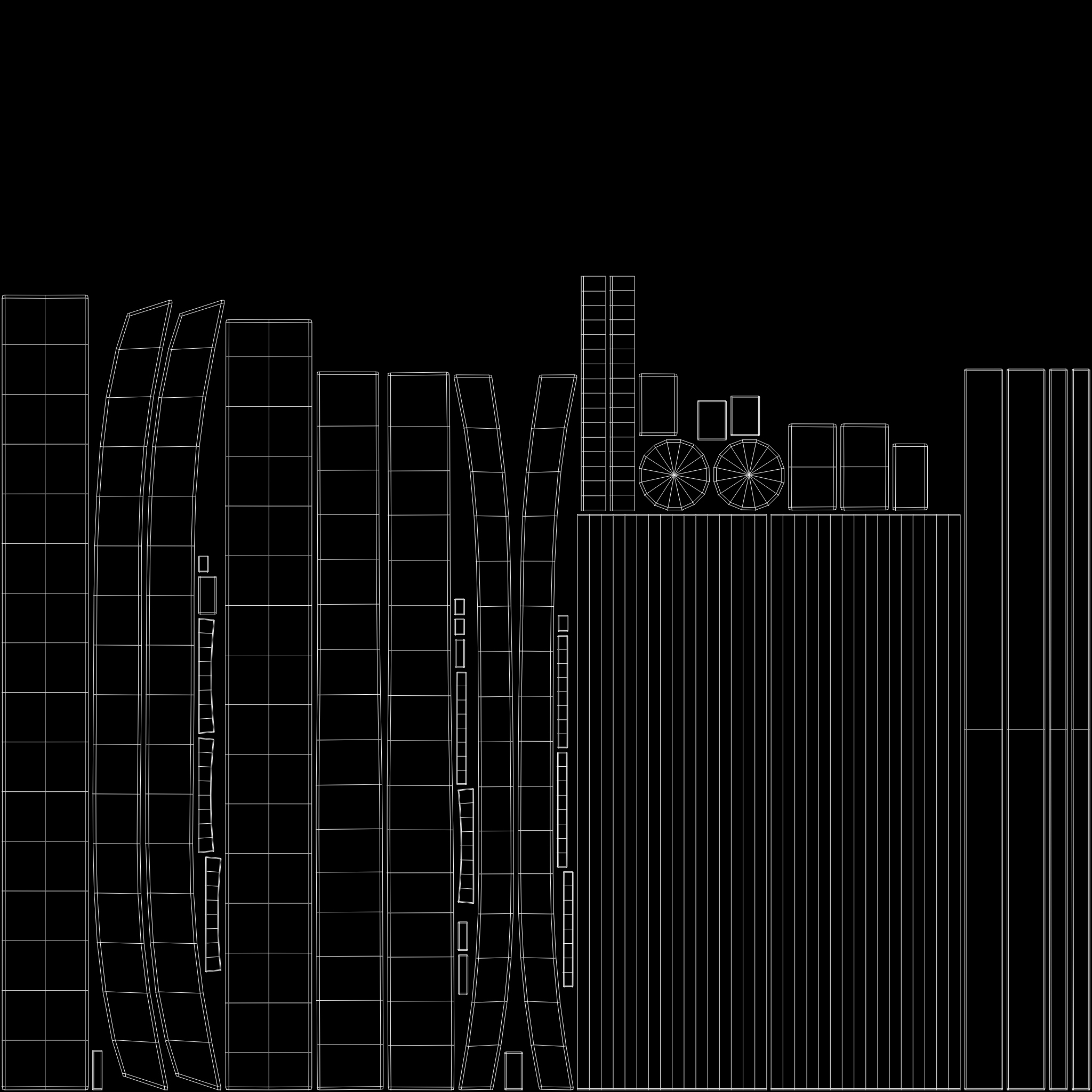
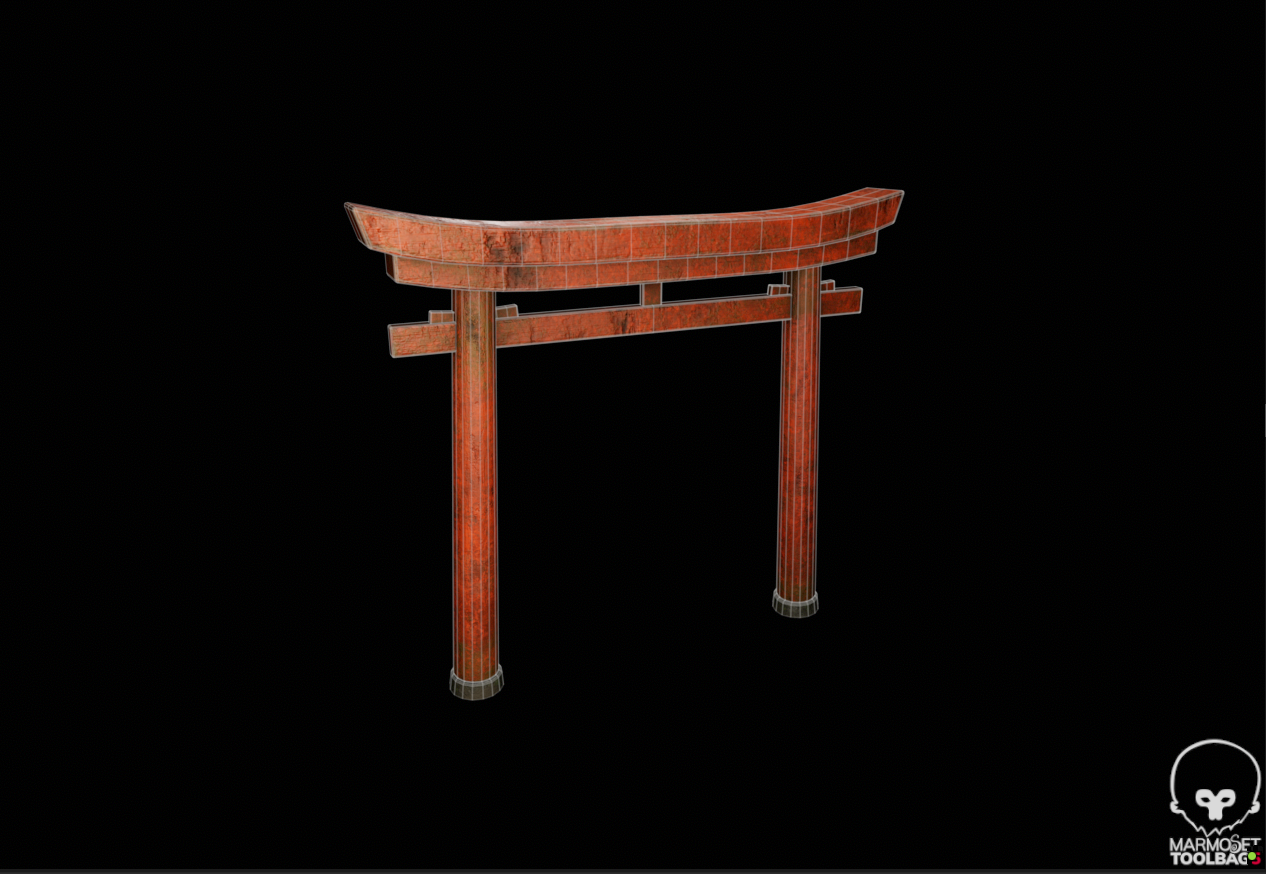
    • Wireframe and UV layout are also included.

    • Currently, I’m using one texture set at 2k with 300 tx/m. I haven’t used trim sheets or tiling textures yet.

    I noticed the texture might look low-res in some areas, so I’m considering using tiling textures or a trim atlas. I’d appreciate any tips on that or anything else I could improve. I am quite struggling with storytelling.
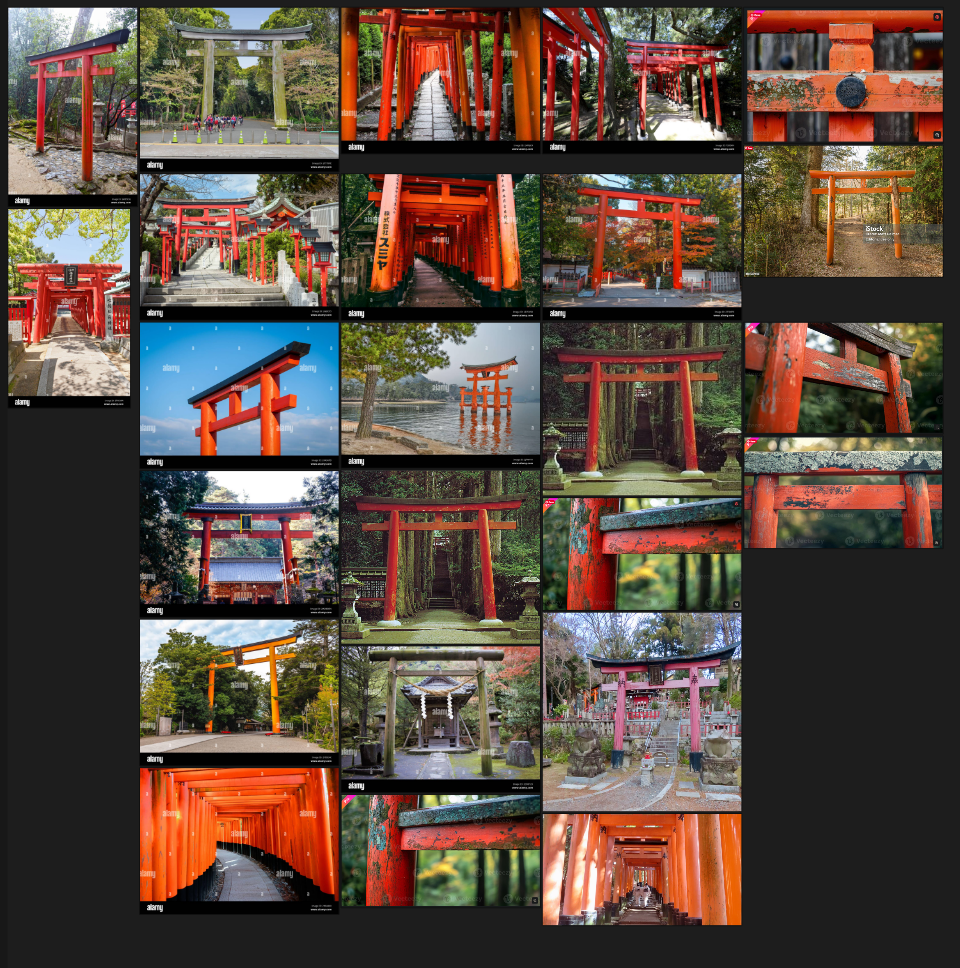
  • Eric Chadwick
    You could definitely improve the texture resolution by not using an "atlas" layout, but instead using tiled textures, and mixing damage with vertex color. We have some info on this in the wiki. http://wiki.polycount.com/wiki/MultiTexture and if you check my Sketchbook, I share some shader graphs for making these kinds of effects.

    I like the images with the repeating torii. You could try a layout like like this for something a bit unusual (and thus, eye-catching)


    Also this shot is nice


    Yandex has a really great reverse-image search function, great for finding inspiration from random images you can just drag-and-drop onto it.
    https://yandex.com/images/  
  • SpeedMetalSF
    Offline / Send Message
    SpeedMetalSF polycounter lvl 9
    It’s hard to judge its realism when it’s against a black background. Do you have an HDRI or something got give it more realistic lighting? Also I think the middle of the arch should be slightly lower. It looks like it comes back up a bit which doesn’t really match the silhouette of your references. 
  • rafiii
    Offline / Send Message
    rafiii triangle
    It’s hard to judge its realism when it’s against a black background. Do you have an HDRI or something got give it more realistic lighting? Also I think the middle of the arch should be slightly lower. It looks like it comes back up a bit which doesn’t really match the silhouette of your references. 

    Hi, thank you for taking the time to review the model. I used a different reference image, so the final result ended up matching that version more closely.

    Regarding the presentation, I kept the lighting and setup very simple because my main goal for this pass was to gather feedback rather than prepare it for posting. I didn’t invest as much effort into that side yet, and I apologize if that made the work harder to evaluate.

    For the next iteration, I’ll incorporate your feedback, refine the model, and present it with more care so the improvements are clearer and easier to assess. I appreciate your input and will make sure the next update reflects it better.

  • rafiii
    Offline / Send Message
    rafiii triangle

    This asset is intended for a real-time/game environment.

    I’ve attached the reference images I’m aiming for, along with wireframe and UV layout.

    The asset currently uses a single 4K texture set at 512 tx/m. No trim sheets or tiling textures were used.

    After rendering, the textures feel a bit softer/blurry than expected, and I’m not entirely sure what’s causing it.

    I’d really appreciate general feedback on the texturing and material work—anything that stands out, feels off, or could be improved.
  • Eric Chadwick
    I merged your new Topic into the thread you have already. Keeping the same project as replies within the same Topic will give people more context when they're formulating feedback for you. By default it also sends notifications to those who have replied before (unless they changed their notification settings).

    As for feedback, the UV layout wastes a lot of texture space, about 1/4 is unused. If you really want to keep it as a single texture set (instead of blending damage with modular tiled textures) then you could reuse some of the space, like the front and back of the beams could use the same texture space, since you cannot physically see the front and the back at the same time. Look for places you can overlap UVs. Create a new UV layout, and bake your textures from the old layout into the new layout.

    Also, your images are taking a long time to load. I'd recommend uploading JPG files instead of PNGs, more about why here.
  • Noren
    Offline / Send Message
    Noren interpolator
    Texture-wise, that looks a lot more believable. Maybe a bit too much wear in some of the inner corners still, but coming along nicely.
  • rafiii
    Offline / Send Message
    rafiii triangle
    Noren said:
    Texture-wise, that looks a lot more believable. Maybe a bit too much wear in some of the inner corners still, but coming along nicely.
    Thanks for the feedback! I’ll tone down the wear in the inner corners a bit, but glad to hear the textures are feeling more believable overall
  • rafiii
    Offline / Send Message
    rafiii triangle
    I merged your new Topic into the thread you have already. Keeping the same project as replies within the same Topic will give people more context when they're formulating feedback for you. By default it also sends notifications to those who have replied before (unless they changed their notification settings).

    As for feedback, the UV layout wastes a lot of texture space, about 1/4 is unused. If you really want to keep it as a single texture set (instead of blending damage with modular tiled textures) then you could reuse some of the space, like the front and back of the beams could use the same texture space, since you cannot physically see the front and the back at the same time. Look for places you can overlap UVs. Create a new UV layout, and bake your textures from the old layout into the new layout.

    Also, your images are taking a long time to load. I'd recommend uploading JPG files instead of PNGs, more about why here.
    Thanks for the feedback on the UVs! I also wanted to ask your thoughts on the textures overall—do they read well? Some people mentioned that some of the wear feels unintentional or too large in scale and looks off—what’s your take on that?
Sign In or Register to comment.