Workflow with 2 UVs ( Alex senechal tuto ), issue with visible seams

polycounter lvl 11
Hey guys
I'm trying to reuse the same workflow that Alex Senechal : https://www.artstation.com/artwork/eVm0P
Long story short : 2 uvs workflow, on the first, the baked textures ( trim and decal ), and tileable on the second UV
everything is almost ok, except that :
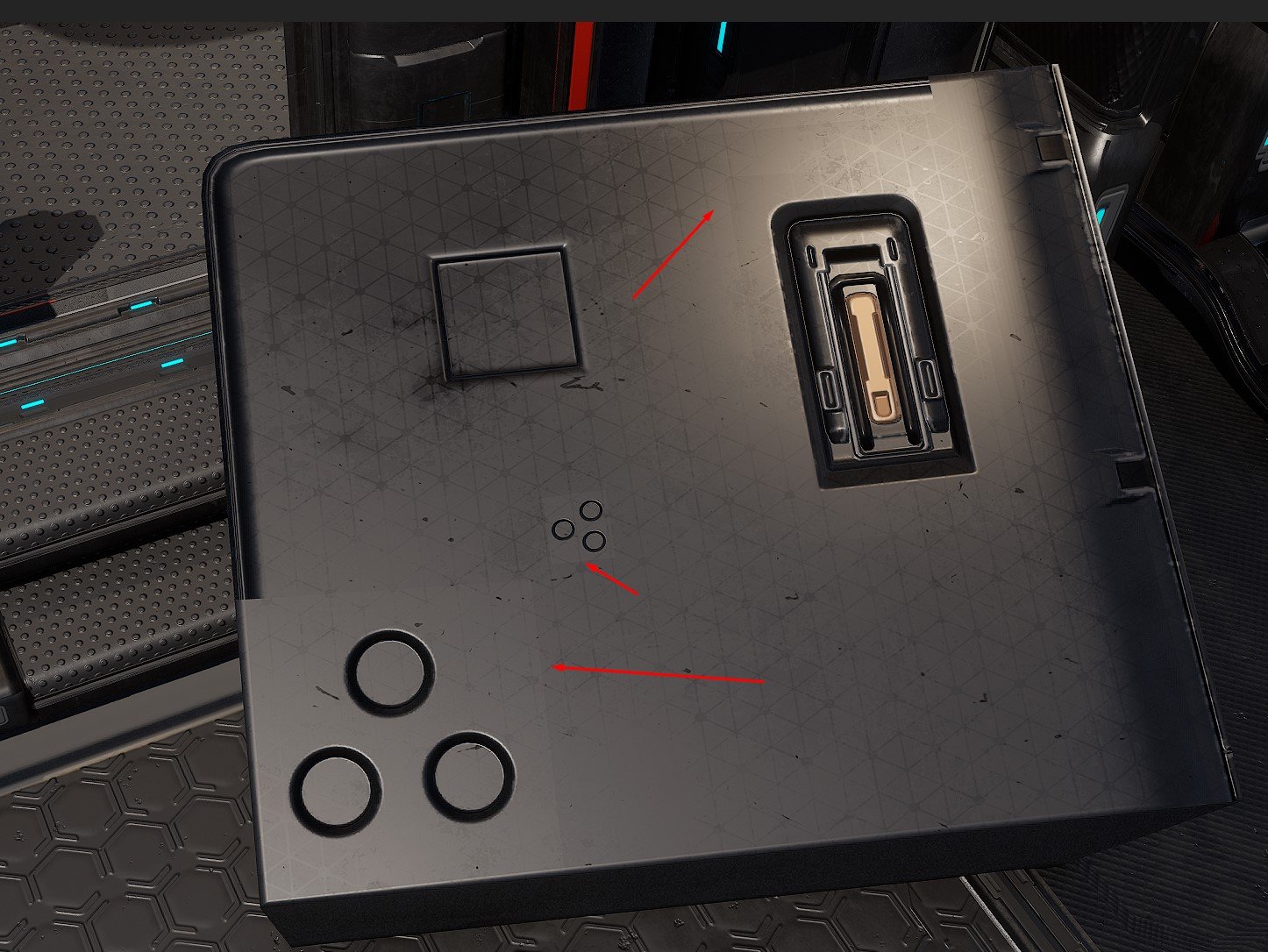
This seam doesn't appears in the different Buffer Pass ( Metallic, Roughness, World Normal etc...)
and I tried everything to remove it....
I've found few hints on the forum to resolve this , without success ( no rotation of the uvs, avoid to scale non uniform etc...)
I tried to setup a very simple shader, still the same problem.
I'm using the layer system but for the tests, I disabled all extra layers ( dirt etc...)
I'm on the latest UE5 version.
This problem makes me crazy....
If you have any idea....it could be very usefull
Thanks a lot
I'm trying to reuse the same workflow that Alex Senechal : https://www.artstation.com/artwork/eVm0P
Long story short : 2 uvs workflow, on the first, the baked textures ( trim and decal ), and tileable on the second UV
everything is almost ok, except that :
This seam doesn't appears in the different Buffer Pass ( Metallic, Roughness, World Normal etc...)
and I tried everything to remove it....
I've found few hints on the forum to resolve this , without success ( no rotation of the uvs, avoid to scale non uniform etc...)
I tried to setup a very simple shader, still the same problem.
I'm using the layer system but for the tests, I disabled all extra layers ( dirt etc...)
I'm on the latest UE5 version.
This problem makes me crazy....
If you have any idea....it could be very usefull
Thanks a lot
Replies
Best attach files that allow re-producing the issue (zip and attach to post). If you don't want to share the whole model, isolate an area that's displaying the issue or create a test case.
complicated to attach file, it's heavy
It's a workflow similar to Star citizen workflow, but here we don't use defered decals on top of the meshes, and we use UV1 for having the Decals / trim and UV2 for tileable.
I tried to setup the easiest shader ever in UE5 ( just the normal map ) and I still have this issue
I used Substance Painter 11.0.2
If remember correctly, in UE4 only tangents of UV0 were stored. To use a tangent space normal map with a different UV channel, its tangents had to be calculated. Perhaps this is still true in UE5? If you're following a tutorial and it still works like in UE4, I would hope it's covered. Here are some of the old UE threads: Tangents only calculated on UV0?. Long going thread, unfortunately broken images: Multiple Normal Maps on Separate UV Channels?
Don't know if this is the solution to your issue. Best provide some test assets.